> For the complete documentation index, see [llms.txt](https://ticketking.xyz/docs/llms.txt). Markdown versions of documentation pages are available by appending `.md` to page URLs; this page is available as [Markdown](https://ticketking.xyz/docs/transcripts/whats-in-a-transcript.md).
# What's in a transcript
What's captured in a ticket transcript, and what isn't.
When a ticket closes, Ticket King generates an HTML transcript with the message history.
## What's captured
* **Member messages.** Content, timestamps, and author name and avatar. Edited messages show an "edited" marker.
* **Staff messages.** A **STAFF** tag appears on staff messages, and a **BOT** tag appears on bot messages.
* **Bot messages.** Including the welcome embed and any later bot replies.
* **Message embeds.** Title, description, fields, color, image, thumbnail, and footer.
* **Buttons and dropdown menus.** Shown statically.
* **Attachments.** Image, video, audio, and other files attached in the ticket.
* **Stickers.** Shown as images. Animated stickers show a placeholder.
* **System messages.** Joins, pins, boosts, and similar.
* **Replies.** Reply chains stay visible.
* **Mentions.** Resolved @mentions of users and roles.
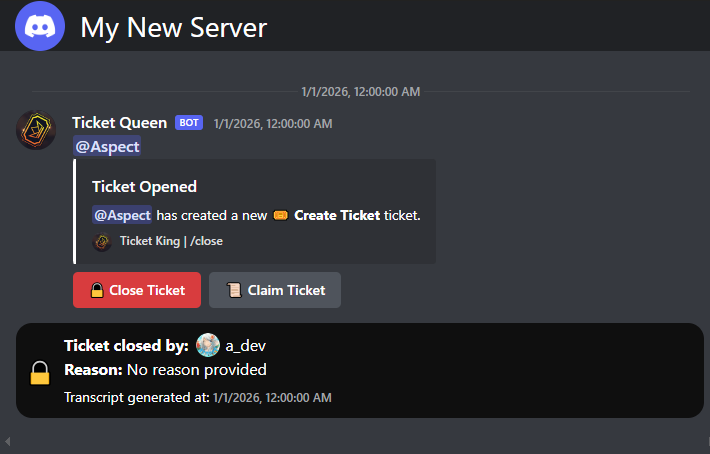
The transcript ends with a footer showing who closed the ticket (or "Staff Team" when **Hide Closing User** is on), the close reason, and the time the transcript was generated.
## What's NOT captured
* **Reactions.** They are not stored at all. The transcript shows no reaction emoji.
* **Edit history.** Only the latest version of each message is kept. Original text from before an edit is not kept.
* **A ticket-info block or participant roster.** The transcript does not contain the ticket number, opener, claim, or form answers. That information goes in the closed-log embed, not inside the transcript.
{% hint style="info" %}
Looking for the ticket number, who opened it, who claimed it, or the form answers? Those are in the **closed-ticket log embed**, not in the transcript.
→ [What goes into each log embed](/docs/logging/log-embed-contents.md)
{% endhint %}
## Per-author info captured
For each message the transcript stores the author's display name and avatar as they were at the time of the message.
If the author later changes their name or leaves the server, the transcript still shows their name as it was **at the time of the message**.
## Message capture cap
| Plan | Messages per transcript |
| ------------------------------------------- | ----------------------- |
| **Free** | 1,000 |
| :crown: **Premium** | 5,000 |
If a ticket has more messages than the cap, the **most recent** N are kept. Older ones are not included.
→ [Transcript capture limits](/docs/logging/transcript-capture-limits.md)
## What the rendered transcript looks like
Discord-style timeline with avatars, usernames, timestamps, embed cards, attachments inline, and markdown formatting rendered.
## What you can do in the rendered transcript
Read it, and save a copy of it.
**Saving a copy.** On a computer, press **Ctrl+S** (or **⌘S** on a Mac) while viewing a transcript. Ticket King saves it as a single HTML file that opens on its own, with no folder alongside it, in place of the browser's usual page save. On a phone, use your browser's own save or share options.
Images in the saved file still load from where they are hosted, so an attachment that is later deleted from Discord will not show in an older copy.
There are no UI actions to share, search, or copy individual messages. Ctrl+F finds text in the page as usual.
## Related
{% content-ref url="/pages/MVC61qSaXCm7eEUgQABZ" %}
[When a transcript is generated](/docs/transcripts/when-generated.md)
{% endcontent-ref %}
{% content-ref url="/pages/9LgYeMt3zCRpnojBs9ZU" %}
[Where to find a transcript](/docs/transcripts/where-to-find.md)
{% endcontent-ref %}
{% content-ref url="/pages/wCbUHb75fVzWZWVTbURD" %}
[Transcript capture limits](/docs/logging/transcript-capture-limits.md)
{% endcontent-ref %}
---
# Agent Instructions
This documentation is published with GitBook. GitBook is the documentation platform designed so that both humans and AI agents can read, navigate, and reason over technical content effectively. Learn more at gitbook.com.
## Querying This Documentation
If you need additional information that is not directly available in this page, you can query the documentation dynamically by asking a question.
Perform an HTTP GET request on the current page URL with the `ask` query parameter, and the optional `goal` query parameter:
```
GET https://ticketking.xyz/docs/transcripts/whats-in-a-transcript.md?ask=&goal=
```
`ask` is the immediate question: it should be specific, self-contained, and written in natural language.
`goal` is optional and describes the broader end goal you are ultimately trying to accomplish on behalf of the user. GitBook uses it to tailor the answer towards what is most useful for that goal.
The response will contain a direct answer to the question and relevant excerpts and sources from the documentation.
Use this mechanism when the answer is not explicitly present in the current page, you need clarification or additional context, or you want to retrieve related documentation sections.