> For the complete documentation index, see [llms.txt](https://ticketking.xyz/docs/llms.txt). Markdown versions of documentation pages are available by appending `.md` to page URLs; this page is available as [Markdown](https://ticketking.xyz/docs/tickets/ticket-numbering.md).
# Ticket numbering
Two toggles control the entire numbering scheme.
Every ticket gets a number, such as `ticket-42`, or whatever your custom ticket name produces. Numbers are never zero-padded. The numbering scheme is controlled by two toggles on the Settings page.
## The two switches
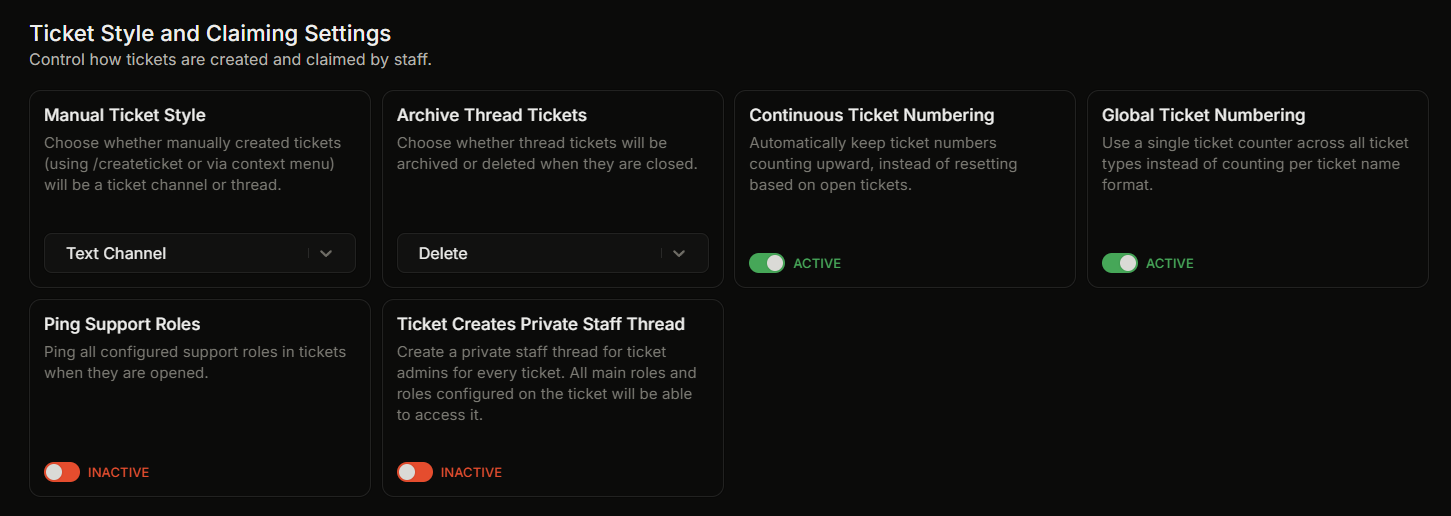
In **Settings, Ticket Style and Claiming Settings**:
| Setting | Default |
| ------------------------------- | ------------------------------------------------------ |
| **Continuous Ticket Numbering** | on |
| **Global Ticket Numbering** | on (disabled unless Continuous Ticket Numbering is on) |
The combination of these two produces three behaviors:
| Continuous | Global | Behavior |
| ---------------- | ---------------- | ---------------------------------------------------------------------------------------------------------------------------------------------------------------------------------------------------------------------- |
| **off** | (forced off) | The next ticket takes the highest number among your currently-open tickets, plus one. This is server-wide, not per format. As tickets close, freed numbers can be reused, so the next number can be lower than before. |
| **on** | **off** | Numbers count upward and never decrease as tickets close. Counted per custom ticket name, so each format keeps its own counter. |
| **on** (default) | **on** (default) | Numbers count upward and are shared across all custom ticket names. One counter for the whole server. |
## What "per custom ticket name" means
Two panels that use the same **Custom Ticket Name** share a counter. Two panels with different formats keep their counters separate.
So if Panel A uses `ticket-{TICKET_NUMBER}` and Panel B uses `bug-{TICKET_NUMBER}`:
* With Continuous on and Global on, the default, both share one counter, so you might see `ticket-7` followed by `bug-8`.
* With Continuous on and Global off, each keeps its own counter that only counts upward, so both could be on number 7 at the same time (`ticket-7` and `bug-7`).
* With Continuous off, the per-format split does not apply. The next ticket of either kind takes the highest number among all your open tickets, plus one.
By default, new servers use one shared counter that counts upward across every ticket type. This gives staff a single stable reference number. Turn Global Ticket Numbering off if you would rather each custom ticket name keep its own separate counter.
## The Danger Zone
Settings page → **Danger Zone**:
### Edit Ticket Counters
The **Edit Counters** button opens a pop-up that lets you adjust each custom ticket name's counter or remove counters you no longer use. You cannot add new counters here, since they are created automatically when tickets open.
If you have never had a ticket yet, the button is disabled and tells you that no counters exist yet.
### Reset All Ticket Counters
The **Reset All Counters** button opens a confirmation pop-up:
> **Reset All Ticket Counters**
>
> Are you sure you want to reset all ticket counters to 0? This action cannot be undone and will affect all ticket numbering going forward.
After you confirm, the counters reset to 0, but existing channels keep their names. The reset only affects what number the next ticket gets. It does not affect any other settings.
## Where the number appears
* The channel name, through your Custom Ticket Name.
* The opening embed title.
* Every log embed that references the ticket.
* The transcript.
* The ticket list in the dashboard.
A consistent numbering scheme means staff can refer to "ticket 42" anywhere and know what is meant.
## Related
{% content-ref url="/pages/EqvfVPSum3JqDjq3shlP" %}
[Custom ticket name](/docs/customization-and-branding/ticket-name-format.md)
{% endcontent-ref %}
---
# Agent Instructions
This documentation is published with GitBook. GitBook is the documentation platform designed so that both humans and AI agents can read, navigate, and reason over technical content effectively. Learn more at gitbook.com.
## Querying This Documentation
If you need additional information that is not directly available in this page, you can query the documentation dynamically by asking a question.
Perform an HTTP GET request on the current page URL with the `ask` query parameter, and the optional `goal` query parameter:
```
GET https://ticketking.xyz/docs/tickets/ticket-numbering.md?ask=&goal=
```
`ask` is the immediate question: it should be specific, self-contained, and written in natural language.
`goal` is optional and describes the broader end goal you are ultimately trying to accomplish on behalf of the user. GitBook uses it to tailor the answer towards what is most useful for that goal.
The response will contain a direct answer to the question and relevant excerpts and sources from the documentation.
Use this mechanism when the answer is not explicitly present in the current page, you need clarification or additional context, or you want to retrieve related documentation sections.