> For the complete documentation index, see [llms.txt](https://ticketking.xyz/docs/llms.txt). Markdown versions of documentation pages are available by appending `.md` to page URLs; this page is available as [Markdown](https://ticketking.xyz/docs/tickets/lifecycle.md).
# The ticket lifecycle
From button click to close, every state a ticket goes through.
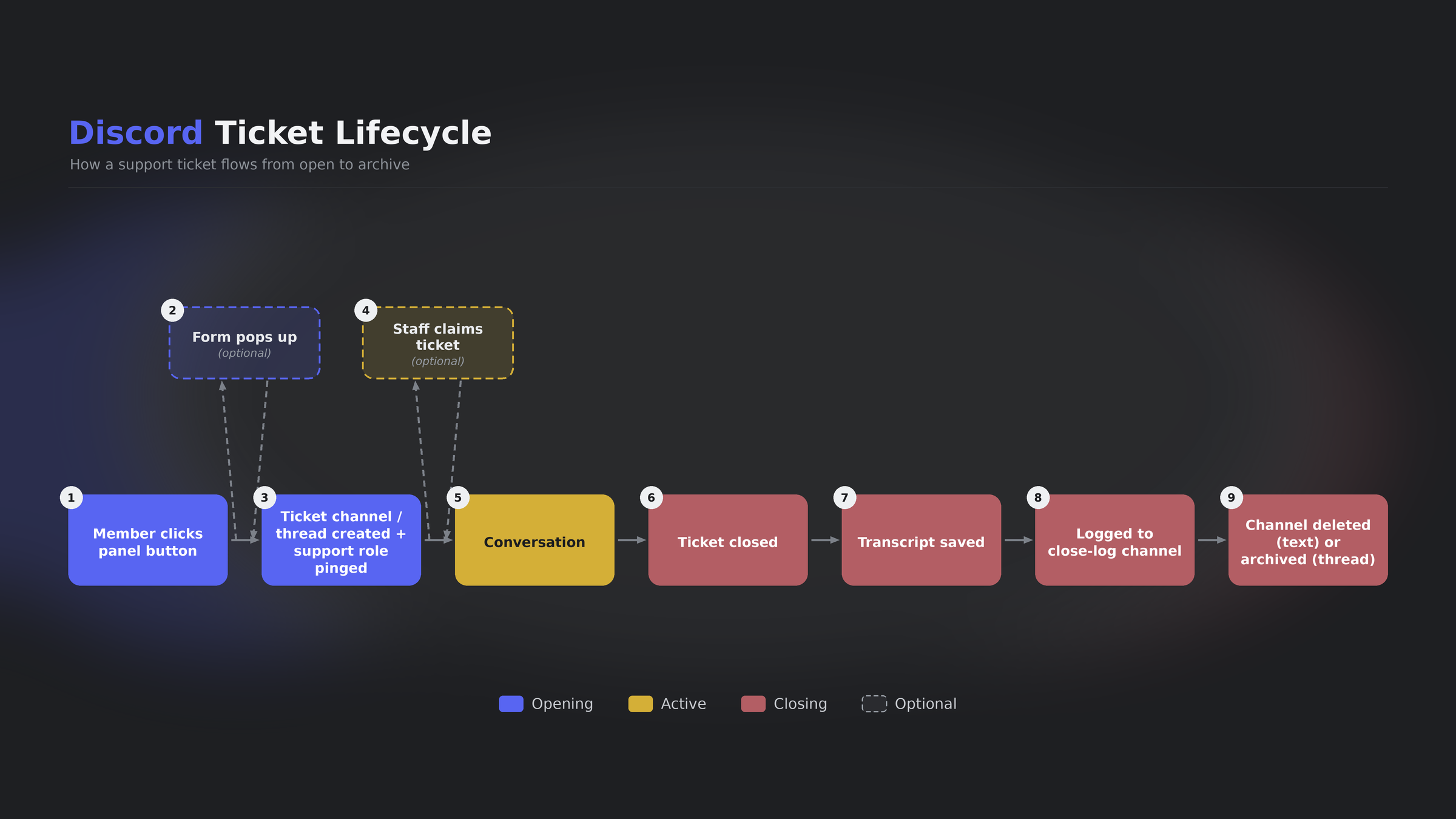
Every Ticket King ticket moves through the same stages: **Open**, then an optional **Claim**, then **Close**. This page covers what happens at each transition, and what your team controls.
## Stage 1: Open
**Triggers:**
* A member clicks a panel button or picks a dropdown-menu option.
* Staff open a ticket on behalf of someone with `/createticket`.
* Staff right-click a message and choose **Apps > Create Ticket**.
**What happens:**
1. Optional eligibility checks run (Required Roles :crown:, Blocked Roles, Steam linking :crown: for options that require it).
2. An optional pop-up form appears (up to 5 questions, or up to 100 with multi-step forms on Premium).
3. Ticket King creates a new channel or thread.
4. The ticket author and configured support roles get access.
5. The opening embed posts. It can ping configured roles if you set that up.
6. Form answers, if any, are placed in the opening embed.
7. A "Ticket Opened" entry is logged in the opened-tickets log channel, if you set one.
**State after:** Open. The author and the support team can chat.
## Stage 2: Claim (optional)
A specific staff member takes ownership. Whether claiming is allowed is configured server-wide.
The four claim modes and their behaviors are detailed on [Claiming a ticket](/docs/tickets/claiming-a-ticket.md). The default mode is **Enabled - Private on Claim**.
Claim is single-claimer. There is no multi-claim. To hand a ticket off, the current claimer runs `/unclaim`, or any staff member who can manage the ticket runs `/transfer @newperson`.
{% hint style="info" %}
Claiming, unclaiming, and transferring inside Discord with `/claim`, `/unclaim`, and `/transfer` are free. Doing the same actions from the dashboard ticket view is :crown: Premium.
{% endhint %}
## Stage 3: Close
The conversation is done.
**Triggers:**
* A staff member who can manage the ticket, or the ticket author, runs `/close [reason]` or clicks the Close button.
* :crown: The Auto-Close Inactivity timer fires after the configured quiet period.
* The ticket author leaves the server, if Autoclose Leave is on. This one is free.
**What happens:**
1. If **Close Requires Reason** is on and no reason was provided, a pop-up asks for one. There is no other yes or no confirmation step.
2. A transcript is generated.
3. A "Ticket Closed" entry posts to the closed-tickets log channel with a "View Transcript" link button, if you set that channel.
4. If **DM User Close Message** is on, which is the default, the ticket author is DM'd a close notice with the transcript link. On a premium server with Ticket Rating on, the DM also includes the 5-star rating row.
5. The channel is removed:
* A **text channel** is deleted. There is no archive option for text channels.
* A **thread** is archived or deleted, depending on the **Archive Thread Tickets** setting (default Delete).
**State after:** Closed. A closed ticket cannot be reopened.
## Can a closed ticket be reopened?
No. Reopening is not supported. The channel is gone for text tickets, or archived or deleted for threads.
If a member needs further help on the same topic, they open a new ticket. Staff can reference the original transcript.
## What you control at each stage
| Stage | What you control | Where |
| ------------ | ----------------------------------------------------------------------------------------------------------------------------------------------------- | -------------------------------------------------------------------- |
| Open | Custom embed, support roles, form, custom ticket name, eligibility, ping behavior | Panel editor and per-option settings |
| Claim | Whether claiming exists and what it does to permissions, ping author on claim, roles added on claim | Settings, Ticket Claiming |
| Close | Reason required, support role required, hide closer, DM the author, default reason, role-specific transcript viewing, staff message counts in the log | Settings, Ticket Close & Transcript Settings |
| Thread close | Archive or delete | Settings, Ticket Style and Claiming Settings, Archive Thread Tickets |
## Channel deletion outside the close flow
If a staff member deletes the ticket channel directly in Discord without using `/close`, Ticket King detects the deletion and closes the ticket with the reason "Ticket channel was manually deleted by an administrator." A transcript is still generated.
## Related
{% content-ref url="/pages/Blu3D3m8EWaNtKWG4Qa9" %}
[Claiming a ticket](/docs/tickets/claiming-a-ticket.md)
{% endcontent-ref %}
{% content-ref url="/pages/9dB72vzFglsTzKnh6Q2Z" %}
[Closing a ticket](/docs/tickets/closing-a-ticket.md)
{% endcontent-ref %}
{% content-ref url="/pages/IF5BZ0r8Id5ZekK1gryx" %}
[Inactivity rules](/docs/tickets/inactivity-rules.md)
{% endcontent-ref %}
---
# Agent Instructions
This documentation is published with GitBook. GitBook is the documentation platform designed so that both humans and AI agents can read, navigate, and reason over technical content effectively. Learn more at gitbook.com.
## Querying This Documentation
If you need additional information that is not directly available in this page, you can query the documentation dynamically by asking a question.
Perform an HTTP GET request on the current page URL with the `ask` query parameter, and the optional `goal` query parameter:
```
GET https://ticketking.xyz/docs/tickets/lifecycle.md?ask=&goal=
```
`ask` is the immediate question: it should be specific, self-contained, and written in natural language.
`goal` is optional and describes the broader end goal you are ultimately trying to accomplish on behalf of the user. GitBook uses it to tailor the answer towards what is most useful for that goal.
The response will contain a direct answer to the question and relevant excerpts and sources from the documentation.
Use this mechanism when the answer is not explicitly present in the current page, you need clarification or additional context, or you want to retrieve related documentation sections.