> For the complete documentation index, see [llms.txt](https://ticketking.xyz/docs/llms.txt). Markdown versions of documentation pages are available by appending `.md` to page URLs; this page is available as [Markdown](https://ticketking.xyz/docs/tickets-history/opening-a-ticket-detail.md).
# Opening a single ticket's detail view
The Ticket Details drawer. What you can see and do.
Click a ticket row in Ticket History, or click its "⋯" button, to open the **Ticket Details** drawer. The drawer slides in from the right side of the page. It is not a separate page, so the list stays where it is behind it. Close the drawer to return to the list with your filters still set.
What the drawer shows depends on whether the ticket is open or closed.
## A closed ticket
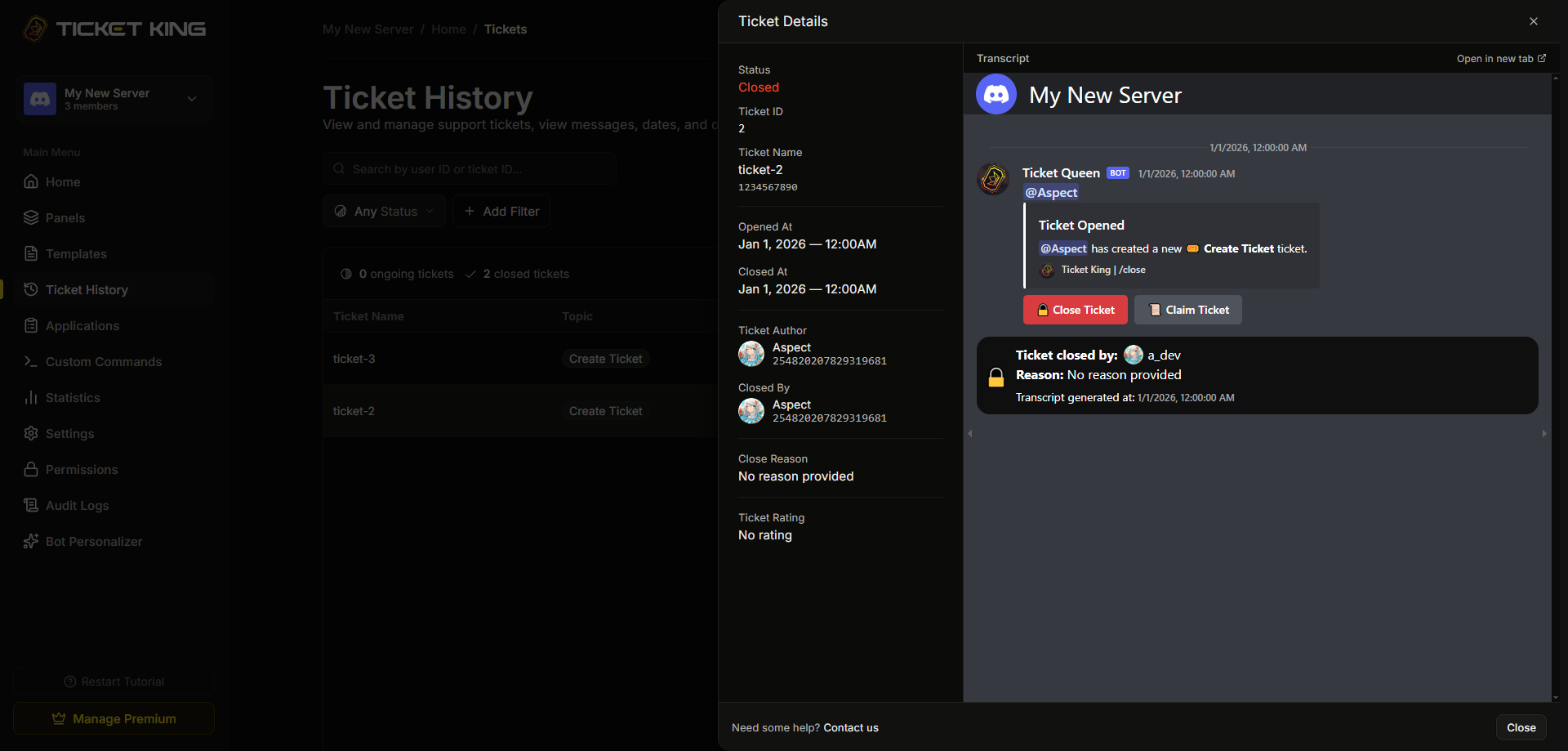
For a closed ticket the drawer shows the ticket details on the left and the transcript on the right.
The detail fields are:
| Field | Content |
| ------------------ | ---------------------------------------- |
| **Status** | "Closed" |
| **Ticket ID** | The ticket ID |
| **Ticket Name** | The ticket channel name |
| **Opened At** | When the ticket opened |
| **Closed At** | When the ticket closed |
| **Ticket Author** | The member who opened the ticket |
| **Closed By** | The person who closed it |
| **Close Reason** | The reason given at close, if any |
| **Ticket Rating** | The star rating, or "No rating" |
| **Rating Comment** | The comment left with the rating, if any |
Ticket rating and rating comment come from the :crown: Premium Ticket Rating feature. On a free server a ticket has no rating.
### Transcript panel
The right side of the drawer shows the ticket's **Transcript** inline. Use **Open in new tab** to view the full transcript in its own page. If the channel was deleted by hand rather than closed through Ticket King, a transcript may not be available.
## An open ticket
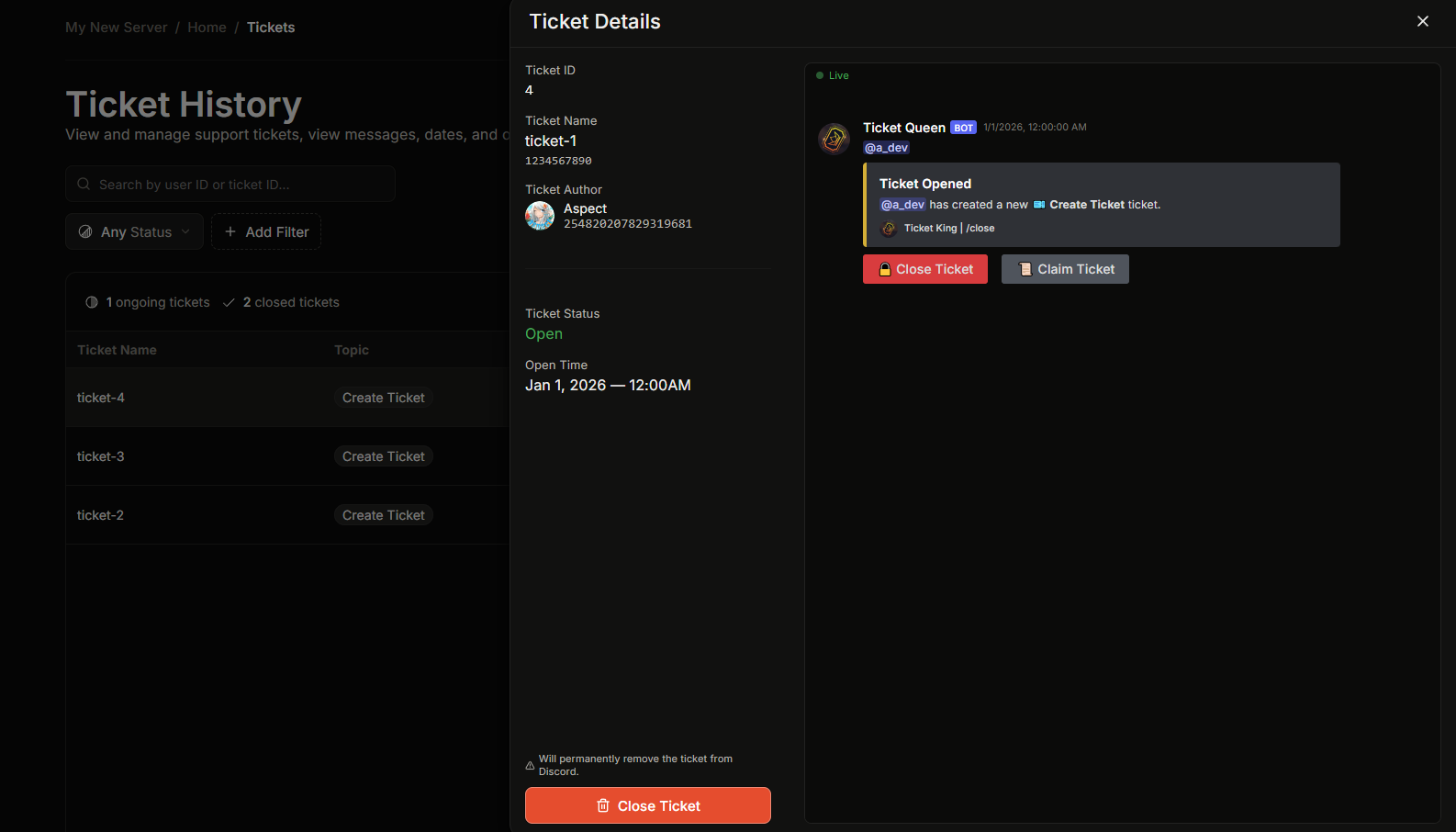
For an open ticket the drawer shows:
| Field | Content |
| ----------------- | -------------------------------- |
| **Ticket ID** | The ticket ID |
| **Ticket Name** | The ticket channel name |
| **Ticket Author** | The member who opened the ticket |
| **Ticket Status** | "Open" |
| **Open Time** | When the ticket opened |
On a premium server a **Close Ticket** button sits at the bottom of the details (:crown: Premium).
### Messages pane (Premium)
For an open ticket the right side of the drawer is a live **Messages** pane (:crown: Premium). On a premium server it shows the ticket's messages in Discord style, with attachments, embeds, and media, and it updates as new messages arrive. On a free server this pane shows a prompt to get premium instead.
Closed tickets do not use this pane. They show the transcript instead.
## Closing from the drawer (Premium)
Closing from the dashboard is :crown: Premium. The **Close Ticket** button asks you to confirm first. The confirmation reads: *"Are you sure you want to close this ticket? This will permanently remove the ticket channel from Discord."* If **Close Requires Reason** is on in your settings, you must type a reason before you can confirm. Otherwise the reason is optional.
Closing here has the same effect as running `/close` in the channel. A transcript is generated, the close log is posted if a log channel is set, and the channel is deleted (or the thread is archived). On a free server, close tickets from Discord with `/close` instead — that is always free.
## Who can use it
* To **open** the drawer you need the **View History** dashboard permission. The server owner and anyone with Administrator or Manage Server can always open it.
* To **close** a ticket from the drawer the server needs premium, and the rules otherwise match `/close`. A support role, Manage Channels, Manage Server, or the server owner can close any ticket. The member who opened the ticket can also close it, unless **Close Requires Support Role** is on.
## Related
{% content-ref url="/pages/EXi2VYmzaYjnpkXRHAAR" %}
[Browsing open and recent tickets](/docs/tickets-history/browsing-tickets.md)
{% endcontent-ref %}
{% content-ref url="/pages/9LgYeMt3zCRpnojBs9ZU" %}
[Where to find a transcript](/docs/transcripts/where-to-find.md)
{% endcontent-ref %}
---
# Agent Instructions
This documentation is published with GitBook. GitBook is the documentation platform designed so that both humans and AI agents can read, navigate, and reason over technical content effectively. Learn more at gitbook.com.
## Querying This Documentation
If you need additional information that is not directly available in this page, you can query the documentation dynamically by asking a question.
Perform an HTTP GET request on the current page URL with the `ask` query parameter, and the optional `goal` query parameter:
```
GET https://ticketking.xyz/docs/tickets-history/opening-a-ticket-detail.md?ask=&goal=
```
`ask` is the immediate question: it should be specific, self-contained, and written in natural language.
`goal` is optional and describes the broader end goal you are ultimately trying to accomplish on behalf of the user. GitBook uses it to tailor the answer towards what is most useful for that goal.
The response will contain a direct answer to the question and relevant excerpts and sources from the documentation.
Use this mechanism when the answer is not explicitly present in the current page, you need clarification or additional context, or you want to retrieve related documentation sections.