> For the complete documentation index, see [llms.txt](https://ticketking.xyz/docs/llms.txt). Markdown versions of documentation pages are available by appending `.md` to page URLs; this page is available as [Markdown](https://ticketking.xyz/docs/tickets-history/browsing-tickets.md).
# Browsing open and recent tickets
The Ticket History page. Finding tickets, filtering, and sorting.
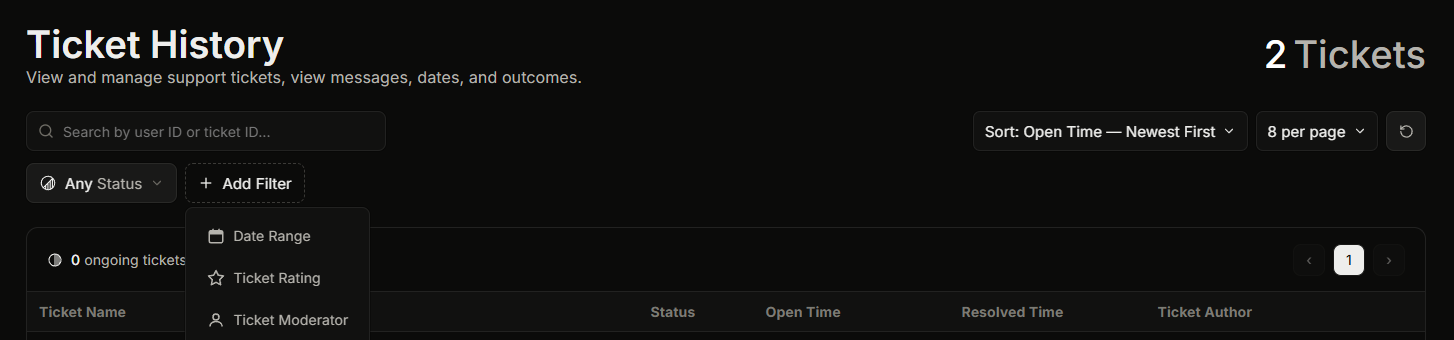
**Dashboard, then Ticket History** is the list of every ticket your server has had. You can search it, sort it, and filter it.
You need the **View History** dashboard permission to open this page. The server owner and anyone with Administrator or Manage Server can always open it.
The base Ticket History listing is free.
## Finding the ticket you want
You can search by a member's user ID or by a ticket ID, sort the list (by open time, close time, or rating), and filter it. Search and filtering are covered in detail on [Filtering and searching ticket history](/docs/tickets-history/filtering-and-searching.md).
Three filters are worth knowing about:
* **Ticket Moderator.** Show only tickets a chosen staff member claimed. This is how you review one person's work.
* **Ticket Closer.** Show only tickets a chosen staff member closed. Useful when the person who closed a ticket is not the person who claimed it.
* **Ticket Rating.** Show only tickets with a chosen star rating. Ratings are a :crown: Premium feature, so on a free server there is nothing to filter by here.
## Opening a ticket's details
Click a ticket to open the **Ticket Details** panel, which shows everything about that ticket and its transcript. See [Opening a single ticket's detail view](/docs/tickets-history/opening-a-ticket-detail.md).
## Closing a ticket from the list (Premium)
On a premium server you can close an open ticket straight from this page (:crown: Premium). The dashboard asks you to confirm first, because closing permanently removes the ticket channel from Discord. If **Close Requires Reason** is on in your settings, you must type a reason before you can confirm. On a free server, close tickets from Discord with `/close` instead.
## Related
{% content-ref url="/pages/PWJJELnoQ97HCqd5f37I" %}
[Opening a single ticket's detail view](/docs/tickets-history/opening-a-ticket-detail.md)
{% endcontent-ref %}
{% content-ref url="/pages/yJoQPW1m07OGcLtKwaAs" %}
[Filtering and searching ticket history](/docs/tickets-history/filtering-and-searching.md)
{% endcontent-ref %}
---
# Agent Instructions
This documentation is published with GitBook. GitBook is the documentation platform designed so that both humans and AI agents can read, navigate, and reason over technical content effectively. Learn more at gitbook.com.
## Querying This Documentation
If you need additional information that is not directly available in this page, you can query the documentation dynamically by asking a question.
Perform an HTTP GET request on the current page URL with the `ask` query parameter, and the optional `goal` query parameter:
```
GET https://ticketking.xyz/docs/tickets-history/browsing-tickets.md?ask=&goal=
```
`ask` is the immediate question: it should be specific, self-contained, and written in natural language.
`goal` is optional and describes the broader end goal you are ultimately trying to accomplish on behalf of the user. GitBook uses it to tailor the answer towards what is most useful for that goal.
The response will contain a direct answer to the question and relevant excerpts and sources from the documentation.
Use this mechanism when the answer is not explicitly present in the current page, you need clarification or additional context, or you want to retrieve related documentation sections.