> For the complete documentation index, see [llms.txt](https://ticketking.xyz/docs/llms.txt). Markdown versions of documentation pages are available by appending `.md` to page URLs; this page is available as [Markdown](https://ticketking.xyz/docs/ticket-rating/rating-modes.md).
# Rating modes
Three rating modes. Rating only, with optional comment, or with required comment.
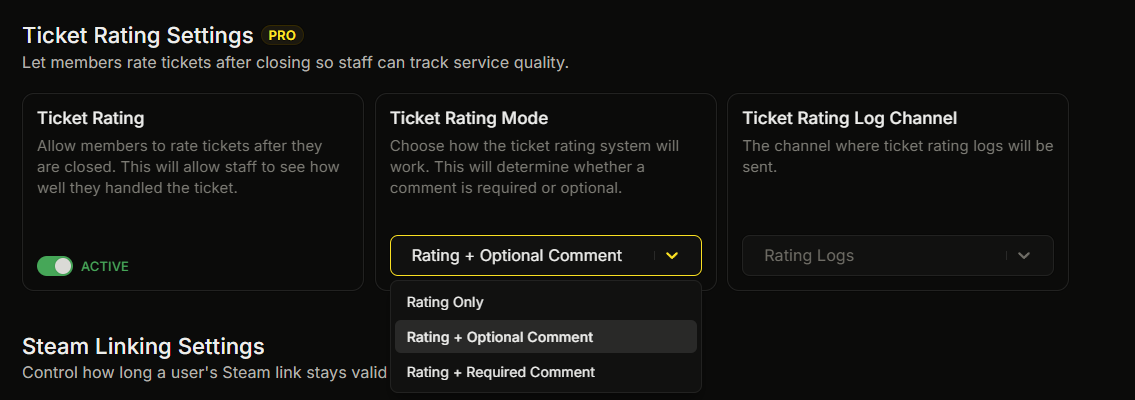
:crown: **Premium.** The **Ticket Rating Mode** dropdown has three options. They control whether the member can leave a text comment with the star rating, and whether that comment is required.
## The three modes
| UI label | Behavior |
| ----------------------------- | ----------------------------------------------------------------------------------------------------------------------------------- |
| **Rating Only** | The member clicks a star and the rating is saved. No comment is requested. |
| **Rating + Optional Comment** | The member clicks a star, then a comment box opens with a single paragraph field. The member can submit it blank or with a comment. |
| **Rating + Required Comment** | The same comment box opens, but the field is required. Submit stays disabled until the member writes something. |
The default mode after you enable Ticket Rating is **Rating + Optional Comment**.
## Which mode to pick
**Rating Only** asks for the fewest clicks, so more members finish the rating. It gives you the star score without any written comment.
**Rating + Optional Comment** gives you the star score from everyone, plus a written comment from members who choose to add one. This is the default.
**Rating + Required Comment** attaches a written comment to every rating. Some members who would give a quick star and leave may not finish, so you may get fewer ratings.
## Where the comment ends up
When a comment is submitted (the optional or required modes):
* It is saved to the dashboard with the ticket.
* It is shown in the Rating Log embed in the **User Feedback** field.
* It is shown on the closed ticket in Ticket History.
## Changing modes later
You can change the rating mode at any time. The new mode applies to tickets that close after the change. A rating prompt that was already sent keeps the mode that was active when it was sent.
## Related
{% content-ref url="/pages/ZJP01LC6EVKd946UMthw" %}
[What ticket ratings are](/docs/ticket-rating/what-ticket-ratings-are.md)
{% endcontent-ref %}
---
# Agent Instructions
This documentation is published with GitBook. GitBook is the documentation platform designed so that both humans and AI agents can read, navigate, and reason over technical content effectively. Learn more at gitbook.com.
## Querying This Documentation
If you need additional information that is not directly available in this page, you can query the documentation dynamically by asking a question.
Perform an HTTP GET request on the current page URL with the `ask` query parameter, and the optional `goal` query parameter:
```
GET https://ticketking.xyz/docs/ticket-rating/rating-modes.md?ask=&goal=
```
`ask` is the immediate question: it should be specific, self-contained, and written in natural language.
`goal` is optional and describes the broader end goal you are ultimately trying to accomplish on behalf of the user. GitBook uses it to tailor the answer towards what is most useful for that goal.
The response will contain a direct answer to the question and relevant excerpts and sources from the documentation.
Use this mechanism when the answer is not explicitly present in the current page, you need clarification or additional context, or you want to retrieve related documentation sections.