> For the complete documentation index, see [llms.txt](https://ticketking.xyz/docs/llms.txt). Markdown versions of documentation pages are available by appending `.md` to page URLs; this page is available as [Markdown](https://ticketking.xyz/docs/steam-linking/turning-it-on.md).
# Turning Steam Linking on
How to enable Steam Linking for your server.
:crown: **Premium feature.** Steam Linking has two steps.
{% stepper %}
{% step %}
### Step 1. Have premium
Steam Linking is part of premium. Once your server has premium, Steam Linking becomes available within a few minutes.
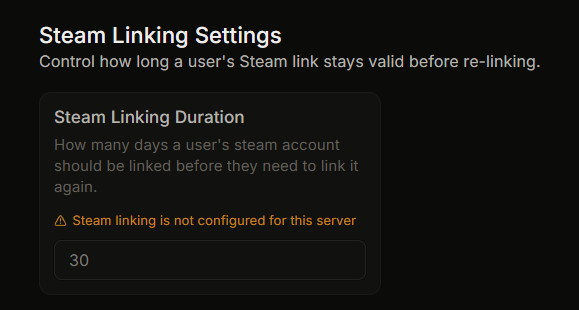
Until then, the **Steam Linking Duration** field on the Settings page is disabled with the reason *"Steam linking is not configured for this server"*.
{% endstep %}
{% step %}
### Step 2. Require it on each option you want to gate
Even with premium, no panel options require linking by default. You turn it on for each option you choose.
For each panel option you want to gate behind Steam linking:
1. Open the panel editor.
2. Click the button or option.
3. Go to the **Advanced tab**.
4. Find **Steam ID Integration**.
5. Turn the **Require Steam Linking** toggle on.
6. Save.
You can also set this as a panel default under **Panel Defaults**, in **Default Steam ID Integration**. Individual options can then override the default.
{% endstep %}
{% endstepper %}
## What happens after you enable it
* When a member clicks the panel option, the bot first checks whether they have a valid Steam link.
* If they do not, the bot asks them to link with a button. They can open the ticket only after they link.
* Their Steam ID becomes available as a `{STEAM_ID}` placeholder. You can use it in:
* The custom ticket name, for example `bug-{TICKET_NUMBER}-{STEAM_ID}`.
* The ticket embed content.
* The staff thread message.
## Disabling it
Turn the **Require Steam Linking** toggle off in the option, or in the panel defaults. New tickets will not require linking. Members who already linked keep their link.
## If premium ends
If your server goes from premium back to free:
* Steam Linking stops working.
* Members who already linked keep their stored Steam ID.
* The `{STEAM_ID}` placeholder stops being filled in.
* The Steam Linking dashboard page becomes locked.
When premium returns, the earlier links work again.
## Related
{% content-ref url="/pages/xl8ZOlixZa4z69uy07g9" %}
[What Steam Linking does](/docs/steam-linking/overview.md)
{% endcontent-ref %}
{% content-ref url="/pages/fsVZpDhUPIhDnOhX0o54" %}
[The link duration setting](/docs/steam-linking/link-duration.md)
{% endcontent-ref %}
---
# Agent Instructions
This documentation is published with GitBook. GitBook is the documentation platform designed so that both humans and AI agents can read, navigate, and reason over technical content effectively. Learn more at gitbook.com.
## Querying This Documentation
If you need additional information that is not directly available in this page, you can query the documentation dynamically by asking a question.
Perform an HTTP GET request on the current page URL with the `ask` query parameter, and the optional `goal` query parameter:
```
GET https://ticketking.xyz/docs/steam-linking/turning-it-on.md?ask=&goal=
```
`ask` is the immediate question: it should be specific, self-contained, and written in natural language.
`goal` is optional and describes the broader end goal you are ultimately trying to accomplish on behalf of the user. GitBook uses it to tailor the answer towards what is most useful for that goal.
The response will contain a direct answer to the question and relevant excerpts and sources from the documentation.
Use this mechanism when the answer is not explicitly present in the current page, you need clarification or additional context, or you want to retrieve related documentation sections.