> For the complete documentation index, see [llms.txt](https://ticketking.xyz/docs/llms.txt). Markdown versions of documentation pages are available by appending `.md` to page URLs; this page is available as [Markdown](https://ticketking.xyz/docs/statistics/the-statistics-page.md).
# The Statistics page
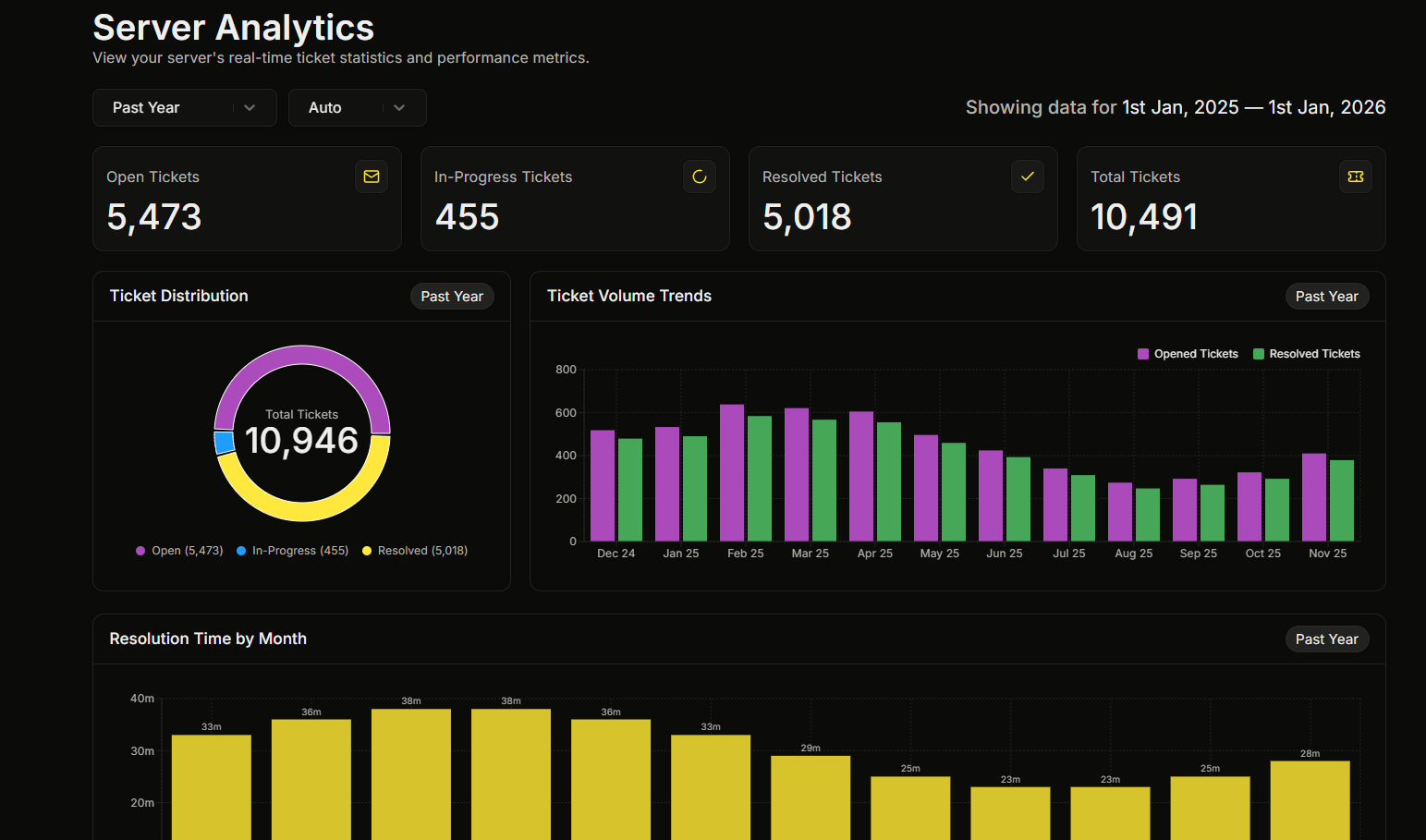
The premium analytics dashboard. What it shows.
:crown: **Premium feature.** The Statistics page is the dashboard's analytics view. The whole page is Premium.
On the dashboard, open **Statistics** in the sidebar. The page header reads **Server Analytics**.
## What is on the page
* **4 stat cards** at the top:
* **Open Tickets**, the count opened in the selected time range.
* **In-Progress Tickets**, tickets that are open and claimed in the selected range.
* **Resolved Tickets**, the count closed in the selected range.
* **Total Tickets**, the open and resolved counts added together.
* **6 charts** below the cards (listed further down).
## Time controls
| Control | Options |
| -------------- | -------------------------------------------------------- |
| **Time range** | Past Week (default), Past Month, Past Year, Custom Range |
| **Grouping** | Auto (default), Daily, Weekly, Monthly |
With **Auto** grouping, the page picks the grouping for you:
* Past Week groups by day.
* Past Month groups by day.
* Past Year groups by month.
* Custom Range groups by day for up to 60 days, by week for up to 180 days, and by month for longer ranges.
The page shows the active range, for example *"Showing data for Mar 1, 2026 to Mar 31, 2026"*.
## The 6 charts
### 1. Ticket Distribution
A donut chart with three slices, Open, In-Progress, and Resolved. The center label shows the total ticket count.
### 2. Ticket Volume Trends
A bar chart with two series, Opened Tickets and Resolved Tickets. The x-axis labels change with the grouping, for example "Mar 14" for daily, "Mar 11 to Mar 17" for weekly, and "Mar '24" for monthly.
### 3. Resolution Time by Day or Month
A bar chart of the average time it took to resolve tickets, shown in minutes or hours. The footer reads *"Based on tickets opened on each day/month"*.
### 4. Average Ticket Rating by Day, Week, or Month
A line chart of the average ticket rating on a 0 to 5 scale. The average is weighted by how many ratings each period had. Next to it you see the average rating, the number of ratings, and the active range. When there are no ratings, it shows *"No ratings yet."* or *"No ratings in this range."*.
### 5. Staff Closed Claimed Tickets by Day or Month
A stacked bar chart showing, per staff member, how many claimed tickets they closed over time. You can filter staff by a count rule (more than, equal to, or less than a number of tickets) using the number input and the "tickets" label. The legend lets you toggle individual staff in or out of the chart.
### 6. Staff Leaderboard
A list with one row per staff member. Each row shows the staff member's avatar, display name or username, user ID, and their closed-and-claimed ticket count with a "Close Claimed" label. It uses the same filter as the chart above it.
## What Statistics does not show
* It does not break tickets down by category.
* It does not break tickets down by panel.
## When the server is not premium
Free servers see the locked **Advanced Statistics** showcase instead of the live page. The showcase lists the analytics premium provides, such as ticket volume analytics, staff leaderboards, weekly, monthly, and yearly reporting, interactive charts, closure-rate analysis, and average resolution-time tracking.
## Related
{% content-ref url="/pages/exzL4IxFJ6d9jWNjp6BF" %}
[The premium-only feature list](/docs/premium/feature-list.md)
{% endcontent-ref %}
{% content-ref url="/pages/EXi2VYmzaYjnpkXRHAAR" %}
[Browsing open and recent tickets](/docs/tickets-history/browsing-tickets.md)
{% endcontent-ref %}
---
# Agent Instructions
This documentation is published with GitBook. GitBook is the documentation platform designed so that both humans and AI agents can read, navigate, and reason over technical content effectively. Learn more at gitbook.com.
## Querying This Documentation
If you need additional information that is not directly available in this page, you can query the documentation dynamically by asking a question.
Perform an HTTP GET request on the current page URL with the `ask` query parameter, and the optional `goal` query parameter:
```
GET https://ticketking.xyz/docs/statistics/the-statistics-page.md?ask=&goal=
```
`ask` is the immediate question: it should be specific, self-contained, and written in natural language.
`goal` is optional and describes the broader end goal you are ultimately trying to accomplish on behalf of the user. GitBook uses it to tailor the answer towards what is most useful for that goal.
The response will contain a direct answer to the question and relevant excerpts and sources from the documentation.
Use this mechanism when the answer is not explicitly present in the current page, you need clarification or additional context, or you want to retrieve related documentation sections.