> For the complete documentation index, see [llms.txt](https://ticketking.xyz/docs/llms.txt). Markdown versions of documentation pages are available by appending `.md` to page URLs; this page is available as [Markdown](https://ticketking.xyz/docs/pt-br/transcricoes/where-to-find.md).
# Onde encontrar uma transcrição
Como acessar uma transcrição após o fechamento de um ticket.
Depois que um ticket é encerrado, a transcrição fica acessível de vários lugares.
## 1. O embed do log de encerramento
O embed de encerramento no seu Canal de Log de Tickets Encerrados tem um **Ver transcrição** botão de link logo abaixo dos campos do embed.
## 2. A página de detalhes de ticket único do painel
**Painel → Histórico de tickets** → clique em qualquer ticket encerrado → a página de detalhes dele tem um **"Ver transcrição"** link no cartão Informações do ticket.
## 3. A DM do autor (quando a Mensagem de Encerramento ao Usuário por DM está ativada)
Quando **Mensagem de fechamento por DM ao usuário** está ativado (o padrão), o autor do ticket recebe o embed de encerramento em suas mensagens diretas, incluindo um **Ver transcrição** link.
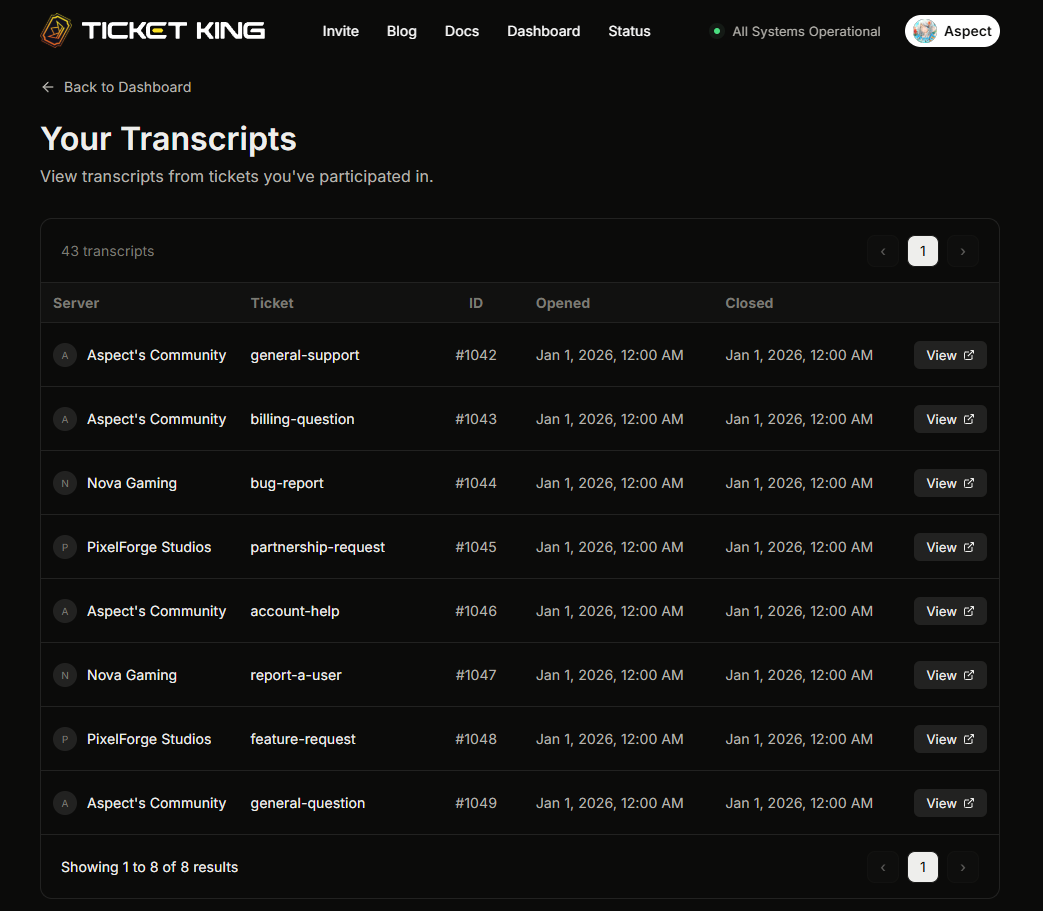
## 4. Sua página "Minhas transcrições"
Os membros podem visitar [**ticketking.xyz/user/transcripts**](https://ticketking.xyz/user/transcripts) para ver todas as transcrições às quais eles têm acesso, em todos os servidores.
## Autenticação
Visualizar uma transcrição exige entrar com o Discord.
→ [Visualização de transcrições específica por cargo](/docs/pt-br/transcricoes/role-specific-viewing.md)
## Compartilhar uma transcrição
Abrir uma transcrição depende de o visualizador ter permissão. Compartilhar o link com alguém que não tem permissão não concede acesso. O acesso é negado quando essa pessoa tenta abri-la.
## Relacionado
{% content-ref url="/pages/dbab97eed9e8898cac767c9c3e0aaf12bb008e2f" %}
[O que há em uma transcrição](/docs/pt-br/transcricoes/whats-in-a-transcript.md)
{% endcontent-ref %}
{% content-ref url="/pages/c77f75c87fe8efd4a5217a6b582c7f7a28c579f1" %}
[Visualização de transcrições específica por cargo](/docs/pt-br/transcricoes/role-specific-viewing.md)
{% endcontent-ref %}
---
# Agent Instructions
This documentation is published with GitBook. GitBook is the documentation platform designed so that both humans and AI agents can read, navigate, and reason over technical content effectively. Learn more at gitbook.com.
## Querying This Documentation
If you need additional information that is not directly available in this page, you can query the documentation dynamically by asking a question.
Perform an HTTP GET request on the current page URL with the `ask` query parameter, and the optional `goal` query parameter:
```
GET https://ticketking.xyz/docs/pt-br/transcricoes/where-to-find.md?ask=&goal=
```
`ask` is the immediate question: it should be specific, self-contained, and written in natural language.
`goal` is optional and describes the broader end goal you are ultimately trying to accomplish on behalf of the user. GitBook uses it to tailor the answer towards what is most useful for that goal.
The response will contain a direct answer to the question and relevant excerpts and sources from the documentation.
Use this mechanism when the answer is not explicitly present in the current page, you need clarification or additional context, or you want to retrieve related documentation sections.