> For the complete documentation index, see [llms.txt](https://ticketking.xyz/docs/llms.txt). Markdown versions of documentation pages are available by appending `.md` to page URLs; this page is available as [Markdown](https://ticketking.xyz/docs/pt-br/paineis/resend-a-panel.md).
# Reenviar um painel
Se a mensagem do painel for excluída ou se você quiser uma cópia nova.
Quando a mensagem do painel no Discord desaparece (um moderador a excluiu, o canal foi limpo etc.), os membros não conseguem mais interagir com ela. A solução é reenviá-la.
## A ação de reenviar
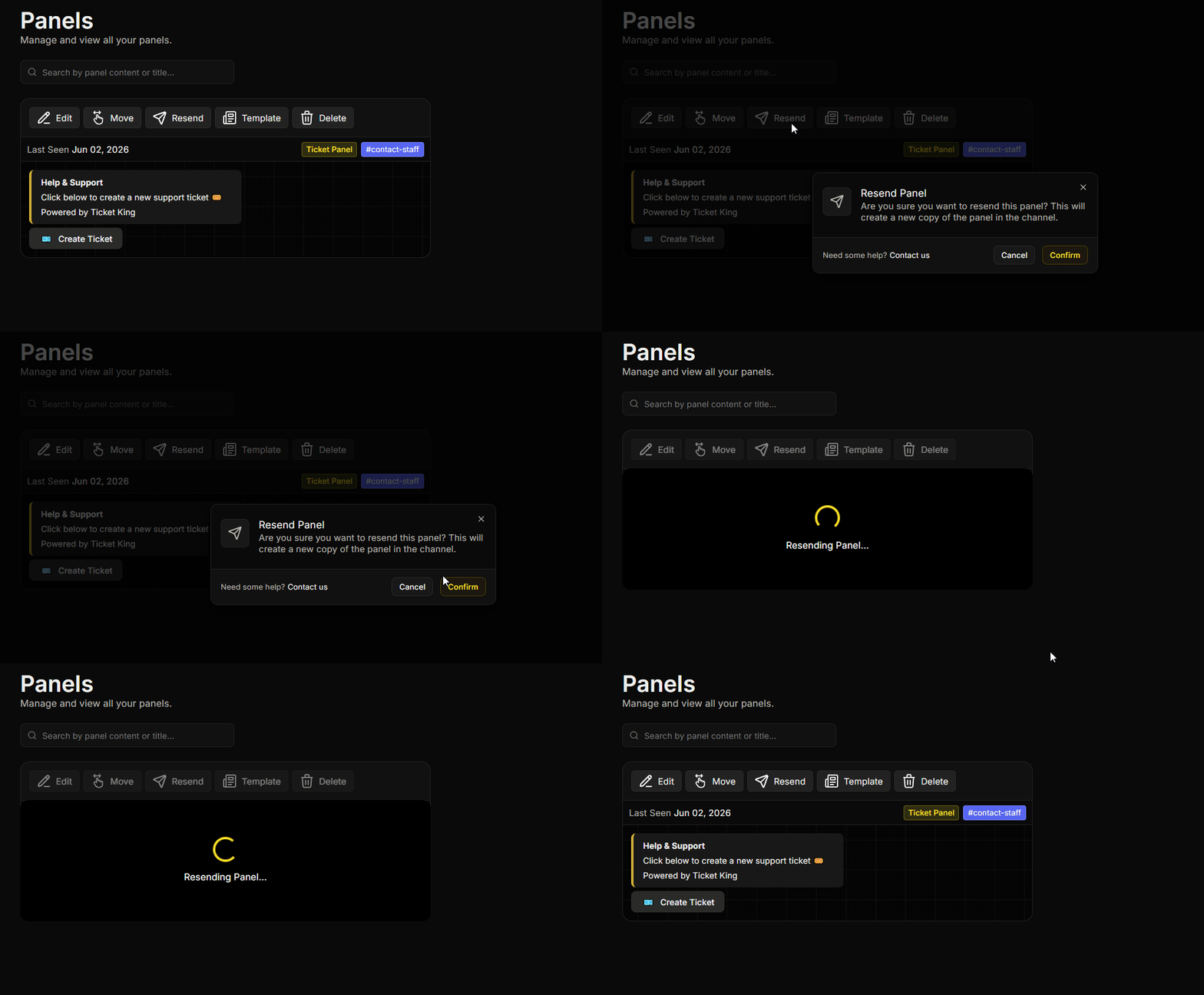
Da **Painéis** página:
1. Encontre o painel que você quer reenviar.
2. No cartão do painel, clique em **Reenviar**.
3. Confirme.
O bot publica uma nova cópia do painel no canal configurado. Todo o resto permanece como estava.
## Quando usá-lo
* A mensagem do painel está ausente ou visivelmente quebrada no Discord.
* Você quer empurrar o painel para o final do canal (novas mensagens o empurraram para cima).
* Você fez edições significativas e quer uma nova publicação para que os membros percebam.
## O que é preservado
Tudo, exceto a mensagem anterior do painel:
* Opções.
* Configurações por opção.
* Tickets abertos.
* Histórico de auditoria.
* Modelos.
## Reenviar vs Mover
* **Reenviar.** Mesmo canal, nova mensagem.
* **Mover.** Canal diferente. Veja [Mover um painel](https://ticketking.xyz/docs/pt-br/paineis/move-a-panel.md).
## Problemas comuns
{% hint style="warning" %}
**O reenvio foi publicado, mas a mensagem antiga ainda está lá.** O Ticket King não conseguiu encontrar a mensagem anterior porque ela foi excluída manualmente ou o canal foi limpo. Exclua o restante você mesmo, se necessário.
{% endhint %}
{% hint style="danger" %}
**Erro de permissão ao reenviar.** Se você vir "não tenho permissão para enviar mensagens nesse canal", o bot não pode publicar no canal do painel. Certifique-se de que o bot tenha **Ver canal**, **Enviar mensagens**, e **Incorporar links** lá, depois tente novamente.
{% endhint %}
## Relacionado
{% content-ref url="/pages/251c1de01feb76eaf30b43384cfaa765e1fba7c9" %}
[Mover um painel para outro canal](https://ticketking.xyz/docs/pt-br/paineis/move-a-panel.md)
{% endcontent-ref %}
---
# Agent Instructions
This documentation is published with GitBook. GitBook is the documentation platform designed so that both humans and AI agents can read, navigate, and reason over technical content effectively. Learn more at gitbook.com.
## Querying This Documentation
If you need additional information that is not directly available in this page, you can query the documentation by asking a question.
Perform an HTTP GET request on the following URL with the `ask` and `goal` query parameters:
```
GET https://ticketking.xyz/docs/pt-br/paineis/resend-a-panel.md?ask=&goal=
```
`ask` is the immediate question: it should be specific, self-contained, and written in natural language.
`goal` is what the user is ultimately trying to achieve, the reason they need the answer. Sharing it helps GitBook give you a better, more relevant answer. A goal is most helpful when it describes the outcome the user wants rather than restating the question. For example, with `ask=how do I create an API token`, a goal like `automate deployments from our CI pipeline` lets GitBook tailor the answer to that use case.
The response will contain a direct answer to the question and relevant excerpts and sources from the documentation.
Use this mechanism when the answer is not explicitly present in the current page, you need clarification or additional context, or you want to retrieve related documentation sections.