> For the complete documentation index, see [llms.txt](https://ticketking.xyz/docs/llms.txt). Markdown versions of documentation pages are available by appending `.md` to page URLs; this page is available as [Markdown](https://ticketking.xyz/docs/pt-br/logs-de-auditoria/reading-the-page.md).
# Lendo a página
Filtrando e lendo a página de Logs de Auditoria.
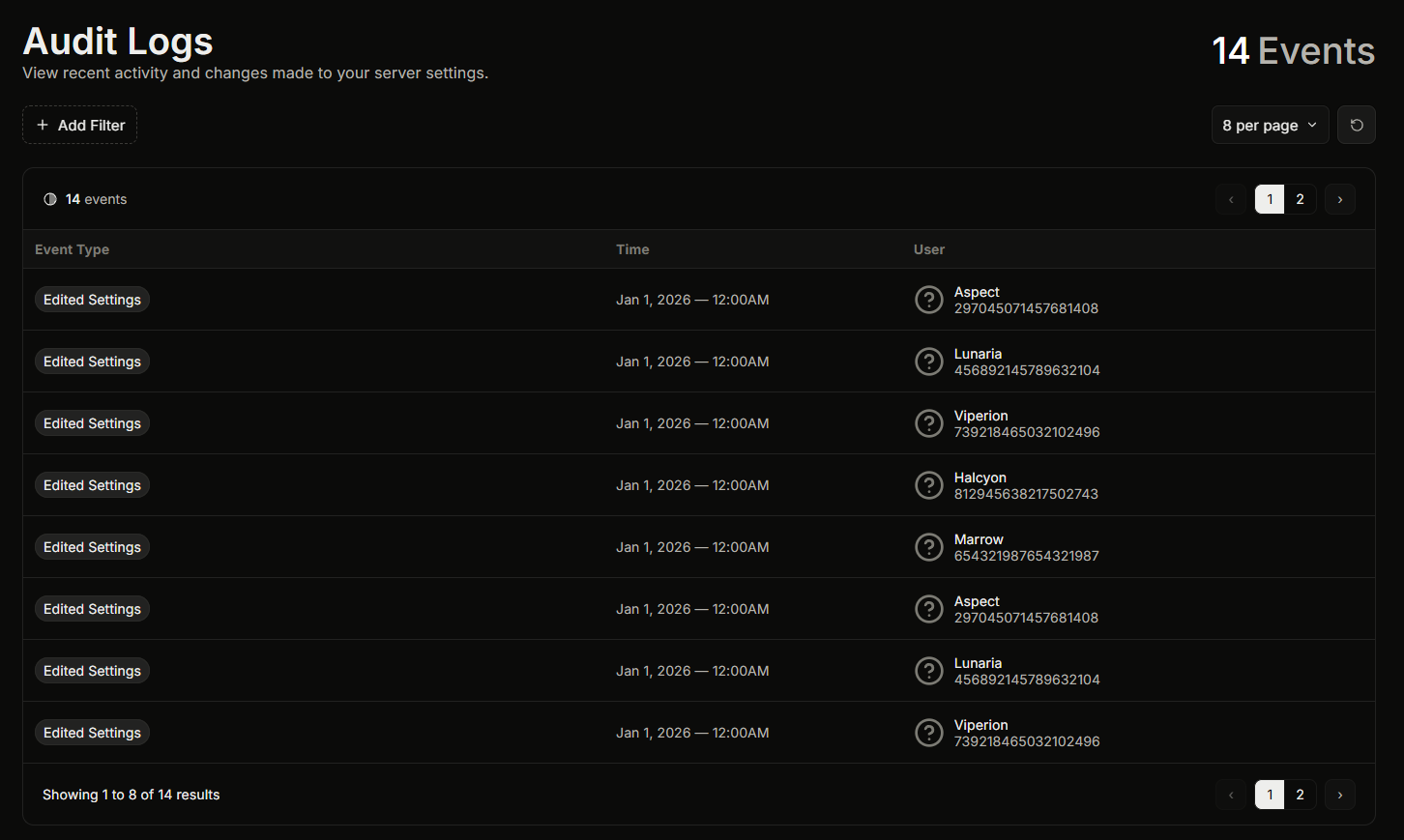
A página de Registros de Auditoria fica em **Painel, Registros de Auditoria** na barra lateral. Para abri-la, você precisa da **Ver Registros de Auditoria** permissão do painel, ou ser o dono do servidor, ou ter Administrador do Discord ou Gerenciar Servidor.
Cada entrada mostra a ação, quem a realizou e quando.
## Restringindo a lista
Você pode filtrar a lista de três maneiras e combiná-las:
* **Por data.** Escolha um intervalo predefinido ou defina um intervalo de datas personalizado.
* **Por usuário.** Escolha um usuário ativo recentemente ou digite um ID de usuário para ver apenas as ações de uma pessoa.
* **Por tipo de evento.** Escolha um ou mais tipos de ação. A lista oferece apenas os tipos de evento que realmente aconteceram no seu servidor, então você nunca estará escolhendo entre ações que nunca usou.
É assim que você responde a perguntas como "o que este moderador alterou na semana passada" ou "quem redefiniu os contadores de tickets."
## Relacionado
{% content-ref url="/pages/541e38190bdf7b1dc52ac8af053d9216fce10f7a" %}
[O que o log de auditoria registra](/docs/pt-br/logs-de-auditoria/what-it-captures.md)
{% endcontent-ref %}
{% content-ref url="/pages/3e3800ac74145a00321ac83950bfb974d6bd004d" %}
[O que os logs de auditoria não mostram](/docs/pt-br/logs-de-auditoria/what-it-doesnt-show.md)
{% endcontent-ref %}
---
# Agent Instructions
This documentation is published with GitBook. GitBook is the documentation platform designed so that both humans and AI agents can read, navigate, and reason over technical content effectively. Learn more at gitbook.com.
## Querying This Documentation
If you need additional information that is not directly available in this page, you can query the documentation dynamically by asking a question.
Perform an HTTP GET request on the current page URL with the `ask` query parameter, and the optional `goal` query parameter:
```
GET https://ticketking.xyz/docs/pt-br/logs-de-auditoria/reading-the-page.md?ask=&goal=
```
`ask` is the immediate question: it should be specific, self-contained, and written in natural language.
`goal` is optional and describes the broader end goal you are ultimately trying to accomplish on behalf of the user. GitBook uses it to tailor the answer towards what is most useful for that goal.
The response will contain a direct answer to the question and relevant excerpts and sources from the documentation.
Use this mechanism when the answer is not explicitly present in the current page, you need clarification or additional context, or you want to retrieve related documentation sections.