> For the complete documentation index, see [llms.txt](https://ticketking.xyz/docs/llms.txt). Markdown versions of documentation pages are available by appending `.md` to page URLs; this page is available as [Markdown](https://ticketking.xyz/docs/pt-br/historico-de-tickets/browsing-tickets.md).
# Navegando por tickets abertos e recentes
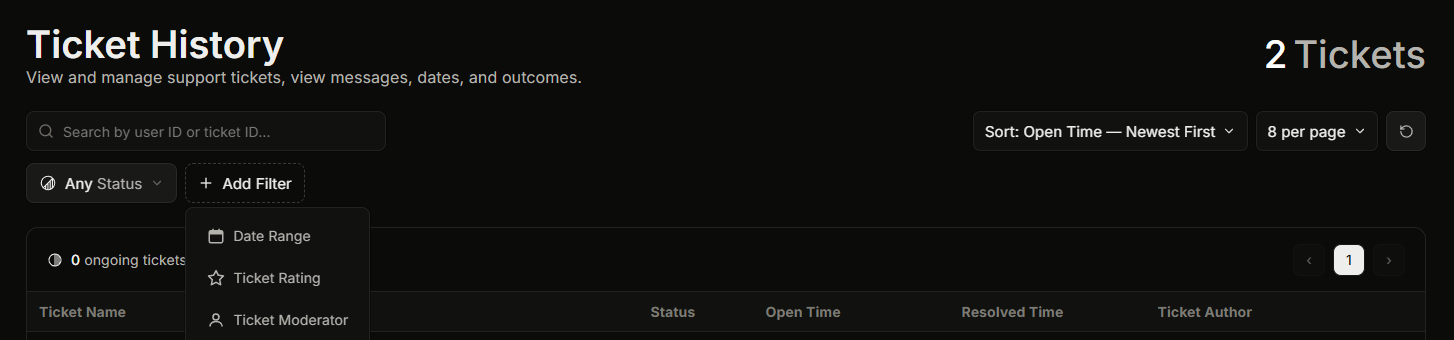
A página Histórico de tickets. Encontrar tickets, filtrar e ordenar.
**Painel, depois Histórico de Tickets** é a lista de todos os tickets que seu servidor já teve. Você pode pesquisá-la, classificá-la e filtrá-la.
Você precisa da **Ver Histórico** permissão do painel para abrir esta página. O proprietário do servidor e qualquer pessoa com Administrator ou Gerenciar Servidor sempre podem abri-la.
A listagem básica do Histórico de Tickets é gratuita.
## Encontrando o ticket que você quer
Você pode pesquisar por um ID de usuário de um membro ou por um ID de ticket, classificar a lista (por horário de abertura, horário de fechamento ou avaliação) e filtrá-la. A pesquisa e a filtragem são abordadas em detalhes em [Filtrando e pesquisando o histórico de tickets](/docs/pt-br/historico-de-tickets/filtering-and-searching.md).
Há três filtros que vale a pena conhecer:
* **Moderador do ticket.** Mostrar apenas os tickets reivindicados por um membro da equipe escolhido. É assim que você revisa o trabalho de uma pessoa.
* **Fechador do ticket.** Mostrar apenas os tickets fechados por um membro da equipe escolhido. Útil quando a pessoa que fechou um ticket não é a mesma que o reivindicou.
* **Avaliação do ticket.** Mostrar apenas os tickets com uma avaliação por estrelas escolhida. As avaliações são um :crown: recurso Premium, então em um servidor gratuito não há nada para filtrar aqui.
## Abrindo os detalhes de um ticket
Clique em um ticket para abrir o **Detalhes do ticket** painel, que mostra tudo sobre esse ticket e sua transcrição. Veja [Abrindo a visualização de detalhes de um único ticket](/docs/pt-br/historico-de-tickets/opening-a-ticket-detail.md).
## Fechando um ticket pela lista (Premium)
Em um servidor Premium, você pode fechar um ticket aberto diretamente desta página (:crown: Premium). O painel pede que você confirme primeiro, porque o fechamento remove permanentemente o canal do ticket do Discord. Se **Fechar requer motivo** estiver ativado nas suas configurações, você precisa digitar um motivo antes de confirmar. Em um servidor gratuito, feche tickets no Discord com `/close` em vez disso.
## Relacionados
{% content-ref url="/pages/db58d85477a52a981398b277cb195705952de08b" %}
[Abrindo a visualização de detalhes de um ticket](/docs/pt-br/historico-de-tickets/opening-a-ticket-detail.md)
{% endcontent-ref %}
{% content-ref url="/pages/ad3f2bd2138154ce077a37d5ec358ff49ab1acdf" %}
[Filtrando e pesquisando no histórico de tickets](/docs/pt-br/historico-de-tickets/filtering-and-searching.md)
{% endcontent-ref %}
---
# Agent Instructions
This documentation is published with GitBook. GitBook is the documentation platform designed so that both humans and AI agents can read, navigate, and reason over technical content effectively. Learn more at gitbook.com.
## Querying This Documentation
If you need additional information that is not directly available in this page, you can query the documentation dynamically by asking a question.
Perform an HTTP GET request on the current page URL with the `ask` query parameter, and the optional `goal` query parameter:
```
GET https://ticketking.xyz/docs/pt-br/historico-de-tickets/browsing-tickets.md?ask=&goal=
```
`ask` is the immediate question: it should be specific, self-contained, and written in natural language.
`goal` is optional and describes the broader end goal you are ultimately trying to accomplish on behalf of the user. GitBook uses it to tailor the answer towards what is most useful for that goal.
The response will contain a direct answer to the question and relevant excerpts and sources from the documentation.
Use this mechanism when the answer is not explicitly present in the current page, you need clarification or additional context, or you want to retrieve related documentation sections.