> For the complete documentation index, see [llms.txt](https://ticketking.xyz/docs/llms.txt). Markdown versions of documentation pages are available by appending `.md` to page URLs; this page is available as [Markdown](https://ticketking.xyz/docs/pt-br/configuracoes/messages.md).
# Mensagens de ticket
Onde as mensagens de ticket do bot são configuradas.
Não há um grupo "mensagens" em todo o servidor na página de Configurações. O texto exibido quando um ticket é aberto é definido por opção do painel no editor do painel. O único texto de mensagem na página de Configurações é o **Motivo padrão de fechamento do ticket**.
## Mensagens por opção (editor do painel)
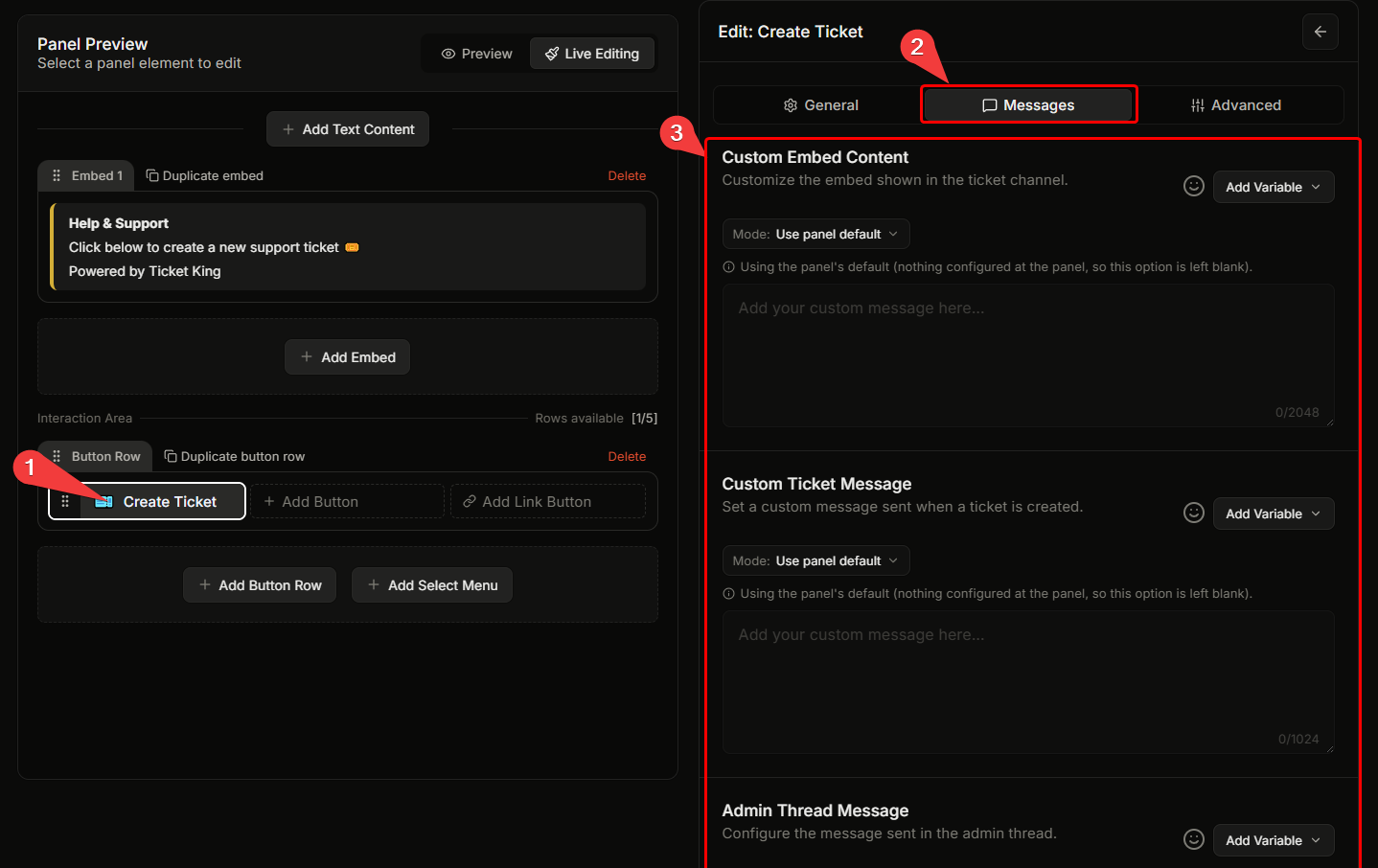
Abra um painel no dashboard, clique em um botão ou em uma opção de menu suspenso e vá para a **Mensagens** aba. Ambos os campos aqui são livres.
| Campo | O que faz | Limite |
| ------------------------------------------------------------------------- | ----------------------------------------------------------------------------------------------------- | --------------- |
| **Conteúdo personalizado do embed** | O embed exibido dentro do ticket quando ele é aberto. | 2048 caracteres |
| **Mensagem personalizada do ticket** | Uma mensagem enviada para o ticket quando ele é aberto. | 1024 caracteres |
| **Mensagem da thread de admin** (:crown: Premium) | Uma mensagem publicada na thread da equipe. O texto personalizado só entra em vigor no plano premium. | 1024 caracteres |
Um painel também pode definir padrões que todas as opções herdam (por exemplo **Mensagem padrão de embed do ticket** e **Conteúdo padrão da mensagem do ticket**) no editor de padrões gerais do painel.
→ [Configurações por opção no editor do painel](/docs/pt-br/paineis/per-option-settings.md)
## Motivo padrão de fechamento do ticket (Configurações)
Na **Configurações de fechamento do ticket e transcrição** grupo, **Motivo padrão de fechamento do ticket** define o motivo registrado quando um ticket é fechado sem que um seja informado. Quando estiver em branco, o Ticket King usa seu próprio motivo padrão integrado.
## Relacionado
{% content-ref url="/pages/a0038fed456abc996c8c0439995a23d882c334f8" %}
[Fechando um ticket](/docs/pt-br/tickets/closing-a-ticket.md)
{% endcontent-ref %}
{% content-ref url="/pages/b6391153c345fd8011363245cfcf94144826f044" %}
[Visão geral das configurações](/docs/pt-br/configuracoes/overview.md)
{% endcontent-ref %}
---
# Agent Instructions
This documentation is published with GitBook. GitBook is the documentation platform designed so that both humans and AI agents can read, navigate, and reason over technical content effectively. Learn more at gitbook.com.
## Querying This Documentation
If you need additional information that is not directly available in this page, you can query the documentation dynamically by asking a question.
Perform an HTTP GET request on the current page URL with the `ask` query parameter, and the optional `goal` query parameter:
```
GET https://ticketking.xyz/docs/pt-br/configuracoes/messages.md?ask=&goal=
```
`ask` is the immediate question: it should be specific, self-contained, and written in natural language.
`goal` is optional and describes the broader end goal you are ultimately trying to accomplish on behalf of the user. GitBook uses it to tailor the answer towards what is most useful for that goal.
The response will contain a direct answer to the question and relevant excerpts and sources from the documentation.
Use this mechanism when the answer is not explicitly present in the current page, you need clarification or additional context, or you want to retrieve related documentation sections.