> For the complete documentation index, see [llms.txt](https://ticketking.xyz/docs/llms.txt). Markdown versions of documentation pages are available by appending `.md` to page URLs; this page is available as [Markdown](https://ticketking.xyz/docs/panels/templates.md).
# Templates
Your saved panel designs on the Templates page.
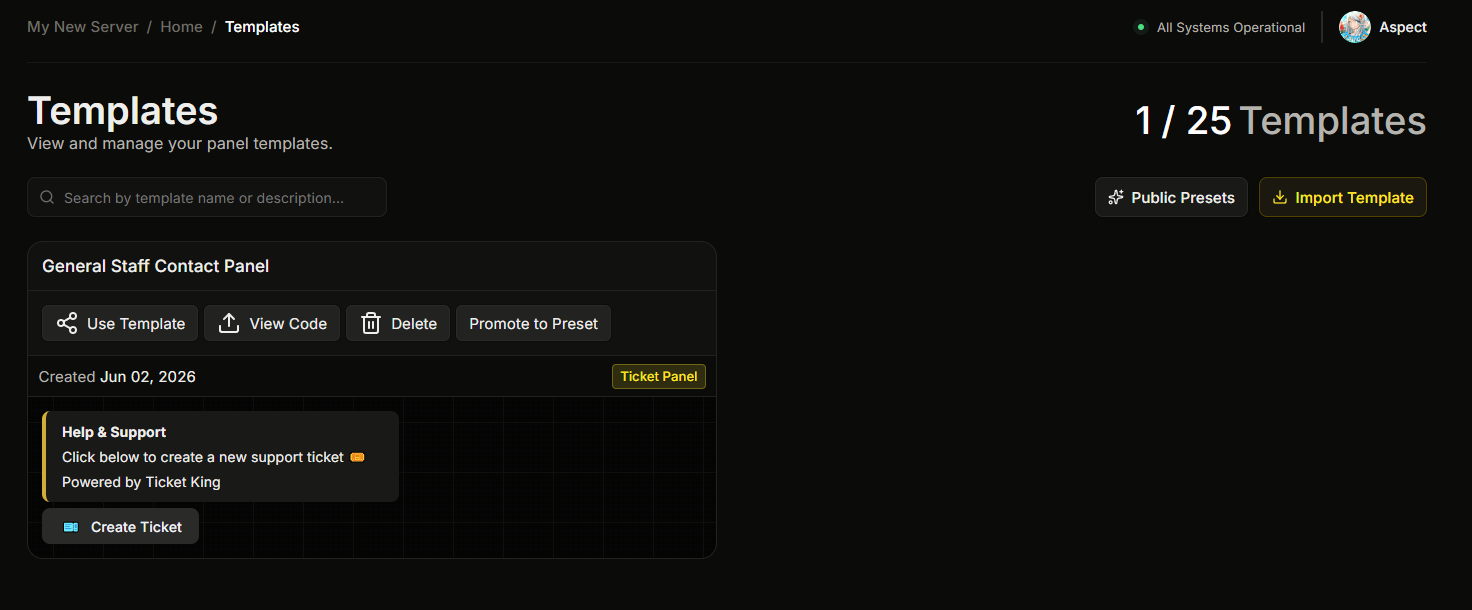
The dashboard's **Templates** section (sidebar) is where every panel template you've saved lives.
For the basics of saving a template, see [Save a panel as a template](/docs/panels/save-a-panel-as-a-template.md).
## What's on the page
* Every template you've saved.
* For each: a name and optional description, plus when it was created.
* Per-template actions: **Use Template** (create a new panel from this), **Get Code** / **View Code** (the share code), and **Delete**.
* At the top of the page: a **Public Presets** button and an **Import Template** button.
## How templates get created
You do not create templates from a blank page. A template is made from a panel:
1. Go to the **Panels** page.
2. On the panel card, click **Template**.
3. Give it a **Template Name** and an optional **Description**, then save.
The new template then appears on this Templates page.
→ [Save a panel as a template](/docs/panels/save-a-panel-as-a-template.md)
## Sharing a template with another server
Sharing is **free**. You move a template between servers with a **share code**, a short code you generate on one server and paste into another. There is no file to download and no JSON to copy.
### Getting the code
On the Templates page, find your template and click **Get Code** (the button reads **View Code** once a code already exists). The **Export Template** window opens. Click **Generate Code**, then copy the **Template Code** shown.
### Importing with a code
On the destination server's Templates page, click **Import Template**. Paste the code and click **Confirm**. The template appears in that server's list.
### Creating a panel straight from a code
If you just want the panel and don't need to keep the template around, you can skip the import step entirely. On the destination server's **Panels** page, click **Use Share Code**, paste the code, and click **Continue**. The panel creation wizard opens pre-filled with the template's design — pick the channel to send the panel to and you land in the editor.
This one-step path saves nothing to your Templates page and does not use a template slot; only the regular panel limit applies.
### Removing a code
The source server can delete the code from the same **Export Template** window (click **Delete Code**). After that the code can no longer be used to import the template. Copies already imported into other servers keep working.
{% hint style="info" %}
**Import is available on every plan.** The **Import Template** button is disabled only when you are already at your template limit. Free servers can hold 1 template, so to import a new one you first delete your existing one or upgrade.
{% endhint %}
## Limits
| Limit | Free | Premium |
| ------------------------------------- | --------------------------------------------- | --------------------------------------------- |
| Saved templates per server | 1 | 25 |
| Get a share code / Import with a code | :circle-check: | :circle-check: |
| Create a panel straight from a code | :circle-check: | :circle-check: |
| Use templates | :circle-check: | :circle-check: |
## Public Presets
Separately from your private templates, Ticket King maintains a curated **Public Presets** catalog you can use without saving them as templates first.
{% content-ref url="/pages/ic8mhJahTYnRJuissPyd" %}
[Public Presets](/docs/panels/public-presets.md)
{% endcontent-ref %}
## Related
{% content-ref url="/pages/EcxTLp69gSSiBMLpeZHQ" %}
[Save a panel as a template](/docs/panels/save-a-panel-as-a-template.md)
{% endcontent-ref %}
---
# Agent Instructions
This documentation is published with GitBook. GitBook is the documentation platform designed so that both humans and AI agents can read, navigate, and reason over technical content effectively. Learn more at gitbook.com.
## Querying This Documentation
If you need additional information that is not directly available in this page, you can query the documentation dynamically by asking a question.
Perform an HTTP GET request on the current page URL with the `ask` query parameter, and the optional `goal` query parameter:
```
GET https://ticketking.xyz/docs/panels/templates.md?ask=&goal=
```
`ask` is the immediate question: it should be specific, self-contained, and written in natural language.
`goal` is optional and describes the broader end goal you are ultimately trying to accomplish on behalf of the user. GitBook uses it to tailor the answer towards what is most useful for that goal.
The response will contain a direct answer to the question and relevant excerpts and sources from the documentation.
Use this mechanism when the answer is not explicitly present in the current page, you need clarification or additional context, or you want to retrieve related documentation sections.