> For the complete documentation index, see [llms.txt](https://ticketking.xyz/docs/llms.txt). Markdown versions of documentation pages are available by appending `.md` to page URLs; this page is available as [Markdown](https://ticketking.xyz/docs/panels/panel-wide-defaults.md).
# Panel-wide defaults
Set values once at the panel level. Every option inherits unless you override it.
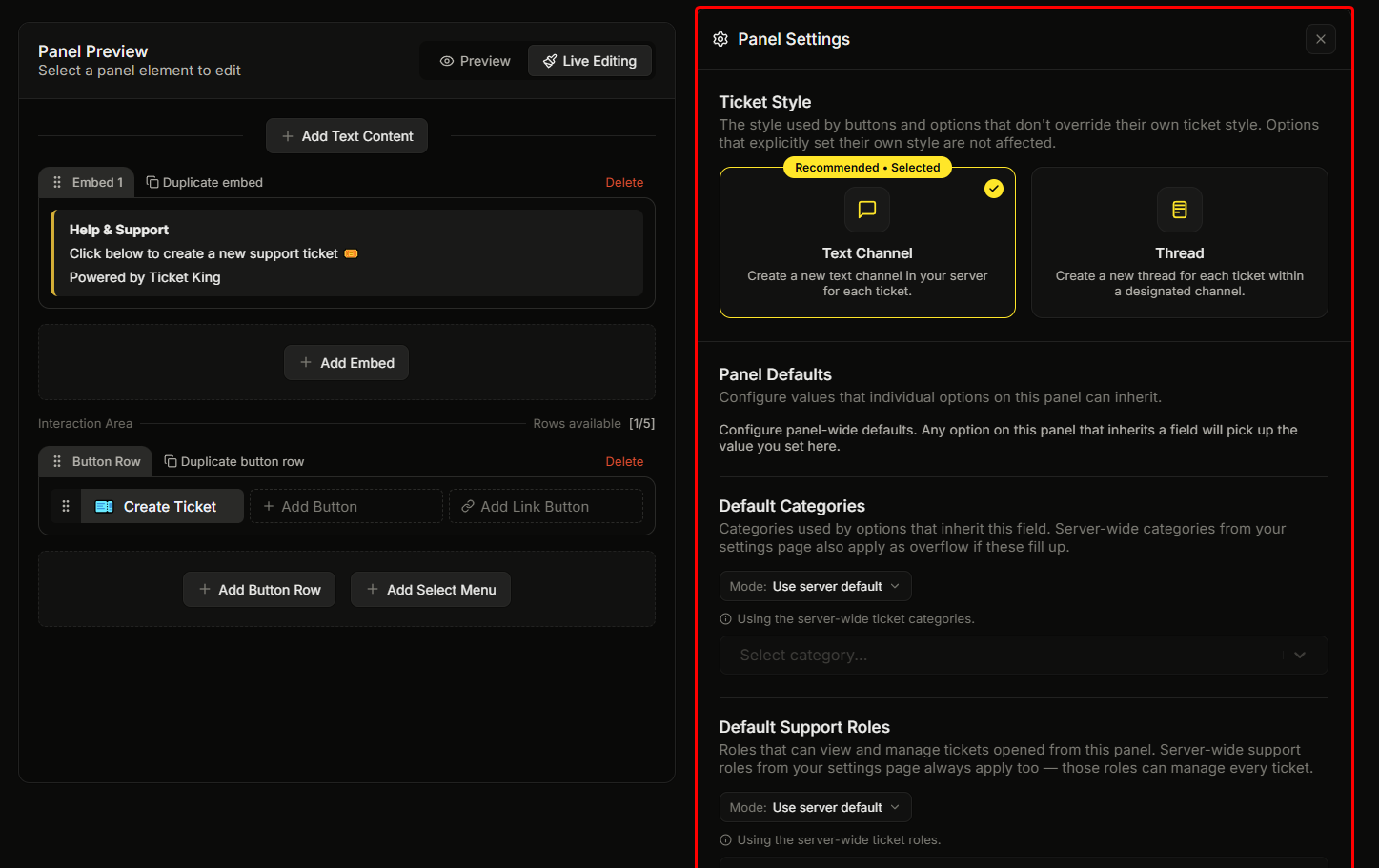
Most panels have several options. Setting the category, support role, and welcome message on each one separately is repetitive. Panel-wide defaults let you set those values once at the panel level. Every option inherits them unless you override the option.
Configure them in the panel editor, in the **Panel Settings** pane (the gear icon at the top of the right pane).
## Inheriting or overriding
Each panel default can either inherit the matching server-wide setting from the Settings page, or be overridden with a value you set here. When a field inherits, the editor shows a short note telling you which server-wide value it is using.
Each option on the panel can then inherit the panel default, fall back to the server-wide value, or be overridden with its own value.
The editor tells you how far each default actually reaches. If some options override a field, a yellow note under it says the default will not apply to all of them. If **no** option inherits a field, a red notice above it says nothing on the panel is using that default: click a button or dropdown option and set the field's mode to **Use panel default** to have it pick the value up.
## Ticket-panel defaults
| Field | Description | Default | Is Premium? |
| ------------------------------------- | ------------------------------------------------------------------------------------------------------------------------------------------------------------------------------------------------------------------------------------------------------------------------------------------------------------------------------------------------------------------------------------------------------------------------------------------------------------------------------------------------------------------------------------------------------------------------------------------------------------------------------------------------------------------------------------------------------------------------------------------------------------------------------------------------------------------------------------------------------------------------------------------------------------------------------------------- | ---------------------------------- | ----------------------------------------------- |
| **Default Categories** | Categories used by inheriting options. Server-wide categories also apply as overflow. | Inherits server setting | No (free) |
| **Default Support Roles** | Roles that can view and manage tickets from this panel. Server-wide support roles always apply on top. | Inherits server setting | No (free) |
| **Default Custom Ticket Name** | How channels are named for inheriting options. Placeholder `ticket-{TICKET_NUMBER}`. Max 100 characters, placeholders included. The final channel name is capped at 100 by Discord. | Empty (uses the built-in default) | Steam variables :crown: |
| **Default Ticket Embed Message** | The message shown inside the ticket's opening embed. Max 2048 characters. | Empty (uses the built-in greeting) | No (free) |
| **Default Ticket Message Content** | An extra message sent alongside the ticket's opening embed. Max 1024 characters. | Empty | No (free) |
| **Default Blocked Roles** | Users with any of these roles are blocked from inheriting options. | Empty | :crown: Premium |
| **Default Ticket Open Log Channel** | Channel where the open-ticket log is sent for tickets from this panel. | Inherits server setting | No (free) |
| **Default Ticket Close Log Channel** | Channel where the close-ticket log is sent. | Inherits server setting | No (free) |
| **Default Required Roles** | Inheriting options will require any of these roles to open a ticket. | Empty | :crown: Premium |
| **Default Steam ID Integration** | Whether inheriting options ask members to link their Steam account first. | Off | :crown: Premium |
| **Default Ticket Opener Permissions** | What the ticket opener can do inside their ticket channel. Restrictions apply only to the person who opened the ticket — staff and everyone else keep their normal permissions. View Channel, Read Message History, and Send Messages are always granted (tickets can't work without them); Add Reactions, Attach Files, Embed Links, Send Voice Messages, External Emojis, External Stickers, and Application Commands can each be turned off to block them for the opener — for example, disable Attach Files and Embed Links to stop openers from sending images or file uploads to staff. Permissions left on aren't changed: the opener keeps whatever their server roles normally grant. Only applies to text-channel tickets, not threads. Turning off Embed Links removes link previews, but a URL can still be posted as plain text. Note: Discord never enforces channel restrictions against administrators or the server owner. | All on (no restrictions) | No (free) |
## Application-panel defaults
A smaller set, for application panels only:
| Field | Description | Default | Is Premium? |
| -------------------------- | ------------------------------------------------------------------------------------------------------------------------------------------- | ------- | --------------------------------------- |
| **Default Log Channel** | Channel where submissions for inheriting options are logged. This must be set somewhere, either the panel default or a per-option override. | Empty | No (free) |
| **Default Blocked Roles** | Users with any of these roles are blocked from inheriting application options. | Empty | :crown: Premium |
| **Default Required Roles** | Inheriting options will require any of these roles to apply. | Empty | :crown: Premium |
## Worked example
Imagine a "Support Tickets" panel with three buttons: General, Billing, and Partnership.
Without panel defaults, you would set the category, support role, and welcome message on each button. That is 3 buttons by 3 fields, so 9 things to keep in sync.
With panel defaults:
| Field | Panel default | General | Billing | Partnership |
| -------------------- | ----------------- | ------- | -------------- | -------------------- |
| Categories | Tickets | inherit | inherit | inherit |
| Support Roles | `@Support` | inherit | **`@Billing`** | **`@Partnerships`** |
| Ticket Embed Message | Standard greeting | inherit | inherit | **Partner greeting** |
Only the cells in bold are overrides. That is 6 things to maintain instead of 9. The savings grow with more options or more panels.
## Saving
Panel defaults are part of the panel. They save with the panel using the same Save button. There is no separate save action for panel defaults.
## Related
{% content-ref url="/pages/aHGH6BOJh48aZHUVoiWW" %}
[Per-option settings](/docs/panels/per-option-settings.md)
{% endcontent-ref %}
{% content-ref url="/pages/UIA35ZwZnGsgiE5BmK60" %}
[Support roles](/docs/permissions-and-your-support-team/support-roles.md)
{% endcontent-ref %}
---
# Agent Instructions
This documentation is published with GitBook. GitBook is the documentation platform designed so that both humans and AI agents can read, navigate, and reason over technical content effectively. Learn more at gitbook.com.
## Querying This Documentation
If you need additional information that is not directly available in this page, you can query the documentation dynamically by asking a question.
Perform an HTTP GET request on the current page URL with the `ask` query parameter, and the optional `goal` query parameter:
```
GET https://ticketking.xyz/docs/panels/panel-wide-defaults.md?ask=&goal=
```
`ask` is the immediate question: it should be specific, self-contained, and written in natural language.
`goal` is optional and describes the broader end goal you are ultimately trying to accomplish on behalf of the user. GitBook uses it to tailor the answer towards what is most useful for that goal.
The response will contain a direct answer to the question and relevant excerpts and sources from the documentation.
Use this mechanism when the answer is not explicitly present in the current page, you need clarification or additional context, or you want to retrieve related documentation sections.