> For the complete documentation index, see [llms.txt](https://ticketking.xyz/docs/llms.txt). Markdown versions of documentation pages are available by appending `.md` to page URLs; this page is available as [Markdown](https://ticketking.xyz/docs/logging/three-log-channels.md).
# Log channels
The Discord log channels for opened tickets, closed tickets, and the Premium ticket rating log.
Ticket King has **separate Discord log channels**, each for a different kind of event. Each one is optional. Leave one unset and that kind of event is not logged.
## Opened and closed ticket logs
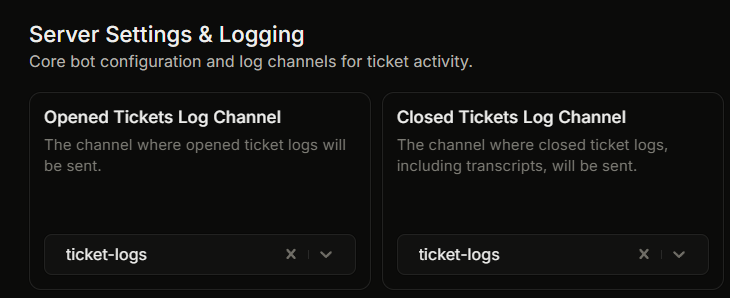
These two are set in Settings, under **Server Settings & Logging**.
| Log channel | What triggers a log post |
| ------------------------------ | --------------------------------------------------------------------------- |
| **Opened Tickets Log Channel** | Every new ticket opened. |
| **Closed Tickets Log Channel** | Every ticket closed (any close path). This log carries the transcript link. |
## Ticket rating log (Premium)
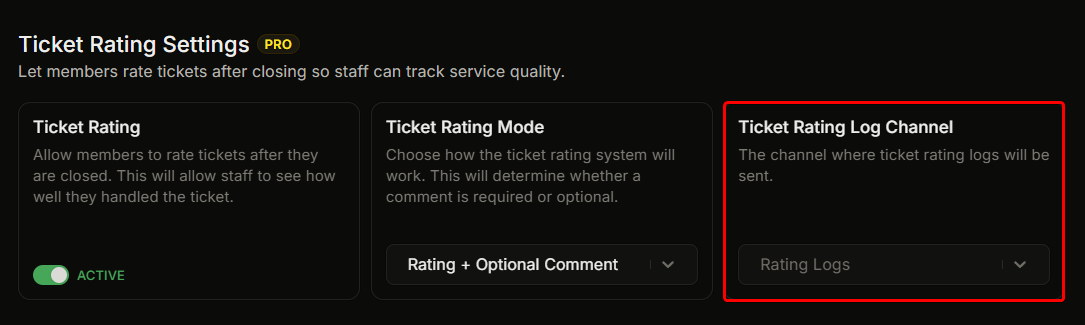
The :crown: **Ticket Rating Log Channel** is set separately, under the premium **Ticket Rating Settings** group. A post is made here when a member submits a post-close ticket rating.
## Channel splitting
Logs are split by kind. There is no "log everything to one channel" option. You can route opened-ticket logs to one channel and closed-ticket logs to another, or send all three to the same channel by picking the same channel everywhere.
Many servers create:
* `#tk-opened-tickets` for opened logs.
* `#tk-closed-tickets` for closed logs.
* `#tk-rating` for rating logs (premium).
Use Discord channel permissions to control who can read each.
## Per-panel overrides
A panel can override the opened and closed log destinations, separately from the server-wide channels above.
→ [Per-panel log overrides](/docs/logging/per-panel-overrides.md)
## If you delete a log channel in Discord
If you delete a log channel in Discord but leave it set in Ticket King, posts to that channel cannot be delivered. When you remove a log channel in Discord, also clear it in Settings, or pick a different channel.
## Bot permissions required
The bot needs these Discord permissions in each log channel:
* **View Channel**
* **Send Messages**
* **Embed Links**
* **Attach Files** (needed for some log types)
If one of these is missing, the log cannot be posted. Grant the bot these permissions in the log channel.
## Related
{% content-ref url="/pages/eVTerms9iQ4YvLHX9XWq" %}
[What a log entry shows](/docs/logging/log-embed-contents.md)
{% endcontent-ref %}
{% content-ref url="/pages/Hhto0FN83hiYDIKoVO1C" %}
[Per-panel log overrides](/docs/logging/per-panel-overrides.md)
{% endcontent-ref %}
---
# Agent Instructions
This documentation is published with GitBook. GitBook is the documentation platform designed so that both humans and AI agents can read, navigate, and reason over technical content effectively. Learn more at gitbook.com.
## Querying This Documentation
If you need additional information that is not directly available in this page, you can query the documentation dynamically by asking a question.
Perform an HTTP GET request on the current page URL with the `ask` query parameter, and the optional `goal` query parameter:
```
GET https://ticketking.xyz/docs/logging/three-log-channels.md?ask=&goal=
```
`ask` is the immediate question: it should be specific, self-contained, and written in natural language.
`goal` is optional and describes the broader end goal you are ultimately trying to accomplish on behalf of the user. GitBook uses it to tailor the answer towards what is most useful for that goal.
The response will contain a direct answer to the question and relevant excerpts and sources from the documentation.
Use this mechanism when the answer is not explicitly present in the current page, you need clarification or additional context, or you want to retrieve related documentation sections.