> For the complete documentation index, see [llms.txt](https://ticketking.xyz/docs/llms.txt). Markdown versions of documentation pages are available by appending `.md` to page URLs; this page is available as [Markdown](https://ticketking.xyz/docs/logging/per-panel-overrides.md).
# Per-panel log overrides
Send one panel's logs to a different channel than the server-wide defaults.
Each panel can override the **opened** and **closed** log channels independently of the server-wide defaults. Useful when different ticket types should be logged to different places.
## How to configure
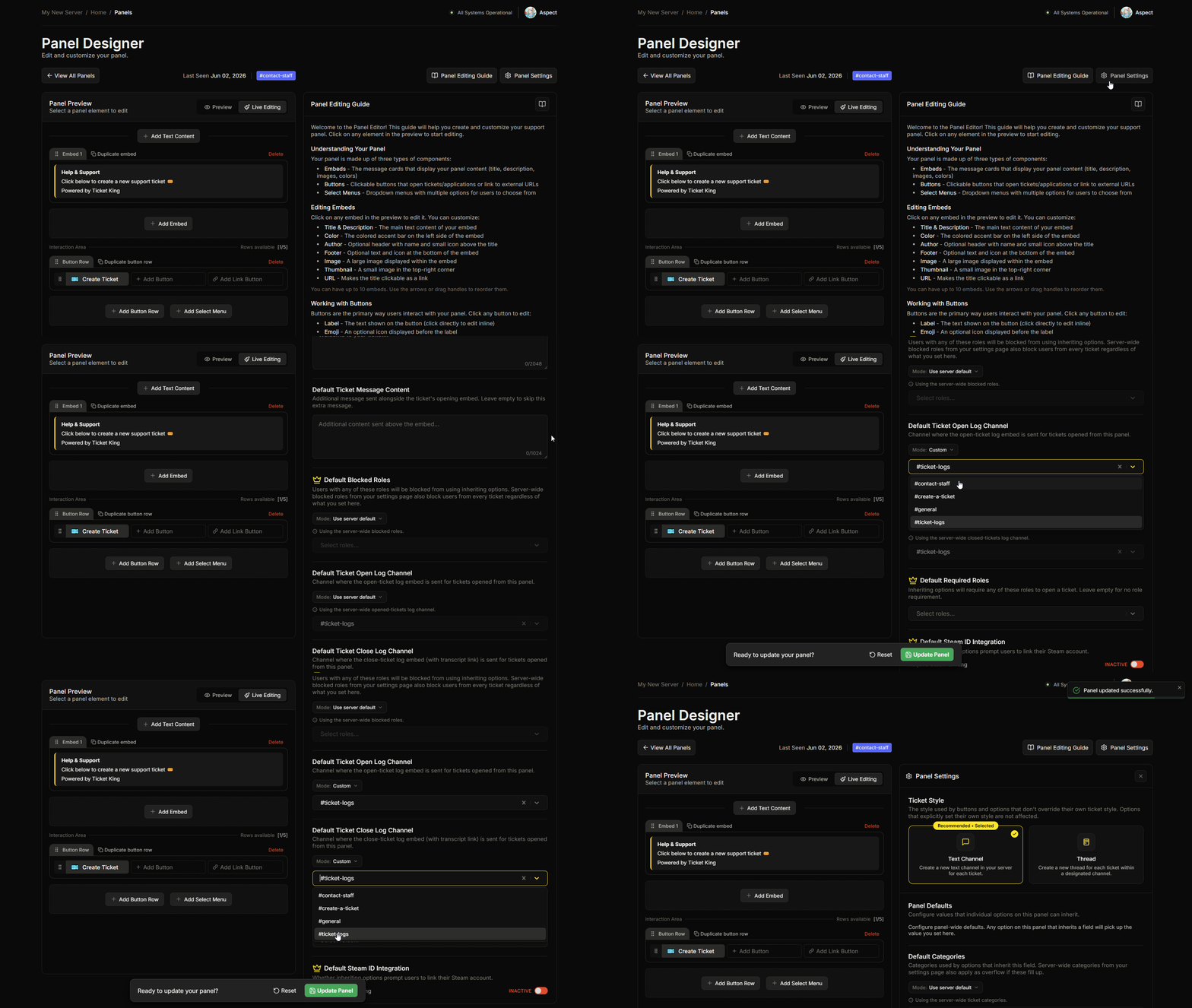
In the panel editor, open the panel-wide defaults editor. Two fields control the per-panel log channels:
* **Default Ticket Open Log Channel**
* **Default Ticket Close Log Channel**
Each field can be left to use the server-wide channel, or set to a value of your own. When you set one, the value can be:
* A **channel** (where this panel's logs go instead).
* **No channel** (this panel's open or close events are not logged at all).
Sending a panel's logs to a different channel is the common case. Setting it to no channel is useful when you have a high-volume panel whose logs you do not need.
## How the bot picks the channel
When a ticket opens or closes, the bot decides where to log it:
1. **If the panel sets its own log channel,** the bot uses that channel, or skips logging if the panel is set to no channel.
2. **Otherwise,** the bot falls back to the server-wide Opened Tickets Log Channel or Closed Tickets Log Channel.
## Application panels
Application panels have their own **Log Channel** field on each option, and it is required. This is not the same as the ticket log channels.
→ [Designing your application](/docs/applications/designing-your-application.md)
## Worked example
Server has:
* Opened-tickets log: `#tk-opened-tickets`.
* Closed-tickets log: `#tk-closed-tickets`.
Panels:
| Panel | Open log | Close log |
| --------------- | ---------------------------- | ---------------------------- |
| General Support | (inherit) | (inherit) |
| Bug Reports | Override → `#bug-tracker` | Override → `#bug-tracker` |
| Staff Tickets | Override → `#staff-internal` | Override → `#staff-internal` |
Result:
* General Support tickets open/close logs go to the default channels.
* Bug Reports tickets log to `#bug-tracker` exclusively.
* Staff Tickets log to `#staff-internal` (kept separate from member-facing logs).
## Related
{% content-ref url="/pages/BdzAJh6nhAgNyRVnzgM9" %}
[Log channels](/docs/logging/three-log-channels.md)
{% endcontent-ref %}
---
# Agent Instructions
This documentation is published with GitBook. GitBook is the documentation platform designed so that both humans and AI agents can read, navigate, and reason over technical content effectively. Learn more at gitbook.com.
## Querying This Documentation
If you need additional information that is not directly available in this page, you can query the documentation dynamically by asking a question.
Perform an HTTP GET request on the current page URL with the `ask` query parameter, and the optional `goal` query parameter:
```
GET https://ticketking.xyz/docs/logging/per-panel-overrides.md?ask=&goal=
```
`ask` is the immediate question: it should be specific, self-contained, and written in natural language.
`goal` is optional and describes the broader end goal you are ultimately trying to accomplish on behalf of the user. GitBook uses it to tailor the answer towards what is most useful for that goal.
The response will contain a direct answer to the question and relevant excerpts and sources from the documentation.
Use this mechanism when the answer is not explicitly present in the current page, you need clarification or additional context, or you want to retrieve related documentation sections.