> For the complete documentation index, see [llms.txt](https://ticketking.xyz/docs/llms.txt). Markdown versions of documentation pages are available by appending `.md` to page URLs; this page is available as [Markdown](https://ticketking.xyz/docs/it/pannelli/edit-a-panel.md).
# Modifica un pannello
L'editor del pannello, le sue due sezioni e come funziona il salvataggio.
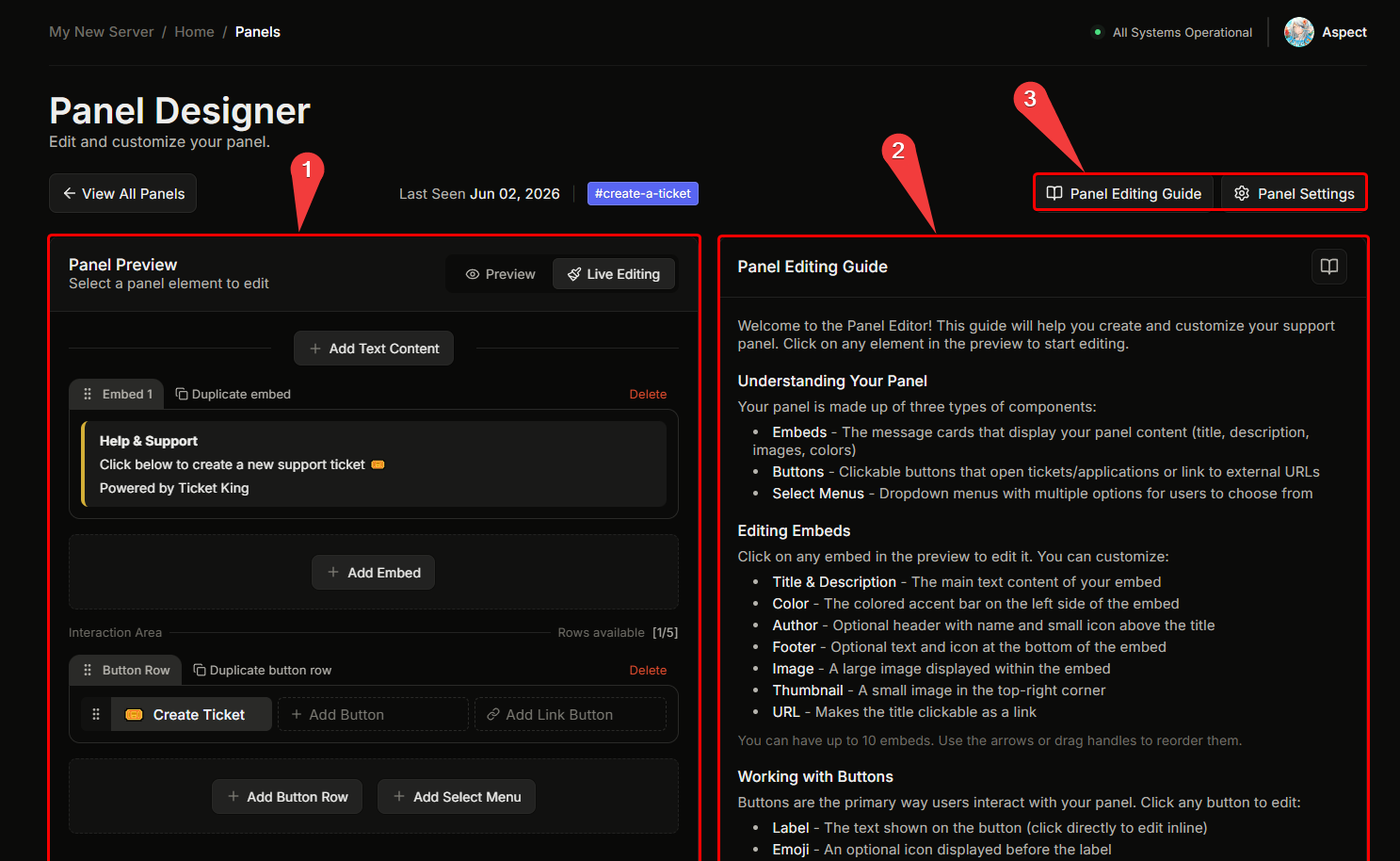
Il Designer del pannello ha due riquadri principali:
* **Riquadro sinistro.** Una barra superiore con il link del canale, poi una **anteprima in tempo reale** del pannello così come verrà visualizzato in Discord.
* **Riquadro destro.** Un editor sensibile al contesto. Ciò che appare dipende da ciò che è selezionato.
## Come funziona l'editor
Il riquadro sinistro è un'anteprima in tempo reale del tuo pannello, così come apparirà in Discord. Per modificare qualsiasi parte, fai clic su quella parte nell'anteprima. Facendo clic su un componente a sinistra si apre il suo editor a destra: facendo clic su un embed si apre l'editor dell'embed, facendo clic su un pulsante si aprono le impostazioni di quel pulsante e così via. L'icona a ingranaggio apre le impostazioni predefinite dell'intero pannello.
Il canale di invio viene impostato durante la procedura guidata di creazione, quindi un nuovo pannello ha già un canale quando arrivi all'editor. Per spostarlo in seguito in un canale diverso, vedi [Sposta un pannello](/docs/it/pannelli/move-a-panel.md).
## Salvataggio
Le tue modifiche non sono attive finché non salvi. Quando hai modifiche non salvate, in basso appare una barra con **Salva** e **Ripristina**. Salva applica le tue modifiche e Ripristina le scarta. Se provi a uscire con modifiche non salvate, la dashboard ti chiede prima di confermare.
Se manca un campo obbligatorio, il pulsante Salva rimane disattivato finché non lo compili.
## Le modifiche interferiranno con i ticket aperti?
**No.** Le modifiche a un pannello influiscono solo sul messaggio del pannello e **futuri** aperture dei ticket. I ticket attualmente aperti continuano esattamente come erano.
## Dovrò reinviare il pannello dopo averlo modificato?
**No.** Il messaggio del pannello in Discord si aggiorna automaticamente quando salvi. Il reinvio è necessario solo se il messaggio del pannello è stato eliminato.
→ [Reinvia un pannello](/docs/it/pannelli/resend-a-panel.md)
## Correlati
{% content-ref url="/pages/2ef6db3a30c9a004875d7820cb89d3d013ce2bf7" %}
[Modifica l'embed](/docs/it/pannelli/edit-the-embed.md)
{% endcontent-ref %}
{% content-ref url="/pages/46a4303088a78a4e9645f6c63232786275167b3f" %}
[Modifica un pulsante](/docs/it/pannelli/edit-a-button.md)
{% endcontent-ref %}
{% content-ref url="/pages/42acf38fc2e49403152622540baa18e96fcb1d77" %}
[Impostazioni per opzione](/docs/it/pannelli/per-option-settings.md)
{% endcontent-ref %}
---
# Agent Instructions
This documentation is published with GitBook. GitBook is the documentation platform designed so that both humans and AI agents can read, navigate, and reason over technical content effectively. Learn more at gitbook.com.
## Querying This Documentation
If you need additional information that is not directly available in this page, you can query the documentation by asking a question.
Perform an HTTP GET request on the following URL with the `ask` and `goal` query parameters:
```
GET https://ticketking.xyz/docs/it/pannelli/edit-a-panel.md?ask=&goal=
```
`ask` is the immediate question: it should be specific, self-contained, and written in natural language.
`goal` is what the user is ultimately trying to achieve, the reason they need the answer. Sharing it helps GitBook give you a better, more relevant answer. A goal is most helpful when it describes the outcome the user wants rather than restating the question. For example, with `ask=how do I create an API token`, a goal like `automate deployments from our CI pipeline` lets GitBook tailor the answer to that use case.
The response will contain a direct answer to the question and relevant excerpts and sources from the documentation.
Use this mechanism when the answer is not explicitly present in the current page, you need clarification or additional context, or you want to retrieve related documentation sections.