> For the complete documentation index, see [llms.txt](https://ticketking.xyz/docs/llms.txt). Markdown versions of documentation pages are available by appending `.md` to page URLs; this page is available as [Markdown](https://ticketking.xyz/docs/it/lingue/server-language.md).
# L'impostazione Lingua del server
Le lingue supportate da Ticket King, scelte una sola volta a livello di server.
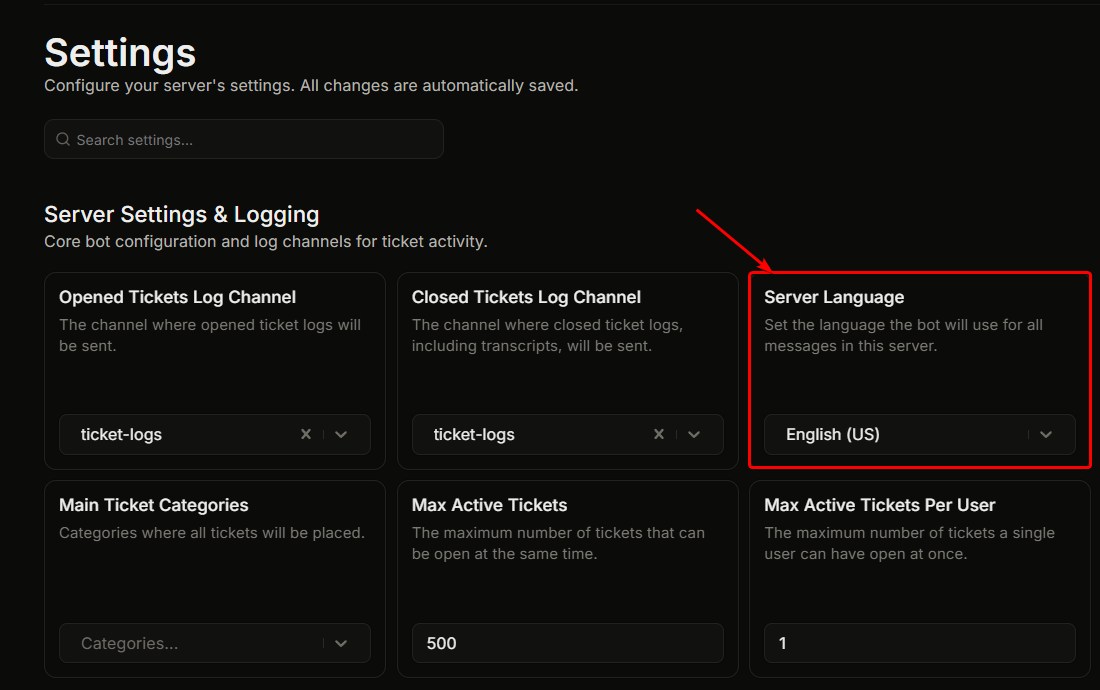
Impostazioni, "Impostazioni server e registrazione", **Lingua del server**.
Questo imposta la lingua che Ticket King utilizza nel tuo server. Ogni messaggio del bot (embed di benvenuto, embed di registro, risposte di errore, risposte ai comandi slash, notifiche DM) usa la lingua configurata.
## Predefinito
**Inglese.** Questa è anche la lingua di base da cui vengono tradotte tutte le altre lingue.
## Come cambiare
1. Fai clic sul **Lingua del server** menu a discesa.
2. Scegli dall'elenco delle lingue supportate.
3. Le impostazioni vengono salvate automaticamente.
Le modifiche si applicano a tutti i futuri messaggi del bot. I messaggi già pubblicati non vengono ritradotti.
## Lingue supportate
Mostra l'elenco completo delle lingue supportate
| Lingua |
| --------------------------------------------------- |
| Arabo (العربية) |
| Bulgaro (Български) |
| Bosniaco (Bosanski) |
| Ceco (Čeština) |
| Danese (Dansk) |
| Tedesco (Deutsch) |
| Tedesco informale (Deutsch (Informell)) |
| Greco (Ελληνικά) |
| Inglese (Regno Unito) |
| Inglese (Stati Uniti), predefinito |
| Spagnolo (America Latina) (Español (Latinoamérica)) |
| Spagnolo (Spagna) (Español (España)) |
| Finlandese (Suomi) |
| Francese (Français) |
| Ebraico (עברית) |
| Hindi (हिन्दी) |
| Croato (Hrvatski) |
| Creolo haitiano (Kreyòl Ayisyen) |
| Ungherese (Magyar) |
| Indonesiano (Bahasa Indonesia) |
| Italiano (Italiano) |
| Giapponese (日本語) |
| Coreano (한국어) |
| Lituano (Lietuvių) |
| Olandese (Nederlands) |
| Norvegese (Norsk) |
| Polacco (Polski) |
| Portoghese (Brasile) (Português (Brasil)) |
| Rumeno (Română) |
| Russo (Русский) |
| Slovacco (Slovenčina) |
| Sloveno (Slovenščina) |
| Serbo (Srpski) |
| Svedese (Svenska) |
| Tailandese (ไทย) |
| Turco (Türkçe) |
| Ucraino (Українська) |
| Vietnamita (Tiếng Việt) |
| Cinese (semplificato) (简体中文) |
| Cinese (tradizionale) (繁體中文) |
Molte di queste sono supportate nativamente anche da Discord. Le restanti sono specifiche di Ticket King.
## Hai notato un problema di traduzione?
Se una traduzione sembra sbagliata o una stringa appare ancora in inglese, faccelo sapere così possiamo correggerla. Vedi [Segnalazione dei problemi di traduzione](/docs/it/ottieni-aiuto-e-comunita/translation-issues.md).
## Correlati
{% content-ref url="/pages/ec61e5f2c11d3f10df83c4ceffbbb8e2fcad6b1a" %}
[Come il bot sceglie una lingua](/docs/it/lingue/how-the-bot-picks-a-language.md)
{% endcontent-ref %}
{% content-ref url="/pages/bd367b7a986d2dcaba81188cf261c9e812e248d3" %}
[Segnalazione dei problemi di traduzione](/docs/it/ottieni-aiuto-e-comunita/translation-issues.md)
{% endcontent-ref %}
---
# Agent Instructions
This documentation is published with GitBook. GitBook is the documentation platform designed so that both humans and AI agents can read, navigate, and reason over technical content effectively. Learn more at gitbook.com.
## Querying This Documentation
If you need additional information that is not directly available in this page, you can query the documentation by asking a question.
Perform an HTTP GET request on the following URL with the `ask` and `goal` query parameters:
```
GET https://ticketking.xyz/docs/it/lingue/server-language.md?ask=&goal=
```
`ask` is the immediate question: it should be specific, self-contained, and written in natural language.
`goal` is what the user is ultimately trying to achieve, the reason they need the answer. Sharing it helps GitBook give you a better, more relevant answer. A goal is most helpful when it describes the outcome the user wants rather than restating the question. For example, with `ask=how do I create an API token`, a goal like `automate deployments from our CI pipeline` lets GitBook tailor the answer to that use case.
The response will contain a direct answer to the question and relevant excerpts and sources from the documentation.
Use this mechanism when the answer is not explicitly present in the current page, you need clarification or additional context, or you want to retrieve related documentation sections.