> For the complete documentation index, see [llms.txt](https://ticketking.xyz/docs/llms.txt). Markdown versions of documentation pages are available by appending `.md` to page URLs; this page is available as [Markdown](https://ticketking.xyz/docs/it/cronologia-ticket/browsing-tickets.md).
# Navigare tra i ticket aperti e recenti
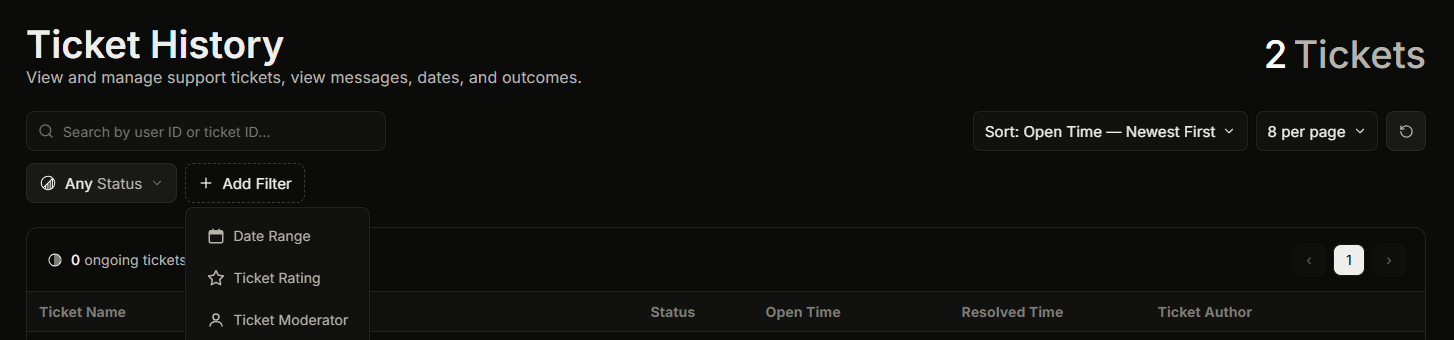
La pagina Cronologia ticket. Trovare ticket, filtrare e ordinare.
**Dashboard, poi Cronologia ticket** è l'elenco di tutti i ticket che il tuo server ha avuto. Puoi cercarlo, ordinarlo e filtrarlo.
È necessario il **Visualizza cronologia** Serve il permesso della dashboard per aprire questa pagina. Il proprietario del server e chiunque abbia Administrator o Manage Server possono sempre aprirla.
L'elenco base della Cronologia ticket è gratuito.
## Trovare il ticket che desideri
Puoi cercare per ID utente di un membro o per ID ticket, ordinare l'elenco (per ora di apertura, ora di chiusura o valutazione) e filtrarlo. La ricerca e il filtraggio sono trattati in dettaglio in [Filtrare e cercare nella cronologia ticket](/docs/it/cronologia-ticket/filtering-and-searching.md).
Ci sono due filtri da conoscere:
* **Moderatore del ticket.** Mostra solo i ticket presi in carico o chiusi da un determinato membro dello staff. In questo modo puoi esaminare il lavoro di una persona.
* **Valutazione del ticket.** Mostra solo i ticket con una valutazione a stelle scelta. Le valutazioni sono una :crown: funzionalità Premium, quindi su un server gratuito non c'è nulla da filtrare qui.
## Aprire i dettagli di un ticket
Fai clic su un ticket per aprire il **Dettagli ticket** pannello, che mostra tutto su quel ticket e la sua trascrizione. Vedi [Aprire la vista dettagli di un singolo ticket](/docs/it/cronologia-ticket/opening-a-ticket-detail.md).
## Chiudere un ticket dall'elenco
Puoi chiudere un ticket aperto direttamente da questa pagina. La dashboard ti chiede prima di confermare, perché la chiusura rimuove definitivamente il canale del ticket da Discord. Se **Close Requires Reason** è attiva nelle impostazioni, devi digitare un motivo prima di poter confermare.
## Correlati
{% content-ref url="/pages/f5ed8e41ebf6ba587b46ab738eef4faf8119ba56" %}
[Aprire la vista dettagli di un singolo ticket](/docs/it/cronologia-ticket/opening-a-ticket-detail.md)
{% endcontent-ref %}
{% content-ref url="/pages/f072595f50730dee94212f31a3d8d97610781e25" %}
[Filtrare e cercare nella cronologia ticket](/docs/it/cronologia-ticket/filtering-and-searching.md)
{% endcontent-ref %}
---
# Agent Instructions
This documentation is published with GitBook. GitBook is the documentation platform designed so that both humans and AI agents can read, navigate, and reason over technical content effectively. Learn more at gitbook.com.
## Querying This Documentation
If you need additional information that is not directly available in this page, you can query the documentation by asking a question.
Perform an HTTP GET request on the following URL with the `ask` and `goal` query parameters:
```
GET https://ticketking.xyz/docs/it/cronologia-ticket/browsing-tickets.md?ask=&goal=
```
`ask` is the immediate question: it should be specific, self-contained, and written in natural language.
`goal` is what the user is ultimately trying to achieve, the reason they need the answer. Sharing it helps GitBook give you a better, more relevant answer. A goal is most helpful when it describes the outcome the user wants rather than restating the question. For example, with `ask=how do I create an API token`, a goal like `automate deployments from our CI pipeline` lets GitBook tailor the answer to that use case.
The response will contain a direct answer to the question and relevant excerpts and sources from the documentation.
Use this mechanism when the answer is not explicitly present in the current page, you need clarification or additional context, or you want to retrieve related documentation sections.