> For the complete documentation index, see [llms.txt](https://ticketking.xyz/docs/llms.txt). Markdown versions of documentation pages are available by appending `.md` to page URLs; this page is available as [Markdown](https://ticketking.xyz/docs/it/collegamento-a-steam/link-duration.md).
# L'impostazione della durata del collegamento
Per quanto tempo il collegamento Steam di un membro rimane valido prima che sia necessario ricollegarlo.
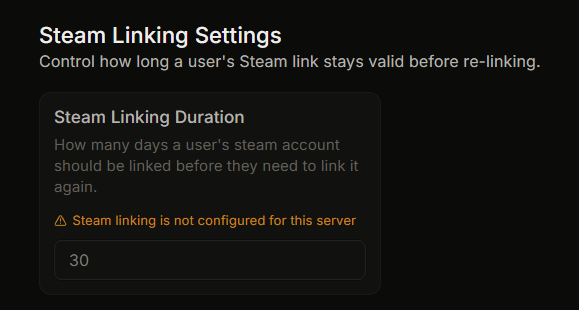
:crown: **funzionalità Premium.** Apri Impostazioni, poi **Impostazioni di collegamento Steam** gruppo, poi **Durata del collegamento Steam**.
Questo imposta per quanti giorni il collegamento Steam-Discord di un membro rimane valido prima che debba collegarsi di nuovo.
## Configurazione
| Campo | Tipo | Intervallo | Predefinito |
| --------------------------------- | ---------------- | ---------- | ----------- |
| **Durata del collegamento Steam** | numero di giorni | da 1 a 365 | 30 |
Finché il tuo server non ha il premium, questo campo è disabilitato con il motivo *"Il collegamento Steam non è configurato per questo server"*.
## Cosa significa la durata
Quando un membro collega il proprio account Steam, viene salvato l'orario del collegamento. Una volta trascorso il numero di giorni impostato da quel momento:
* La prossima volta che il membro prova ad aprire un'opzione che richiede Steam, il bot lo considera non collegato.
* Devono collegarsi di nuovo prima che il ticket possa aprirsi.
Il conteggio parte dal momento in cui il membro si è collegato per la prima volta, non dall'ultima volta in cui ha usato il collegamento. Un membro che si è collegato al giorno 0 con una durata di 30 giorni viene invitato a collegarsi di nuovo al giorno 30, indipendentemente da quanto recentemente sia stato attivo.
## Perché impostare una durata
* A volte i membri cambiano account Steam, quindi un vecchio collegamento può diventare obsoleto.
* Collegarsi di nuovo di tanto in tanto riduce l'impatto di un account compromesso.
* Alcune comunità preferiscono non mantenere i collegamenti indefinitamente.
## Scegliere una durata
| Giorni | Adatto per |
| ------ | --------------------------------------------------------- |
| 7 | Comunità che desiderano controlli frequenti |
| 30 | La maggior parte dei server |
| 90 | Comunità che usano l'ID Steam principalmente per comodità |
| 365 | Comunità con una base di membri stabile |
Non esiste un'opzione permanente. Il minimo è 1 giorno e il massimo è 365.
## Ricollegamento prima della fine della durata
Un membro può ricollegarsi prima eseguendo `/unlinksteam` per cancellare il collegamento attuale, quindi aprendo qualsiasi opzione che richiede Steam, il che avvia di nuovo il flusso di collegamento.
Un gestore del server (il proprietario, o qualcuno con Administrator o Manage Server) può anche scollegare un membro dalla pagina Steam Linking della dashboard, usando il pulsante Scollega accanto alla voce.
## Correlati
{% content-ref url="/pages/179e115e6b68636886b2cb2fdf3c42ae379c0b41" %}
[Cosa fa il collegamento Steam](https://ticketking.xyz/docs/it/collegamento-a-steam/overview.md)
{% endcontent-ref %}
{% content-ref url="/pages/187a614b76522f45a5739c740ec4dc89f533e784" %}
[Attivare il collegamento Steam](https://ticketking.xyz/docs/it/collegamento-a-steam/turning-it-on.md)
{% endcontent-ref %}
---
# Agent Instructions
This documentation is published with GitBook. GitBook is the documentation platform designed so that both humans and AI agents can read, navigate, and reason over technical content effectively. Learn more at gitbook.com.
## Querying This Documentation
If you need additional information that is not directly available in this page, you can query the documentation by asking a question.
Perform an HTTP GET request on the following URL with the `ask` and `goal` query parameters:
```
GET https://ticketking.xyz/docs/it/collegamento-a-steam/link-duration.md?ask=&goal=
```
`ask` is the immediate question: it should be specific, self-contained, and written in natural language.
`goal` is what the user is ultimately trying to achieve, the reason they need the answer. Sharing it helps GitBook give you a better, more relevant answer. A goal is most helpful when it describes the outcome the user wants rather than restating the question. For example, with `ask=how do I create an API token`, a goal like `automate deployments from our CI pipeline` lets GitBook tailor the answer to that use case.
The response will contain a direct answer to the question and relevant excerpts and sources from the documentation.
Use this mechanism when the answer is not explicitly present in the current page, you need clarification or additional context, or you want to retrieve related documentation sections.