> For the complete documentation index, see [llms.txt](https://ticketking.xyz/docs/llms.txt). Markdown versions of documentation pages are available by appending `.md` to page URLs; this page is available as [Markdown](https://ticketking.xyz/docs/fr/panneaux/resend-a-panel.md).
# Renvoyer un panneau
Si le message du panneau est supprimé ou si vous voulez une copie fraîche.
Lorsque le message du panneau dans Discord disparaît (un mod l’a supprimé, le salon a été vidé, etc.), les membres ne peuvent plus interagir avec lui. La solution consiste à le renvoyer.
## L’action de renvoi
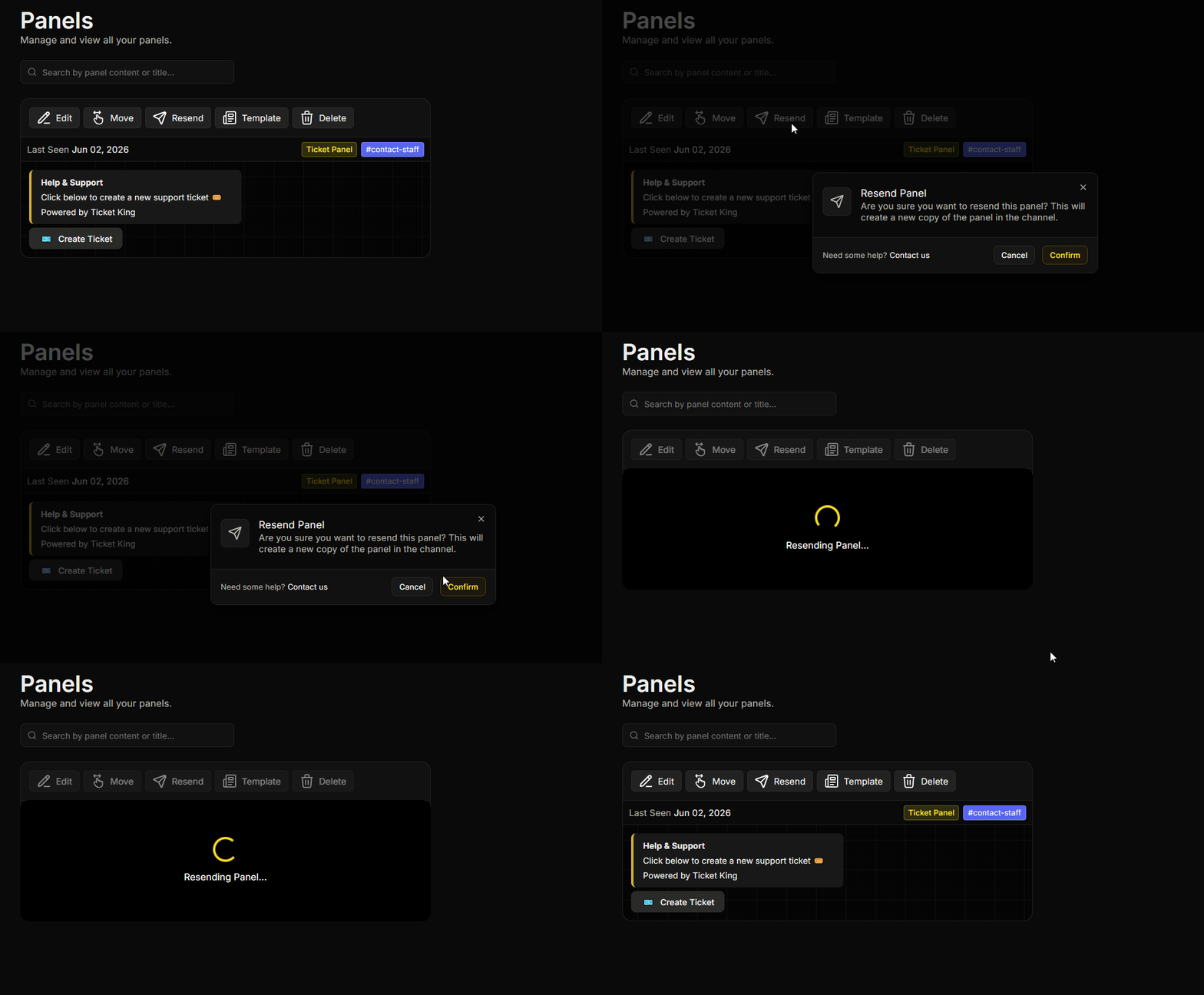
Depuis la **Panneaux** page :
1. Trouvez le panneau que vous souhaitez renvoyer.
2. Sur la carte du panneau, cliquez sur **Renvoyer**.
3. Confirmez.
Le bot publie une nouvelle copie du panneau dans le salon configuré. Tout le reste reste inchangé.
## Quand l’utiliser
* Le message du panneau est manquant ou visiblement cassé dans Discord.
* Vous voulez faire redescendre le panneau en bas du salon (de nouveaux messages l’ont remonté).
* Vous avez effectué des modifications importantes et souhaitez republier le panneau pour que les membres le remarquent.
## Ce qui est conservé
Tout sauf le message de panneau précédent :
* Options.
* Paramètres par option.
* Tickets ouverts.
* Historique d’audit.
* Modèles.
## Renvoyer vs Déplacer
* **Renvoyer.** Même salon, nouveau message.
* **Déplacer.** Salon différent. Voir [Déplacer un panneau](https://ticketking.xyz/docs/fr/panneaux/move-a-panel.md).
## Problèmes courants
{% hint style="warning" %}
**Le renvoi a été publié, mais l’ancien message est toujours là.** Ticket King n’a pas pu trouver le message précédent, car il a été supprimé à la main ou le salon a été vidé. Supprimez vous-même le message restant si nécessaire.
{% endhint %}
{% hint style="danger" %}
**Erreur d’autorisation lors du renvoi.** Si vous voyez « Je n’ai pas l’autorisation d’envoyer des messages dans ce salon », le bot ne peut pas publier dans le salon du panneau. Assurez-vous que le bot a **Voir le salon**, **Envoyer des messages**, et **Intégrer des liens** là-bas, puis réessayez.
{% endhint %}
## Lié
{% content-ref url="/pages/316ec391c84af4b5cefdd0190fe71e1d76fe1a59" %}
[Déplacer un panneau vers un autre salon](https://ticketking.xyz/docs/fr/panneaux/move-a-panel.md)
{% endcontent-ref %}
---
# Agent Instructions
This documentation is published with GitBook. GitBook is the documentation platform designed so that both humans and AI agents can read, navigate, and reason over technical content effectively. Learn more at gitbook.com.
## Querying This Documentation
If you need additional information that is not directly available in this page, you can query the documentation by asking a question.
Perform an HTTP GET request on the following URL with the `ask` and `goal` query parameters:
```
GET https://ticketking.xyz/docs/fr/panneaux/resend-a-panel.md?ask=&goal=
```
`ask` is the immediate question: it should be specific, self-contained, and written in natural language.
`goal` is what the user is ultimately trying to achieve, the reason they need the answer. Sharing it helps GitBook give you a better, more relevant answer. A goal is most helpful when it describes the outcome the user wants rather than restating the question. For example, with `ask=how do I create an API token`, a goal like `automate deployments from our CI pipeline` lets GitBook tailor the answer to that use case.
The response will contain a direct answer to the question and relevant excerpts and sources from the documentation.
Use this mechanism when the answer is not explicitly present in the current page, you need clarification or additional context, or you want to retrieve related documentation sections.