> For the complete documentation index, see [llms.txt](https://ticketking.xyz/docs/llms.txt). Markdown versions of documentation pages are available by appending `.md` to page URLs; this page is available as [Markdown](https://ticketking.xyz/docs/fr/panneaux/edit-a-panel.md).
# Modifier un panneau
L’éditeur de panneau, ses deux volets et le fonctionnement de l’enregistrement.
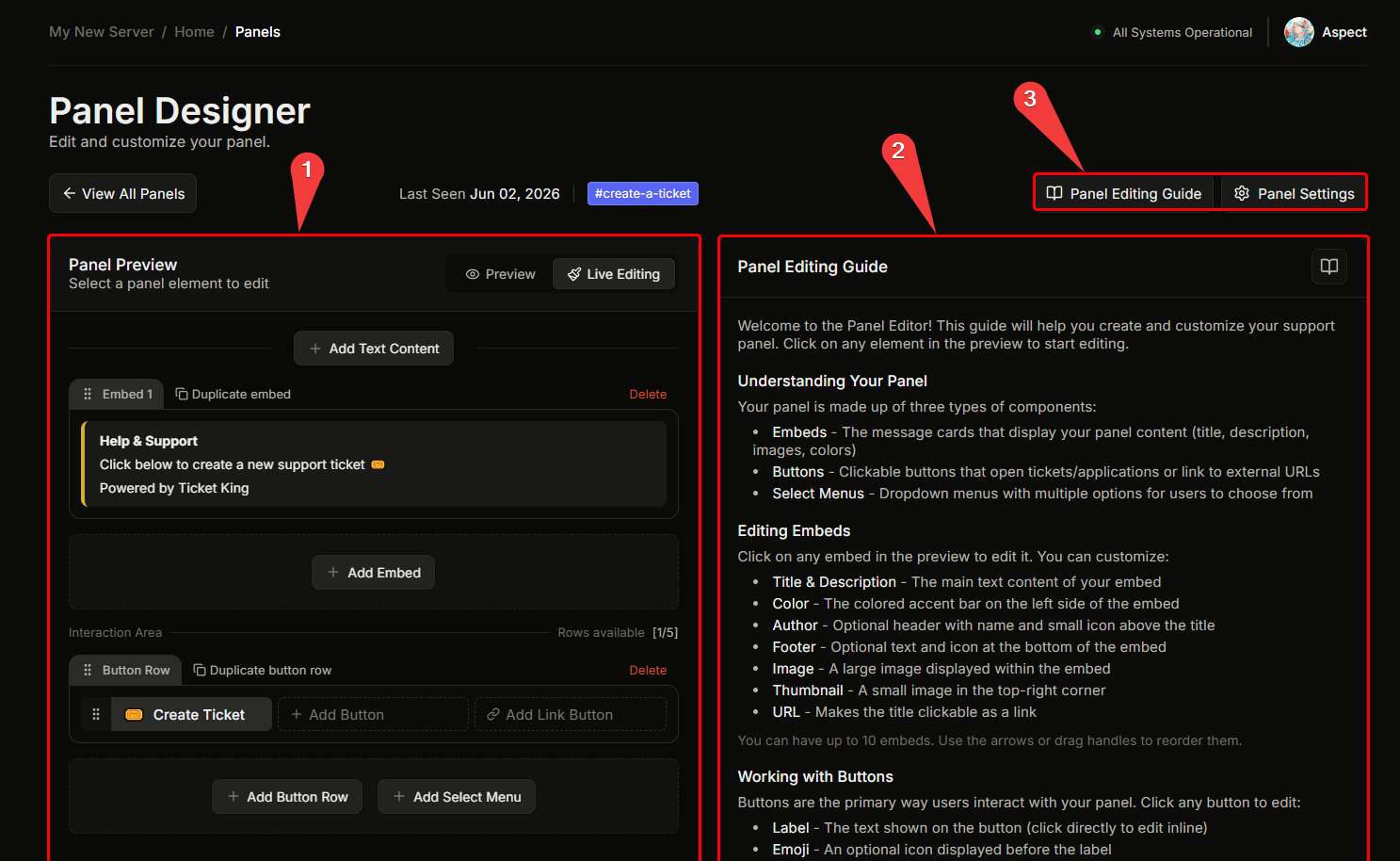
Le concepteur de panneau comporte deux volets principaux :
* **Volet gauche.** Une barre supérieure avec le lien du salon, puis un **aperçu en direct** du panneau tel qu’il s’affichera dans Discord.
* **Volet droit.** Un éditeur contextuel. Ce qui s’affiche dépend de l’élément sélectionné.
## Comment fonctionne l’éditeur
Le volet gauche est un aperçu en direct de votre panneau tel qu’il apparaîtra dans Discord. Pour modifier une partie, cliquez dessus dans l’aperçu. Cliquer sur un composant à gauche ouvre son éditeur à droite : cliquer sur un embed ouvre l’éditeur d’embed, cliquer sur un bouton ouvre les paramètres de ce bouton, et ainsi de suite. L’icône d’engrenage ouvre les paramètres par défaut du panneau.
Le salon d’envoi est défini pendant l’assistant de création, donc un nouveau panneau a déjà un salon lorsque vous arrivez à l’éditeur. Pour le déplacer vers un autre salon plus tard, voir [Déplacer un panneau](https://ticketking.xyz/docs/fr/panneaux/move-a-panel.md).
## Enregistrement
Vos modifications ne sont pas appliquées tant que vous n’enregistrez pas. Lorsque vous avez des modifications non enregistrées, une barre apparaît en bas avec **Enregistrer** et **Réinitialiser**. Enregistrer applique vos modifications, et Réinitialiser les annule. Si vous essayez de partir avec des modifications non enregistrées, le tableau de bord vous demandera d’abord de confirmer.
Si un champ obligatoire manque, le bouton Enregistrer reste désactivé jusqu’à ce que vous le remplissiez.
## La modification perturbera-t-elle les tickets ouverts ?
**Non.** Les modifications apportées à un panneau n’affectent que le message du panneau et **futures** les ouvertures de tickets. Les tickets actuellement ouverts restent exactement comme ils étaient.
## Devrai-je renvoyer le panneau après modification ?
**Non.** Le message du panneau dans Discord se met à jour automatiquement lorsque vous enregistrez. Le renvoi n’est nécessaire que si le message du panneau a été supprimé.
→ [Renvoyer un panneau](https://ticketking.xyz/docs/fr/panneaux/resend-a-panel.md)
## Lié
{% content-ref url="/pages/d9d80132fff2d43510eee68c1b3432540fa054df" %}
[Modifier l’intégration](https://ticketking.xyz/docs/fr/panneaux/edit-the-embed.md)
{% endcontent-ref %}
{% content-ref url="/pages/3312e4bae9ed29dec23838187920afa4235b8247" %}
[Modifier un bouton](https://ticketking.xyz/docs/fr/panneaux/edit-a-button.md)
{% endcontent-ref %}
{% content-ref url="/pages/f777d7e2e6c96e81ff32ca4702344d3106009d9b" %}
[Paramètres par option](https://ticketking.xyz/docs/fr/panneaux/per-option-settings.md)
{% endcontent-ref %}
---
# Agent Instructions
This documentation is published with GitBook. GitBook is the documentation platform designed so that both humans and AI agents can read, navigate, and reason over technical content effectively. Learn more at gitbook.com.
## Querying This Documentation
If you need additional information that is not directly available in this page, you can query the documentation by asking a question.
Perform an HTTP GET request on the following URL with the `ask` and `goal` query parameters:
```
GET https://ticketking.xyz/docs/fr/panneaux/edit-a-panel.md?ask=&goal=
```
`ask` is the immediate question: it should be specific, self-contained, and written in natural language.
`goal` is what the user is ultimately trying to achieve, the reason they need the answer. Sharing it helps GitBook give you a better, more relevant answer. A goal is most helpful when it describes the outcome the user wants rather than restating the question. For example, with `ask=how do I create an API token`, a goal like `automate deployments from our CI pipeline` lets GitBook tailor the answer to that use case.
The response will contain a direct answer to the question and relevant excerpts and sources from the documentation.
Use this mechanism when the answer is not explicitly present in the current page, you need clarification or additional context, or you want to retrieve related documentation sections.