> For the complete documentation index, see [llms.txt](https://ticketking.xyz/docs/llms.txt). Markdown versions of documentation pages are available by appending `.md` to page URLs; this page is available as [Markdown](https://ticketking.xyz/docs/fr/evaluation-des-tickets/rating-log-channel.md).
# Le canal de journal des évaluations
Où sont publiées les soumissions d'évaluation de tickets.
:crown: **Premium.** Définissez-le dans les Paramètres, dans le **Paramètres des évaluations de tickets** groupe, dans **Salon de journal des évaluations de tickets**.
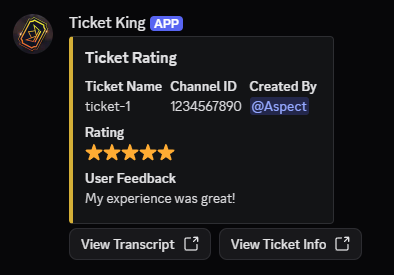
C'est le salon Discord où Ticket King publie un embed « Ticket Rating » chaque fois qu'un membre soumet une évaluation.
## Configuration
* Un menu déroulant de sélection de salon. Vous pouvez choisir un salon textuel.
* Par défaut : aucun. Lorsqu'aucun salon n'est défini, les évaluations sont toujours enregistrées dans le tableau de bord, mais aucun embed n'est publié dans Discord.
* Le champ est désactivé tant que Ticket Rating est désactivé. La raison affichée est *« Pour définir un salon de logs, activez Ticket Rating »*.
## Ce que contient l'embed d'évaluation
| Champ | Contenu |
| --------------------------------- | --------------------------------------------------------------------------------------------- |
| Titre | « Ticket Rating » |
| Couleur | Votre couleur principale d'embed |
| **Nom du ticket** | Le nom du salon du ticket |
| **ID du salon** | L'ID du salon Discord |
| **Créé par** | Une mention de l'auteur du ticket qui a évalué |
| **Réclamé par** | Une mention du membre du personnel qui l'a pris en charge, si le ticket a été pris en charge |
| **Note** | Le nombre d'étoiles, de 1 à 5 |
| **Commentaires des utilisateurs** | Le commentaire textuel, s'il y en a un qui a été recueilli (cela dépend du mode d'évaluation) |
### Boutons
Deux boutons de lien :
* **Voir la transcription** ouvre la transcription du ticket.
* **Voir les informations du ticket** ouvre la page de détail du ticket sur le tableau de bord.
## Où définir le salon
Une configuration courante consiste à utiliser un salon réservé au personnel, par exemple `#tk-ratings`. Configurez les autorisations du salon pour que seul le personnel puisse le lire, car les évaluations sont destinées à votre équipe.
## Autorisations du bot dans le salon
Le bot a besoin des autorisations Envoyer des messages et Intégrer des liens dans le salon pour publier l'embed. S'il ne les possède pas, l'évaluation est tout de même enregistrée dans le tableau de bord, mais l'embed n'apparaîtra pas dans le salon.
## Lié
{% content-ref url="/pages/9dcac67f9056495b84f6870c56820805970e48d6" %}
[Ce que sont les évaluations de tickets](/docs/fr/evaluation-des-tickets/what-ticket-ratings-are.md)
{% endcontent-ref %}
{% content-ref url="/pages/ad7b485781c6b431da82fff2f0bd659d6624ac81" %}
[Où lire les évaluations](/docs/fr/evaluation-des-tickets/where-to-read-ratings.md)
{% endcontent-ref %}
---
# Agent Instructions
This documentation is published with GitBook. GitBook is the documentation platform designed so that both humans and AI agents can read, navigate, and reason over technical content effectively. Learn more at gitbook.com.
## Querying This Documentation
If you need additional information that is not directly available in this page, you can query the documentation dynamically by asking a question.
Perform an HTTP GET request on the current page URL with the `ask` query parameter, and the optional `goal` query parameter:
```
GET https://ticketking.xyz/docs/fr/evaluation-des-tickets/rating-log-channel.md?ask=&goal=
```
`ask` is the immediate question: it should be specific, self-contained, and written in natural language.
`goal` is optional and describes the broader end goal you are ultimately trying to accomplish on behalf of the user. GitBook uses it to tailor the answer towards what is most useful for that goal.
The response will contain a direct answer to the question and relevant excerpts and sources from the documentation.
Use this mechanism when the answer is not explicitly present in the current page, you need clarification or additional context, or you want to retrieve related documentation sections.