> For the complete documentation index, see [llms.txt](https://ticketking.xyz/docs/llms.txt). Markdown versions of documentation pages are available by appending `.md` to page URLs; this page is available as [Markdown](https://ticketking.xyz/docs/es/registros-de-auditoria/reading-the-page.md).
# Leer la página
Filtrar y leer la página de Registros de auditoría.
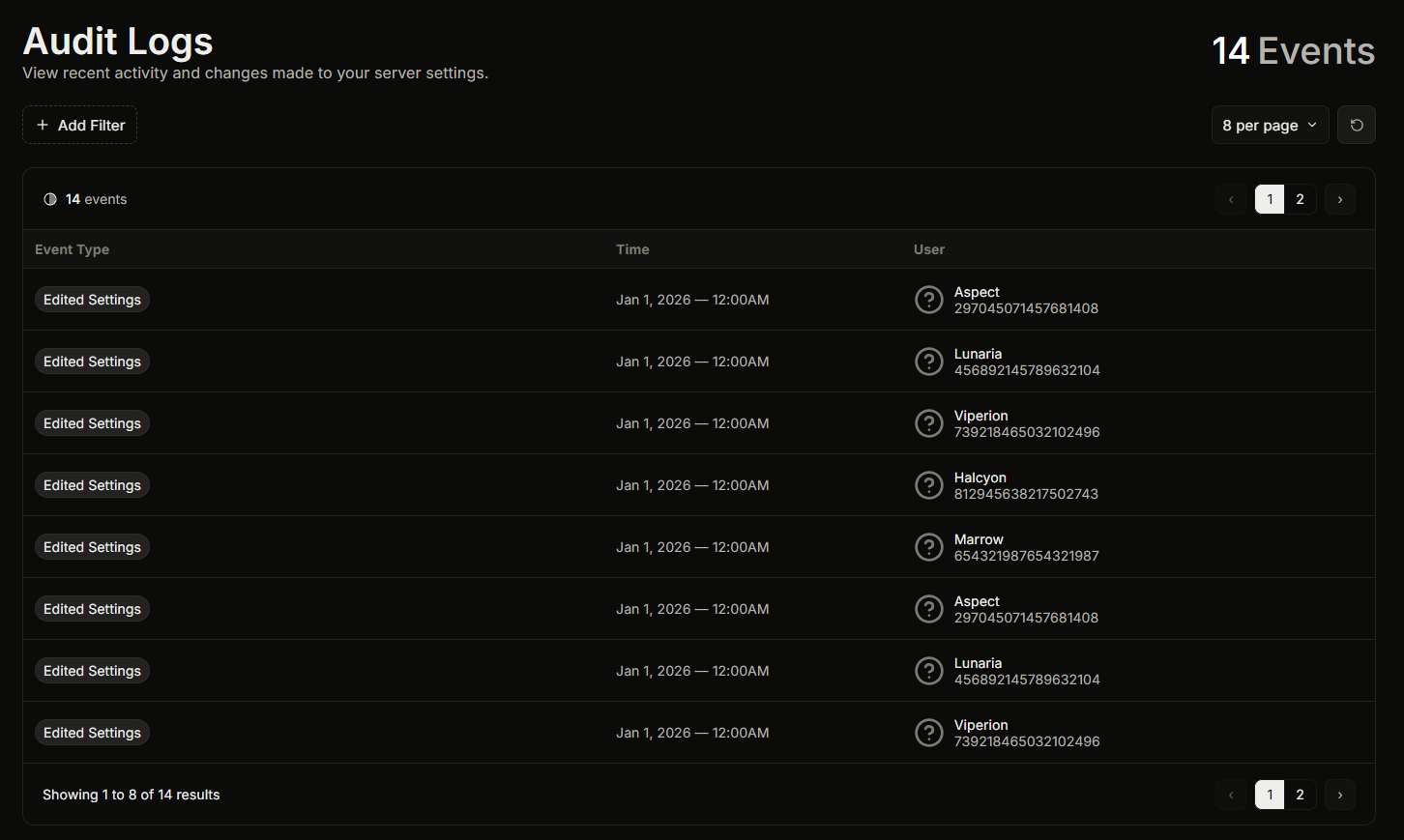
La página de Registros de auditoría está en **Panel, Registros de auditoría** en la barra lateral. Para abrirla necesitas el **Ver registros de auditoría** permiso de panel, o ser el propietario del servidor o tener Discord Administrator o Manage Server.
Cada entrada muestra la acción, quién la realizó y cuándo.
## Reduciendo la lista
Puedes filtrar la lista de tres maneras y combinarlas:
* **Por fecha.** Elige un rango preestablecido o establece un rango de fechas personalizado.
* **Por usuario.** Elige un usuario activo recientemente, o escribe una ID de usuario para ver solo las acciones de una persona.
* **Por tipo de evento.** Elige uno o más tipos de acción. La lista solo ofrece los tipos de eventos que realmente han ocurrido en tu servidor, así que nunca eliges entre acciones que nunca has usado.
Así es como respondes preguntas como "qué cambió este moderador la semana pasada" o "quién reinició los contadores de tickets".
## Relacionado
{% content-ref url="/pages/47a212daf6e6c14e4c3600f828032a1863ec3d63" %}
[Qué captura el registro de auditoría](/docs/es/registros-de-auditoria/what-it-captures.md)
{% endcontent-ref %}
{% content-ref url="/pages/6dbbc00d602c50e36e49d06652b6f46b409dc127" %}
[Qué no muestran los registros de auditoría](/docs/es/registros-de-auditoria/what-it-doesnt-show.md)
{% endcontent-ref %}
---
# Agent Instructions
This documentation is published with GitBook. GitBook is the documentation platform designed so that both humans and AI agents can read, navigate, and reason over technical content effectively. Learn more at gitbook.com.
## Querying This Documentation
If you need additional information that is not directly available in this page, you can query the documentation dynamically by asking a question.
Perform an HTTP GET request on the current page URL with the `ask` query parameter, and the optional `goal` query parameter:
```
GET https://ticketking.xyz/docs/es/registros-de-auditoria/reading-the-page.md?ask=&goal=
```
`ask` is the immediate question: it should be specific, self-contained, and written in natural language.
`goal` is optional and describes the broader end goal you are ultimately trying to accomplish on behalf of the user. GitBook uses it to tailor the answer towards what is most useful for that goal.
The response will contain a direct answer to the question and relevant excerpts and sources from the documentation.
Use this mechanism when the answer is not explicitly present in the current page, you need clarification or additional context, or you want to retrieve related documentation sections.