> For the complete documentation index, see [llms.txt](https://ticketking.xyz/docs/llms.txt). Markdown versions of documentation pages are available by appending `.md` to page URLs; this page is available as [Markdown](https://ticketking.xyz/docs/es/primeros-pasos/open-your-dashboard.md).
# Abre tu panel de control
Inicia sesión en ticketking.xyz para configurar el bot.
El panel de control de Ticket King es donde configuras todo: paneles, roles de soporte, registros, personalización y todos los ajustes. El bot de Discord es la parte que ven tus miembros. El panel de control es donde lo configuras.
Abre tu panel de control
## Cómo empezar
{% stepper %}
{% step %}
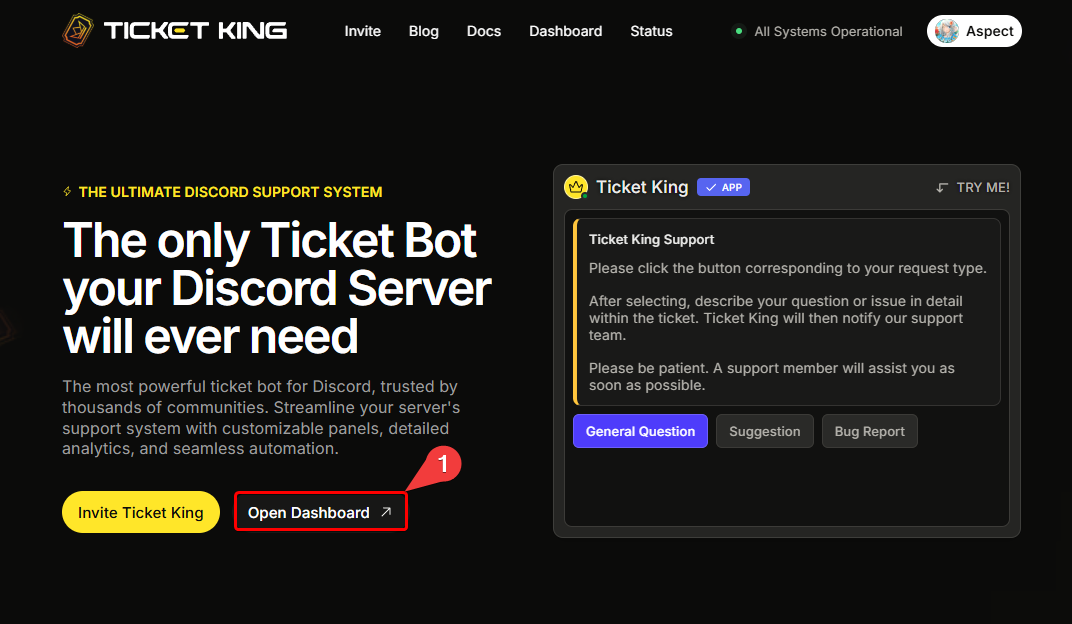
### Ve a ticketking.xyz y haz clic en Panel de control
Ve a [ticketking.xyz](https://ticketking.xyz) y haz clic en **Panel de control**.
{% endstep %}
{% step %}
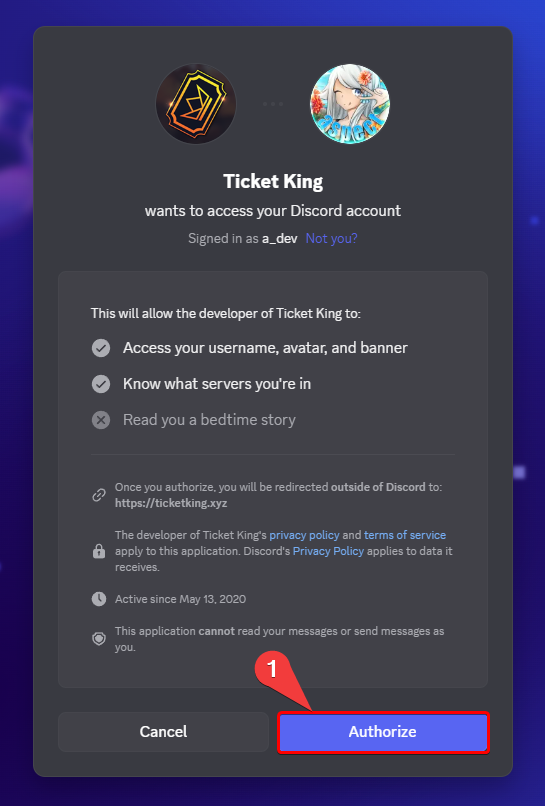
### Inicia sesión con Discord
Inicia sesión con Discord. Si es tu primera vez, Discord te pedirá que autorices el inicio de sesión.
{% endstep %}
{% step %}
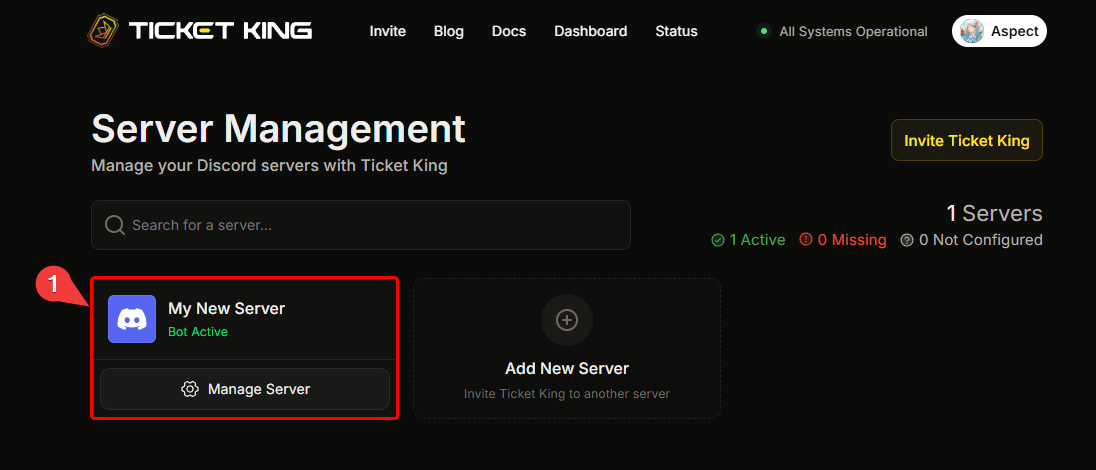
### Elige el servidor que quieres configurar
Elige el servidor que quieres configurar. Eso es todo.
→ [Elige tu servidor](/docs/es/primeros-pasos/pick-your-server.md)
{% endstep %}
{% endstepper %}
## Problemas para iniciar sesión
* Si sigue pidiéndote que inicies sesión una y otra vez, borra las cookies de tu navegador para `discord.com` y `ticketking.xyz` e inténtalo de nuevo.
* Si tu servidor no aparece después de iniciar sesión, puede que no tengas **Administrar servidor** o **Administrador** permisos en ese servidor (o ser el propietario), o puede que Ticket King aún no haya sido invitado.
→ [No puedo acceder al panel de control](/docs/es/solucion-de-problemas/cant-access-dashboard.md)
## Siguiente: elige tu servidor
{% content-ref url="/pages/5e43a1902e9c87793ee2d4478c1e8453555d1a9d" %}
[Elige tu servidor](/docs/es/primeros-pasos/pick-your-server.md)
{% endcontent-ref %}
---
# Agent Instructions
This documentation is published with GitBook. GitBook is the documentation platform designed so that both humans and AI agents can read, navigate, and reason over technical content effectively. Learn more at gitbook.com.
## Querying This Documentation
If you need additional information that is not directly available in this page, you can query the documentation dynamically by asking a question.
Perform an HTTP GET request on the current page URL with the `ask` query parameter, and the optional `goal` query parameter:
```
GET https://ticketking.xyz/docs/es/primeros-pasos/open-your-dashboard.md?ask=&goal=
```
`ask` is the immediate question: it should be specific, self-contained, and written in natural language.
`goal` is optional and describes the broader end goal you are ultimately trying to accomplish on behalf of the user. GitBook uses it to tailor the answer towards what is most useful for that goal.
The response will contain a direct answer to the question and relevant excerpts and sources from the documentation.
Use this mechanism when the answer is not explicitly present in the current page, you need clarification or additional context, or you want to retrieve related documentation sections.