> For the complete documentation index, see [llms.txt](https://ticketking.xyz/docs/llms.txt). Markdown versions of documentation pages are available by appending `.md` to page URLs; this page is available as [Markdown](https://ticketking.xyz/docs/es/personalizacion-y-marca/server-embed-color.md).
# El color del embed del servidor
El color de acento usado en todos los embeds de Ticket King en tu servidor.
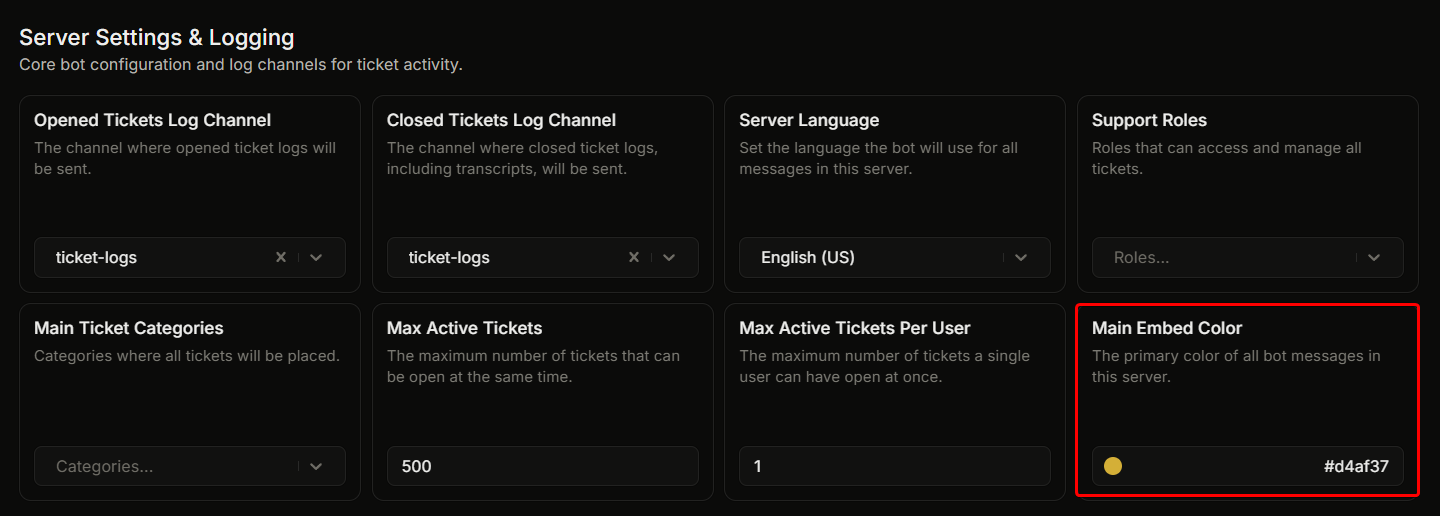
Ajustes, "Ajustes del servidor y registros", **Color principal de la incrustación**.
Esta es la franja de acento en el lado izquierdo de cada embed de Ticket King en tu servidor. Se aplica a los paneles, a los embeds de bienvenida de tickets, a los embeds de registro y a los embeds de solicitud.
## Predeterminado
`#d4af37` (dorado).
## Cambiarlo
1. Haz clic en la muestra de color junto al campo.
2. Se abre el selector de color. Escribe un código de color hexadecimal o haz clic en la rueda de color.
3. La configuración se guarda automáticamente.
## Cómo lo usan los embeds
La mayoría de los embeds usan este color automáticamente:
* Embeds de panel (cuando el campo Color del embed del panel se deja en blanco). Establece un color en un embed de panel para anularlo allí.
* El embed de bienvenida dentro de los nuevos canales de tickets.
* Embeds de registro de apertura y cierre.
* Embeds de solicitud.
Los embeds de error usan en su lugar un rojo fijo, así que el color que establezcas aquí no los cambia.
## Elegir un buen color
Combina con el esquema de color existente de tu servidor. La mayoría de los servidores eligen el color de su rol principal de marca o el color principal del icono de su servidor.
Evita:
* **Negro puro o blanco puro.** Estos son difíciles de ver en los temas de Discord.
* **Colores cercanos a la propia interfaz de Discord.** El blurple de Discord (`#5865F2`) puede confundirse con el fondo.
## Relacionado
{% content-ref url="/pages/376b1955e98ac793d06738b426943f2e7dfc2f1a" %}
[Editar el embed](/docs/es/paneles/edit-the-embed.md)
{% endcontent-ref %}
---
# Agent Instructions
This documentation is published with GitBook. GitBook is the documentation platform designed so that both humans and AI agents can read, navigate, and reason over technical content effectively. Learn more at gitbook.com.
## Querying This Documentation
If you need additional information that is not directly available in this page, you can query the documentation dynamically by asking a question.
Perform an HTTP GET request on the current page URL with the `ask` query parameter, and the optional `goal` query parameter:
```
GET https://ticketking.xyz/docs/es/personalizacion-y-marca/server-embed-color.md?ask=&goal=
```
`ask` is the immediate question: it should be specific, self-contained, and written in natural language.
`goal` is optional and describes the broader end goal you are ultimately trying to accomplish on behalf of the user. GitBook uses it to tailor the answer towards what is most useful for that goal.
The response will contain a direct answer to the question and relevant excerpts and sources from the documentation.
Use this mechanism when the answer is not explicitly present in the current page, you need clarification or additional context, or you want to retrieve related documentation sections.