> For the complete documentation index, see [llms.txt](https://ticketking.xyz/docs/llms.txt). Markdown versions of documentation pages are available by appending `.md` to page URLs; this page is available as [Markdown](https://ticketking.xyz/docs/es/idiomas/server-language.md).
# La configuración de idioma del servidor
Los idiomas que admite Ticket King, elegidos una vez a nivel de servidor.
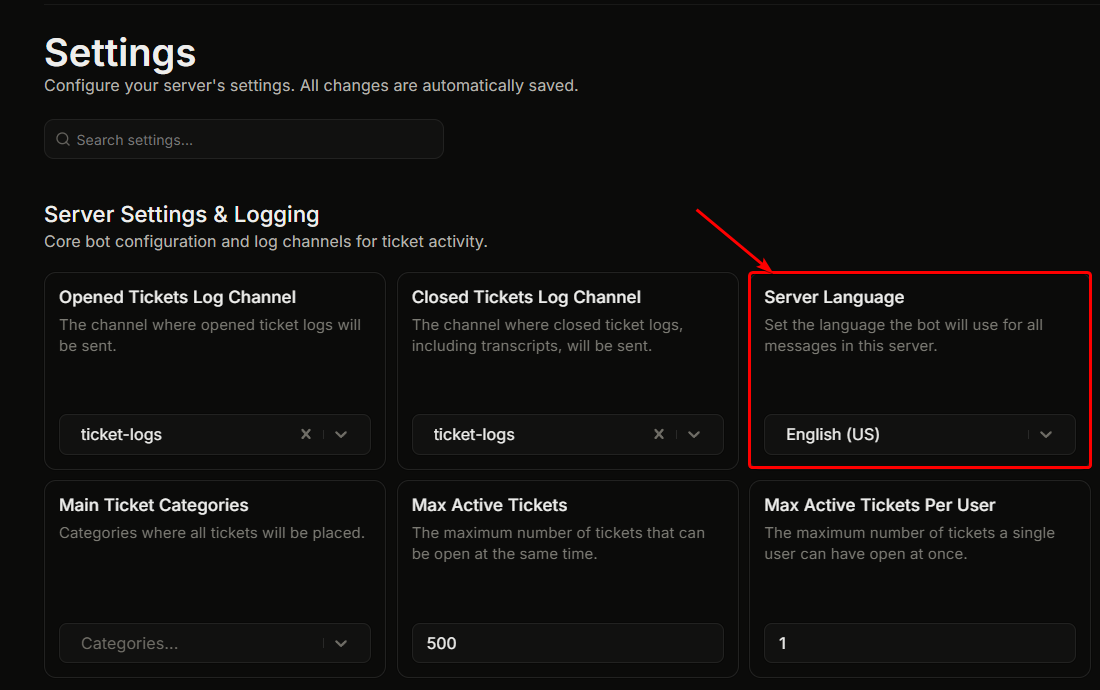
Ajustes, "Ajustes del servidor y registros", **Idioma del servidor**.
Esto define el idioma que usa Ticket King en tu servidor. Cada mensaje del bot (embeds de bienvenida, embeds de registro, respuestas de error, respuestas a comandos de barra y notificaciones por DM) usa el idioma configurado.
## Predeterminado
**Inglés.** Este también es el idioma base desde el que se traduce cualquier otro idioma.
## Cómo cambiarlo
1. Haz clic en el **Idioma del servidor** desplegable.
2. Elige de la lista de idiomas compatibles.
3. La configuración se guarda automáticamente.
Los cambios se aplican a todos los futuros mensajes del bot. Los mensajes que ya se publicaron no se vuelven a traducir.
## Idiomas compatibles
Mostrar la lista completa de idiomas compatibles
| Idioma |
| ------------------------------------------------- |
| Árabe (العربية) |
| Búlgaro (Български) |
| Bosnio (Bosanski) |
| Checo (Čeština) |
| Danés (Dansk) |
| Alemán (Deutsch) |
| Alemán informal (Deutsch (Informell)) |
| Griego (Ελληνικά) |
| Inglés (Reino Unido) |
| Inglés (EE. UU.), predeterminado |
| Español (Latinoamérica) (Español (Latinoamérica)) |
| Español (España) (Español (España)) |
| Finés (Suomi) |
| Francés (Français) |
| Hebreo (עברית) |
| Hindi (हिन्दी) |
| Croata (Hrvatski) |
| Criollo haitiano (Kreyòl Ayisyen) |
| Húngaro (Magyar) |
| Indonesio (Bahasa Indonesia) |
| Italiano (Italiano) |
| Japonés (日本語) |
| Coreano (한국어) |
| Lituano (Lietuvių) |
| Neerlandés (Nederlands) |
| Noruego (Norsk) |
| Polaco (Polski) |
| Portugués (Brasil) (Português (Brasil)) |
| Rumano (Română) |
| Ruso (Русский) |
| Eslovaco (Slovenčina) |
| Esloveno (Slovenščina) |
| Serbio (Srpski) |
| Sueco (Svenska) |
| Tailandés (ไทย) |
| Turco (Türkçe) |
| Ucraniano (Українська) |
| Vietnamita (Tiếng Việt) |
| Chino (simplificado) (简体中文) |
| Chino (tradicional) (繁體中文) |
Muchos de estos también son compatibles de forma nativa con Discord. El resto son específicos de Ticket King.
## ¿Has detectado un problema de traducción?
Si una traducción parece incorrecta o una cadena sigue apareciendo en inglés, avísanos para que podamos corregirlo. Consulta [Informar de problemas de traducción](https://ticketking.xyz/docs/es/obtener-ayuda-y-comunidad/translation-issues.md).
## Relacionado
{% content-ref url="/pages/14bdef8cea499c39666e8b9f2eee77f15846ad18" %}
[Cómo el bot elige un idioma](https://ticketking.xyz/docs/es/idiomas/how-the-bot-picks-a-language.md)
{% endcontent-ref %}
{% content-ref url="/pages/772dac31ac859cd5d0c0af6cca42545ba024416f" %}
[Informar problemas de traducción](https://ticketking.xyz/docs/es/obtener-ayuda-y-comunidad/translation-issues.md)
{% endcontent-ref %}
---
# Agent Instructions
This documentation is published with GitBook. GitBook is the documentation platform designed so that both humans and AI agents can read, navigate, and reason over technical content effectively. Learn more at gitbook.com.
## Querying This Documentation
If you need additional information that is not directly available in this page, you can query the documentation by asking a question.
Perform an HTTP GET request on the following URL with the `ask` and `goal` query parameters:
```
GET https://ticketking.xyz/docs/es/idiomas/server-language.md?ask=&goal=
```
`ask` is the immediate question: it should be specific, self-contained, and written in natural language.
`goal` is what the user is ultimately trying to achieve, the reason they need the answer. Sharing it helps GitBook give you a better, more relevant answer. A goal is most helpful when it describes the outcome the user wants rather than restating the question. For example, with `ask=how do I create an API token`, a goal like `automate deployments from our CI pipeline` lets GitBook tailor the answer to that use case.
The response will contain a direct answer to the question and relevant excerpts and sources from the documentation.
Use this mechanism when the answer is not explicitly present in the current page, you need clarification or additional context, or you want to retrieve related documentation sections.