> For the complete documentation index, see [llms.txt](https://ticketking.xyz/docs/llms.txt). Markdown versions of documentation pages are available by appending `.md` to page URLs; this page is available as [Markdown](https://ticketking.xyz/docs/es/historial-de-tickets/browsing-tickets.md).
# Explorar tickets abiertos y recientes
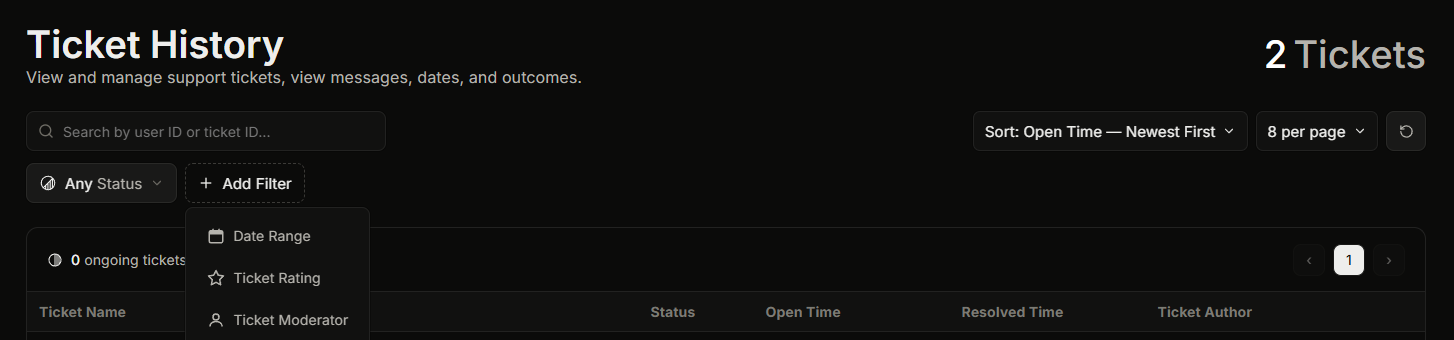
La página de Historial de tickets. Encontrar tickets, filtrar y ordenar.
**Panel, luego Historial de tickets** es la lista de todos los tickets que ha tenido tu servidor. Puedes buscar en ella, ordenarla y filtrarla.
Necesitas el **Ver historial** permiso del panel para abrir esta página. El propietario del servidor y cualquiera con Administrador o Gestionar servidor siempre pueden abrirla.
La lista básica de Historial de tickets es gratuita.
## Encontrar el ticket que quieres
Puedes buscar por el ID de usuario de un miembro o por el ID de un ticket, ordenar la lista (por hora de apertura, hora de cierre o calificación) y filtrarla. La búsqueda y el filtrado se explican en detalle en [Filtrar y buscar en el historial de tickets](/docs/es/historial-de-tickets/filtering-and-searching.md).
Hay tres filtros que conviene conocer:
* **Moderador del ticket.** Muestra solo los tickets que reclamó un miembro del personal elegido. Así es como revisas el trabajo de una persona.
* **Cerrador del ticket.** Muestra solo los tickets que cerró un miembro del personal elegido. Útil cuando la persona que cerró un ticket no es la misma que lo reclamó.
* **Calificación del ticket.** Muestra solo los tickets con una calificación de estrellas elegida. Las calificaciones son una :crown: función Premium, así que en un servidor gratis no hay nada por lo que filtrar aquí.
## Abrir los detalles de un ticket
Haz clic en un ticket para abrir el **Panel de detalles del ticket** panel, que muestra todo sobre ese ticket y su transcripción. Consulta [Abrir la vista de detalles de un solo ticket](/docs/es/historial-de-tickets/opening-a-ticket-detail.md).
## Cerrar un ticket desde la lista (Premium)
En un servidor Premium puedes cerrar un ticket abierto directamente desde esta página (:crown: Premium). El panel te pide confirmar primero, porque cerrarlo elimina permanentemente el canal del ticket de Discord. Si **Cerrar requiere motivo** está activado en tus ajustes, debes escribir un motivo antes de poder confirmar. En un servidor gratis, cierra los tickets desde Discord con `/close` en su lugar.
## Relacionado
{% content-ref url="/pages/31868364e700e7dabcee9fd1bede58d0a56ebc9d" %}
[Abrir la vista detallada de un solo ticket](/docs/es/historial-de-tickets/opening-a-ticket-detail.md)
{% endcontent-ref %}
{% content-ref url="/pages/3e1336c65f6403e670ce9909a821b02b5c2ab45b" %}
[Filtrar y buscar en el historial de tickets](/docs/es/historial-de-tickets/filtering-and-searching.md)
{% endcontent-ref %}
---
# Agent Instructions
This documentation is published with GitBook. GitBook is the documentation platform designed so that both humans and AI agents can read, navigate, and reason over technical content effectively. Learn more at gitbook.com.
## Querying This Documentation
If you need additional information that is not directly available in this page, you can query the documentation dynamically by asking a question.
Perform an HTTP GET request on the current page URL with the `ask` query parameter, and the optional `goal` query parameter:
```
GET https://ticketking.xyz/docs/es/historial-de-tickets/browsing-tickets.md?ask=&goal=
```
`ask` is the immediate question: it should be specific, self-contained, and written in natural language.
`goal` is optional and describes the broader end goal you are ultimately trying to accomplish on behalf of the user. GitBook uses it to tailor the answer towards what is most useful for that goal.
The response will contain a direct answer to the question and relevant excerpts and sources from the documentation.
Use this mechanism when the answer is not explicitly present in the current page, you need clarification or additional context, or you want to retrieve related documentation sections.