> For the complete documentation index, see [llms.txt](https://ticketking.xyz/docs/llms.txt). Markdown versions of documentation pages are available by appending `.md` to page URLs; this page is available as [Markdown](https://ticketking.xyz/docs/es/configuracion/ticket-style-and-claiming.md).
# Estilo de ticket y reclamo
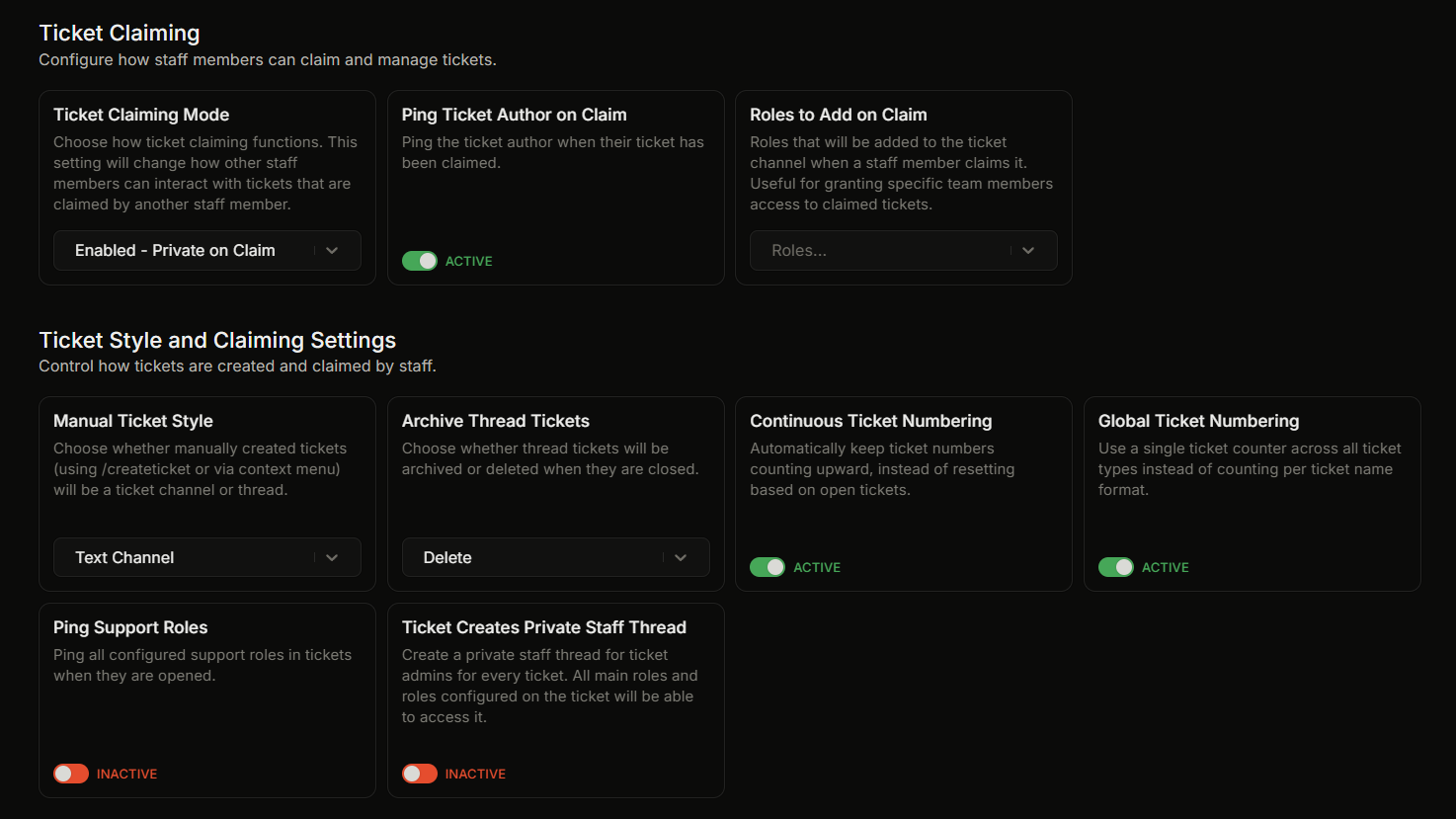
Los grupos de configuración de Reclamo de tickets y Estilo de ticket y reclamo.
La configuración de reclamación y de estilo de tickets está en dos grupos separados en la página de Configuración. Esta página cubre ambos.
## Reclamación de tickets
Este grupo controla cómo funciona la reclamación.
| Etiqueta de la interfaz | Qué hace | Predeterminado |
| --------------------------------------------- | --------------------------------------------------------------------------------------------------------------------------- | -------------------------------- |
| **Modo de reclamación de tickets** | Cómo `/claim` se comporta. Consulta los modos de reclamación a continuación. | Habilitado - Privado al reclamar |
| **Notificar al autor del ticket al reclamar** | Cuando está activado, al reclamar se notifica al autor del ticket. Solo surte efecto cuando la reclamación está habilitada. | Activado |
| **Roles a añadir al reclamar** | Roles añadidos al canal cuando un miembro del personal reclama. Hasta 25. | Ninguno |
### Modos de reclamación
* **Reclamación deshabilitada.** La reclamación está desactivada.
* **Habilitado - Sin cambios.** La reclamación funciona y la visibilidad del canal no cambia.
* **Habilitado - Solo lectura para otros.** Después de reclamar, otros miembros del personal pueden ver el ticket, pero no pueden enviar mensajes en él.
* **Habilitado - Privado al reclamar.** Después de reclamar, el ticket queda restringido al usuario que lo abrió, al miembro del personal que lo reclamó y al bot. Este es el valor predeterminado.
## Configuración de estilo de tickets y reclamación
Este grupo controla cómo se crean los tickets.
| Etiqueta de la interfaz | Qué hace | Predeterminado |
| --------------------------------------------------- | -------------------------------------------------------------------------------------------------------------------------------------------------------------------------------------------------------------------------- | -------------- |
| **Estilo manual de ticket** | Estilo usado por `/createticket` y la acción de clic derecho «Crear ticket». Canal de texto o hilo privado. | Canal de texto |
| **Archivar tickets de hilo** | Cuando se cierra un ticket de hilo, archiva el hilo o elimínalo. | Eliminar |
| **Numeración continua de tickets** | Cuando está activado, los números de ticket siguen aumentando en lugar de reutilizar los números liberados. | Activado |
| **Numeración global de tickets** | Cuando está activado, todos los nombres personalizados de tickets comparten un solo contador. Requiere que la numeración continua de tickets esté activada. | Activado |
| **Notificar a los roles de soporte** | Cuando está activado, los roles de soporte configurados reciben una notificación cuando se abre un ticket. | Desactivado |
| **El ticket crea un hilo privado para el personal** | Cuando está activado, cada nuevo ticket también crea un hilo privado para el personal. | Desactivado |
| **Encerrar las respuestas de preguntas en código** | Cuando está activado, las respuestas de texto a las preguntas del ticket se encierran en código en línea para que se puedan tocar y copiar en móvil. Cuando está desactivado, las respuestas se muestran como texto plano. | Desactivado |
{% hint style="info" %}
Los límites globales del servidor y por usuario en tickets abiertos (**Máximo de tickets activos** y **Máximo de tickets activos por usuario**) están en el **Configuración del servidor y registro** grupo, no aquí.
{% endhint %}
## Páginas detalladas
* [Tickets de hilo frente a tickets de canal](/docs/es/tickets/thread-vs-channel.md)
* [Numeración de tickets](/docs/es/tickets/ticket-numbering.md)
* [Reclamar un ticket y los 4 modos](/docs/es/tickets/claiming-a-ticket.md)
* [Roles de soporte](/docs/es/permisos-y-tu-equipo-de-soporte/support-roles.md)
* [Límites de tickets abiertos](/docs/es/tickets/limits-on-open-tickets.md)
## Relacionado
{% content-ref url="/pages/19d740c9f248add6c32b6fb2d3c800b51ef8bd84" %}
[Resumen de configuración](/docs/es/configuracion/overview.md)
{% endcontent-ref %}
---
# Agent Instructions
This documentation is published with GitBook. GitBook is the documentation platform designed so that both humans and AI agents can read, navigate, and reason over technical content effectively. Learn more at gitbook.com.
## Querying This Documentation
If you need additional information that is not directly available in this page, you can query the documentation by asking a question.
Perform an HTTP GET request on the following URL with the `ask` and `goal` query parameters:
```
GET https://ticketking.xyz/docs/es/configuracion/ticket-style-and-claiming.md?ask=&goal=
```
`ask` is the immediate question: it should be specific, self-contained, and written in natural language.
`goal` is what the user is ultimately trying to achieve, the reason they need the answer. Sharing it helps GitBook give you a better, more relevant answer. A goal is most helpful when it describes the outcome the user wants rather than restating the question. For example, with `ask=how do I create an API token`, a goal like `automate deployments from our CI pipeline` lets GitBook tailor the answer to that use case.
The response will contain a direct answer to the question and relevant excerpts and sources from the documentation.
Use this mechanism when the answer is not explicitly present in the current page, you need clarification or additional context, or you want to retrieve related documentation sections.