> For the complete documentation index, see [llms.txt](https://ticketking.xyz/docs/llms.txt). Markdown versions of documentation pages are available by appending `.md` to page URLs; this page is available as [Markdown](https://ticketking.xyz/docs/de/transkripte/where-to-find.md).
# Wo man ein Transkript findet
Wie du nach dem Schließen eines Tickets auf ein Transkript zugreifst.
Nachdem ein Ticket geschlossen wurde, ist das Transkript an mehreren Stellen zugänglich.
## 1. Das Close-Log-Embed
Das Close-Embed in deinem Closed-Tickets-Log-Kanal hat einen **Transkript ansehen** Link-Button direkt unter den Embed-Feldern.
## 2. Die Detailseite für einzelne Tickets im Dashboard
**Dashboard → Ticketverlauf** → klicke auf ein beliebiges geschlossenes Ticket → auf dessen Detailseite gibt es einen **"Transkript ansehen"** Link in der Karte „Ticketinformationen“.
## 3. Die Direktnachricht des Autors (wenn DM User Close Message aktiviert ist)
Wenn **DM-Nachricht beim Schließen an den Benutzer** aktiviert ist (die Standardeinstellung), erhält der Ticket-Autor das Close-Embed in seinen Direktnachrichten, einschließlich eines **Transkript ansehen** Links.
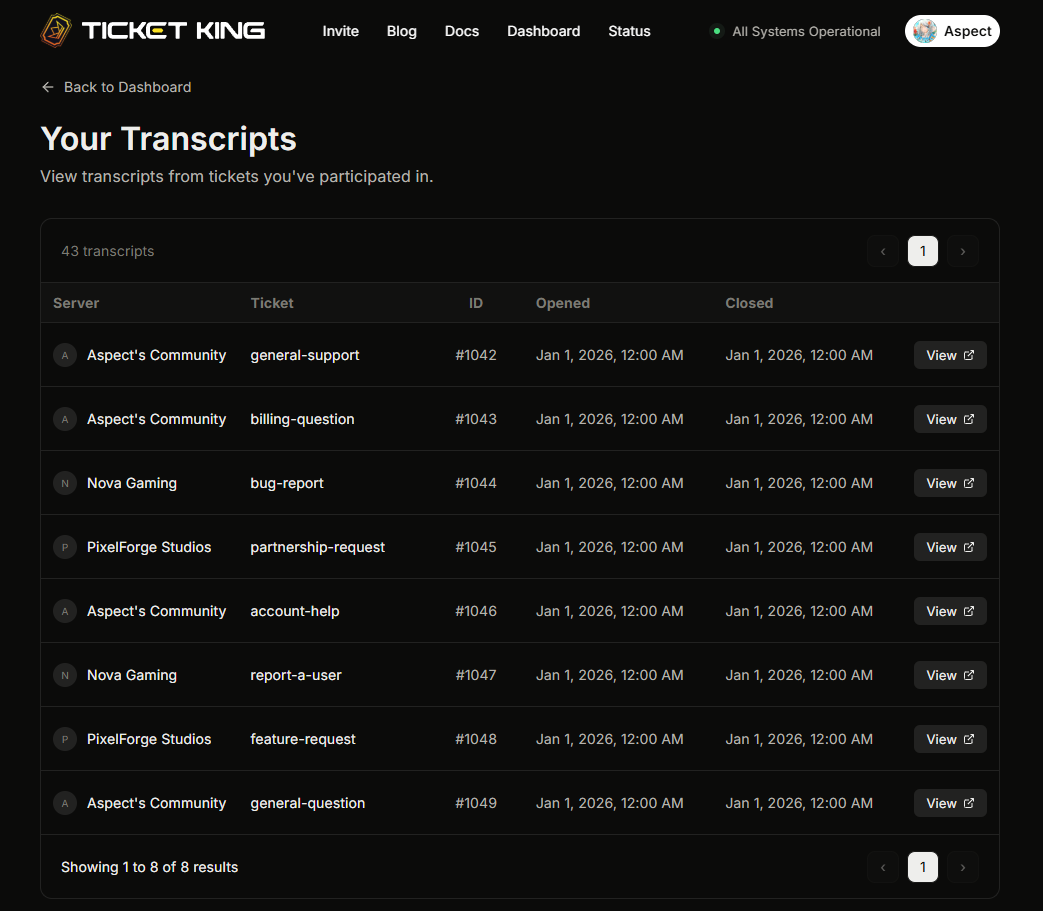
## 4. Deine „Meine Transkripte“-Seite
Mitglieder können [**ticketking.xyz/user/transcripts**](https://ticketking.xyz/user/transcripts) besuchen, um alle Transkripte zu sehen, auf die sie Zugriff haben, serverübergreifend.
## Authentifizierung
Um ein Transkript anzusehen, musst du dich über Discord anmelden.
→ [Rollenbezogene Transkriptansicht](/docs/de/transkripte/role-specific-viewing.md)
## Ein Transkript teilen
Das Öffnen eines Transkripts setzt voraus, dass der Betrachter die Berechtigung hat. Das Teilen des Links mit jemandem, der keine Berechtigung hat, gewährt ihm keinen Zugriff. Ihnen wird der Zugriff verweigert, wenn sie versuchen, es zu öffnen.
## Verwandt
{% content-ref url="/pages/80f2b271a88f409b451e5100773b15edc00fe634" %}
[Was in einem Transkript enthalten ist](/docs/de/transkripte/whats-in-a-transcript.md)
{% endcontent-ref %}
{% content-ref url="/pages/c8483fe28a79f6832cf90916baa95af7817da737" %}
[Rollen-spezifische Transkriptanzeige](/docs/de/transkripte/role-specific-viewing.md)
{% endcontent-ref %}
---
# Agent Instructions
This documentation is published with GitBook. GitBook is the documentation platform designed so that both humans and AI agents can read, navigate, and reason over technical content effectively. Learn more at gitbook.com.
## Querying This Documentation
If you need additional information that is not directly available in this page, you can query the documentation dynamically by asking a question.
Perform an HTTP GET request on the current page URL with the `ask` query parameter, and the optional `goal` query parameter:
```
GET https://ticketking.xyz/docs/de/transkripte/where-to-find.md?ask=&goal=
```
`ask` is the immediate question: it should be specific, self-contained, and written in natural language.
`goal` is optional and describes the broader end goal you are ultimately trying to accomplish on behalf of the user. GitBook uses it to tailor the answer towards what is most useful for that goal.
The response will contain a direct answer to the question and relevant excerpts and sources from the documentation.
Use this mechanism when the answer is not explicitly present in the current page, you need clarification or additional context, or you want to retrieve related documentation sections.