> For the complete documentation index, see [llms.txt](https://ticketking.xyz/docs/llms.txt). Markdown versions of documentation pages are available by appending `.md` to page URLs; this page is available as [Markdown](https://ticketking.xyz/docs/de/ticket-bewertung/rating-log-channel.md).
# Der Bewertungs-Log-Kanal
Wo Ticket-Bewertungs-Einreichungen gepostet werden.
:crown: **Premium.** Setze es unter Einstellungen, in der **Ticket-Bewertungseinstellungen** Gruppe, in **Protokollkanal für Ticket-Bewertungen**.
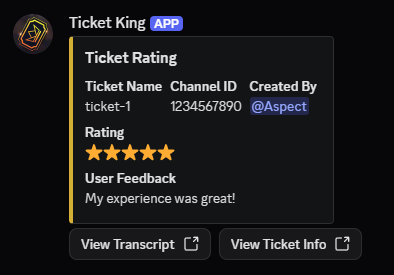
Dies ist der Discord-Kanal, in dem Ticket King jedes Mal ein „Ticket Rating“-Embed postet, wenn ein Mitglied eine Bewertung abgibt.
## Konfiguration
* Ein Dropdown zur Kanalauswahl. Du kannst einen Textkanal auswählen.
* Standard: keiner. Wenn kein Kanal festgelegt ist, werden Bewertungen trotzdem im Dashboard gespeichert, aber in Discord wird kein Embed gepostet.
* Das Feld ist deaktiviert, solange Ticket Rating selbst ausgeschaltet ist. Der angezeigte Grund ist *„Um einen Protokollkanal festzulegen, aktiviere Ticket Rating“*.
## Was das Bewertungs-Embed enthält
| Feld | Inhalt |
| ------------------- | ----------------------------------------------------------------------------------------- |
| Titel | „Ticket Rating“ |
| Farbe | Deine Haupt-Embed-Farbe |
| **Ticketname** | Der Name des Ticket-Kanals |
| **Kanal-ID** | Die Discord-Kanal-ID |
| **Erstellt von** | Eine Erwähnung des Ticket-Erstellers, der bewertet hat |
| **Beansprucht von** | Eine Erwähnung des Mitarbeiters, der es übernommen hat, falls das Ticket übernommen wurde |
| **Bewertung** | Die Sternanzahl, 1 bis 5 |
| **Nutzerfeedback** | Der Textkommentar, falls einer erfasst wurde (hängt vom Bewertungsmodus ab) |
### Schaltflächen
Zwei Link-Schaltflächen:
* **Transkript anzeigen** öffnet das Transkript des Tickets.
* **Ticket-Infos anzeigen** öffnet die Detailseite des Tickets im Dashboard.
## Wo der Kanal festgelegt wird
Eine häufige Einrichtung ist ein Kanal nur für Mitarbeiter, zum Beispiel `#tk-ratings`. Lege die Kanalberechtigungen so fest, dass nur das Personal ihn lesen kann, da Bewertungen für dein Team gedacht sind.
## Bot-Berechtigungen im Kanal
Der Bot benötigt im Kanal die Berechtigungen Nachrichten senden und Embed-Links, um das Embed zu posten. Wenn er sie nicht hat, wird die Bewertung trotzdem im Dashboard gespeichert, aber das Embed wird nicht im Kanal angezeigt.
## Verwandt
{% content-ref url="/pages/33e00957b84a464f8bdb8953efa28f1a9fed3b8d" %}
[Was Ticket-Bewertungen sind](/docs/de/ticket-bewertung/what-ticket-ratings-are.md)
{% endcontent-ref %}
{% content-ref url="/pages/c55524b214e0c61146efc0bb2190a12894d62d63" %}
[Wo man Bewertungen lesen kann](/docs/de/ticket-bewertung/where-to-read-ratings.md)
{% endcontent-ref %}
---
# Agent Instructions
This documentation is published with GitBook. GitBook is the documentation platform designed so that both humans and AI agents can read, navigate, and reason over technical content effectively. Learn more at gitbook.com.
## Querying This Documentation
If you need additional information that is not directly available in this page, you can query the documentation dynamically by asking a question.
Perform an HTTP GET request on the current page URL with the `ask` query parameter, and the optional `goal` query parameter:
```
GET https://ticketking.xyz/docs/de/ticket-bewertung/rating-log-channel.md?ask=&goal=
```
`ask` is the immediate question: it should be specific, self-contained, and written in natural language.
`goal` is optional and describes the broader end goal you are ultimately trying to accomplish on behalf of the user. GitBook uses it to tailor the answer towards what is most useful for that goal.
The response will contain a direct answer to the question and relevant excerpts and sources from the documentation.
Use this mechanism when the answer is not explicitly present in the current page, you need clarification or additional context, or you want to retrieve related documentation sections.