> For the complete documentation index, see [llms.txt](https://ticketking.xyz/docs/llms.txt). Markdown versions of documentation pages are available by appending `.md` to page URLs; this page is available as [Markdown](https://ticketking.xyz/docs/de/sprachen/server-language.md).
# Die Einstellung für die Serversprache
Die von Ticket King unterstützten Sprachen, einmal auf Serverebene ausgewählt.
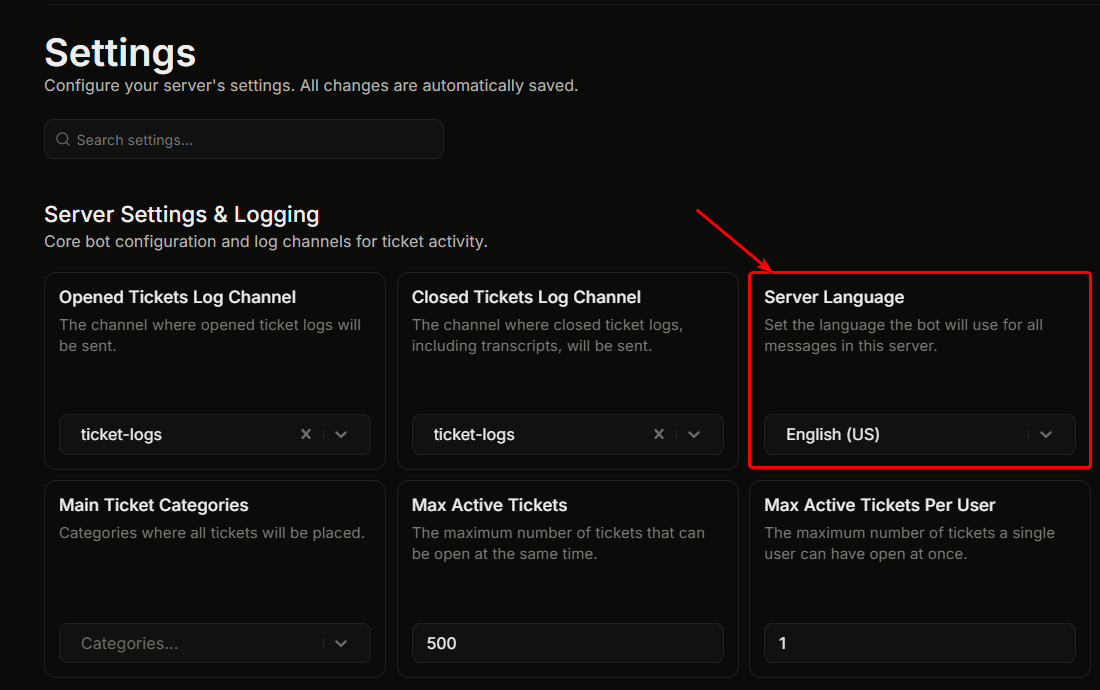
Einstellungen, "Servereinstellungen & Protokollierung", **Serversprache**.
Dies legt die Sprache fest, die Ticket King auf deinem Server verwendet. Jede Bot-Nachricht (Willkommens-Embeds, Log-Embeds, Fehlermeldungen, Antworten auf Slash-Befehle, DM-Benachrichtigungen) verwendet die konfigurierte Sprache.
## Standard
**Englisch.** Dies ist auch die Ausgangssprache, aus der jede andere Sprache übersetzt wird.
## So ändern
1. Klicke auf den **Serversprache** Dropdown.
2. Wähle aus der Liste der unterstützten Sprachen.
3. Einstellungen werden automatisch gespeichert.
Änderungen gelten für alle zukünftigen Bot-Nachrichten. Bereits gesendete Nachrichten werden nicht erneut übersetzt.
## Unterstützte Sprachen
Die vollständige Liste der unterstützten Sprachen anzeigen
| Sprache |
| -------------------------------------------------- |
| Arabisch (العربية) |
| Bulgarisch (Български) |
| Bosnisch (Bosanski) |
| Tschechisch (Čeština) |
| Dänisch (Dansk) |
| Deutsch (Deutsch) |
| Deutsch informell (Deutsch (Informell)) |
| Griechisch (Ελληνικά) |
| Englisch (UK) |
| Englisch (US), standardmäßig |
| Spanisch (Lateinamerika) (Español (Latinoamérica)) |
| Spanisch (Spanien) (Español (España)) |
| Finnisch (Suomi) |
| Französisch (Français) |
| Hebräisch (עברית) |
| Hindi (हिन्दी) |
| Kroatisch (Hrvatski) |
| Haitianisches Kreol (Kreyòl Ayisyen) |
| Ungarisch (Magyar) |
| Indonesisch (Bahasa Indonesia) |
| Italienisch (Italiano) |
| Japanisch (日本語) |
| Koreanisch (한국어) |
| Litauisch (Lietuvių) |
| Niederländisch (Nederlands) |
| Norwegisch (Norsk) |
| Polnisch (Polski) |
| Portugiesisch (Brasilien) (Português (Brasil)) |
| Rumänisch (Română) |
| Russisch (Русский) |
| Slowakisch (Slovenčina) |
| Slowenisch (Slovenščina) |
| Serbisch (Srpski) |
| Schwedisch (Svenska) |
| Thailändisch (ไทย) |
| Türkisch (Türkçe) |
| Ukrainisch (Українська) |
| Vietnamesisch (Tiếng Việt) |
| Chinesisch (vereinfacht) (简体中文) |
| Chinesisch (traditionell) (繁體中文) |
Viele davon werden auch nativ von Discord unterstützt. Die übrigen sind spezifisch für Ticket King.
## Einen Übersetzungsfehler entdeckt?
Wenn eine Übersetzung falsch aussieht oder ein Text noch auf Englisch angezeigt wird, lass es uns wissen, damit wir es beheben können. Siehe [Übersetzungsprobleme melden](https://ticketking.xyz/docs/de/hilfe-and-community-erhalten/translation-issues.md).
## Verwandt
{% content-ref url="/pages/8cf39710f506db034e3377954512b80187ca22b5" %}
[Wie der Bot eine Sprache auswählt](https://ticketking.xyz/docs/de/sprachen/how-the-bot-picks-a-language.md)
{% endcontent-ref %}
{% content-ref url="/pages/077630f027dbedc072dac541718676d97c721443" %}
[Übersetzungsprobleme melden](https://ticketking.xyz/docs/de/hilfe-and-community-erhalten/translation-issues.md)
{% endcontent-ref %}
---
# Agent Instructions
This documentation is published with GitBook. GitBook is the documentation platform designed so that both humans and AI agents can read, navigate, and reason over technical content effectively. Learn more at gitbook.com.
## Querying This Documentation
If you need additional information that is not directly available in this page, you can query the documentation by asking a question.
Perform an HTTP GET request on the following URL with the `ask` and `goal` query parameters:
```
GET https://ticketking.xyz/docs/de/sprachen/server-language.md?ask=&goal=
```
`ask` is the immediate question: it should be specific, self-contained, and written in natural language.
`goal` is what the user is ultimately trying to achieve, the reason they need the answer. Sharing it helps GitBook give you a better, more relevant answer. A goal is most helpful when it describes the outcome the user wants rather than restating the question. For example, with `ask=how do I create an API token`, a goal like `automate deployments from our CI pipeline` lets GitBook tailor the answer to that use case.
The response will contain a direct answer to the question and relevant excerpts and sources from the documentation.
Use this mechanism when the answer is not explicitly present in the current page, you need clarification or additional context, or you want to retrieve related documentation sections.