> For the complete documentation index, see [llms.txt](https://ticketking.xyz/docs/llms.txt). Markdown versions of documentation pages are available by appending `.md` to page URLs; this page is available as [Markdown](https://ticketking.xyz/docs/de/protokollierung/three-log-channels.md).
# Log-Kanäle
Die Discord-Log-Kanäle für geöffnete Tickets, geschlossene Tickets und das Premium-Ticket-Bewertungsprotokoll.
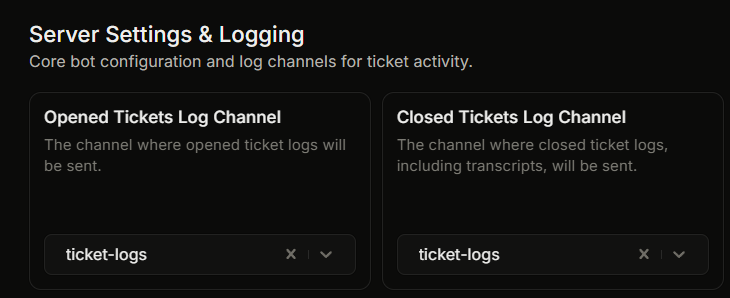
Ticket King hat **separate Discord-Protokollkanäle**, jeweils für eine andere Art von Ereignis. Jeder ist optional. Wenn du einen deaktivierst, wird diese Art von Ereignis nicht protokolliert.
## Protokolle für geöffnete und geschlossene Tickets
Diese beiden werden in den Einstellungen unter **Servereinstellungen & Protokollierung**.
| Protokollkanal | Was einen Protokolleintrag auslöst |
| ------------------------------------------- | ------------------------------------------------------------------------------------------- |
| **Protokollkanal für geöffnete Tickets** | Jedes neu geöffnete Ticket. |
| **Protokollkanal für geschlossene Tickets** | Jedes geschlossene Ticket (jeder Schließpfad). Dieses Protokoll enthält den Transkriptlink. |
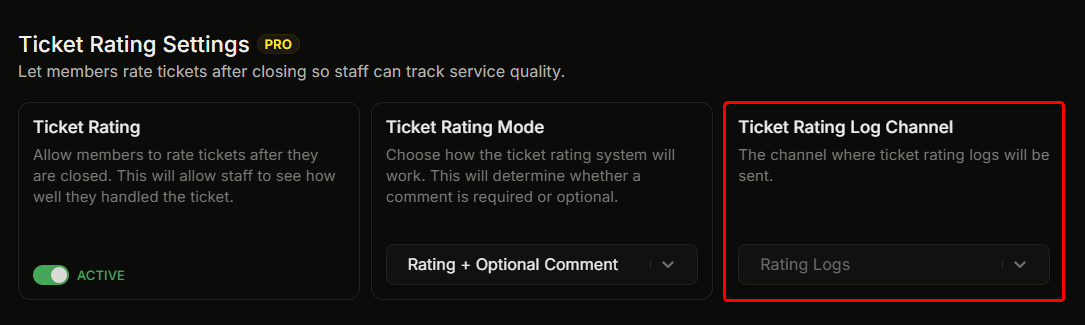
## Ticket-Bewertungsprotokoll (Premium)
Die :crown: **Protokollkanal für Ticket-Bewertungen** wird separat unter den Premium- **Einstellungen für Ticket-Bewertungen** Gruppe festgelegt. Hier wird ein Beitrag erstellt, wenn ein Mitglied nach dem Schließen eines Tickets eine Bewertung abgibt.
## Aufteilung der Kanäle
Protokolle werden nach Art aufgeteilt. Es gibt keine Option, "alles in einem Kanal zu protokollieren". Du kannst Protokolle für geöffnete Tickets an einen Kanal und Protokolle für geschlossene Tickets an einen anderen weiterleiten oder alle drei an denselben Kanal senden, indem du überall denselben Kanal auswählst.
Viele Server erstellen:
* `#tk-geöffnete-tickets` für Protokolle zu geöffneten Tickets.
* `#tk-geschlossene-tickets` für Protokolle zu geschlossenen Tickets.
* `#tk-bewertung` für Bewertungsprotokolle (Premium).
Verwende die Discord-Kanalberechtigungen, um zu steuern, wer welche lesen kann.
## Überschreibungen pro Panel
Ein Panel kann die Zielkanäle für geöffnete und geschlossene Protokolle separat von den serverweiten Kanälen oben überschreiben.
→ [Protokoll-Überschreibungen pro Panel](/docs/de/protokollierung/per-panel-overrides.md)
## Wenn du einen Protokollkanal in Discord löschst
Wenn du einen Protokollkanal in Discord löschst, ihn aber in Ticket King weiterhin gesetzt lässt, können Beiträge an diesen Kanal nicht zugestellt werden. Wenn du einen Protokollkanal in Discord entfernst, lösche ihn auch in den Einstellungen oder wähle einen anderen Kanal.
## Erforderliche Bot-Berechtigungen
Der Bot benötigt in jedem Protokollkanal diese Discord-Berechtigungen:
* **Kanal ansehen**
* **Nachrichten senden**
* **Embed-Links**
* **Dateien anhängen** (für einige Protokollarten erforderlich)
Wenn eine davon fehlt, kann das Protokoll nicht gepostet werden. Erteile dem Bot diese Berechtigungen im Protokollkanal.
## Verwandt
{% content-ref url="/pages/446dee6554ba9e7cc103cbc9de7e167aaf582a7b" %}
[Was ein Protokolleintrag anzeigt](/docs/de/protokollierung/log-embed-contents.md)
{% endcontent-ref %}
{% content-ref url="/pages/235e07e22fb029ebd61d91d6729fa88cf8014669" %}
[Pro-Panel-Log-Überschreibungen](/docs/de/protokollierung/per-panel-overrides.md)
{% endcontent-ref %}
---
# Agent Instructions
This documentation is published with GitBook. GitBook is the documentation platform designed so that both humans and AI agents can read, navigate, and reason over technical content effectively. Learn more at gitbook.com.
## Querying This Documentation
If you need additional information that is not directly available in this page, you can query the documentation dynamically by asking a question.
Perform an HTTP GET request on the current page URL with the `ask` query parameter, and the optional `goal` query parameter:
```
GET https://ticketking.xyz/docs/de/protokollierung/three-log-channels.md?ask=&goal=
```
`ask` is the immediate question: it should be specific, self-contained, and written in natural language.
`goal` is optional and describes the broader end goal you are ultimately trying to accomplish on behalf of the user. GitBook uses it to tailor the answer towards what is most useful for that goal.
The response will contain a direct answer to the question and relevant excerpts and sources from the documentation.
Use this mechanism when the answer is not explicitly present in the current page, you need clarification or additional context, or you want to retrieve related documentation sections.