> For the complete documentation index, see [llms.txt](https://ticketking.xyz/docs/llms.txt). Markdown versions of documentation pages are available by appending `.md` to page URLs; this page is available as [Markdown](https://ticketking.xyz/docs/de/premium/subscribing.md).
# Abonnieren
Wie man einen Server auf Premium aktualisiert.
Abonnements werden über dein **Dashboard auf ticketking.xyz verwaltet**.
Öffne Premium in deinem Dashboard
## Schritt für Schritt
{% stepper %}
{% step %}
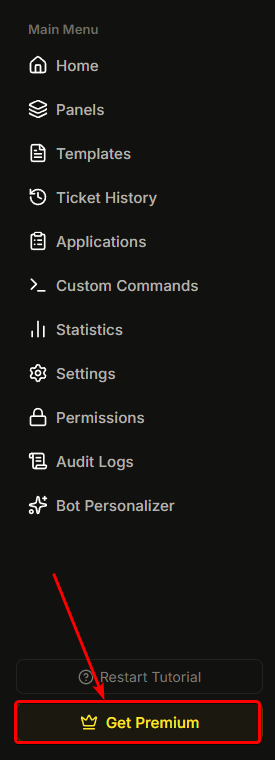
### Öffne die Premium-Seite
**Seitenleiste → Premium** (oder klicke unten auf einer beliebigen Dashboard-Seite auf "Premium verwalten").
{% endstep %}
{% step %}
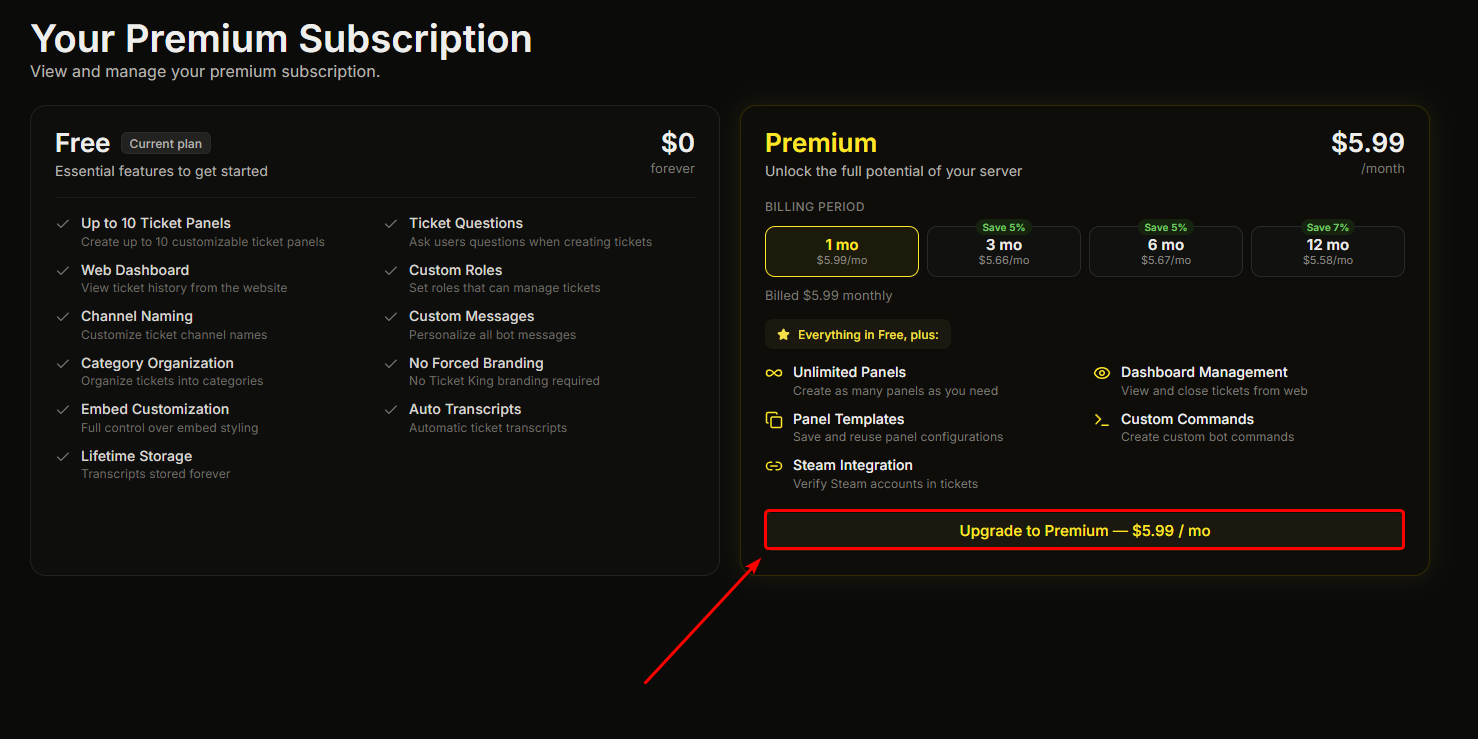
### Klicke auf Upgrade auf Premium
Klicke auf den **Auf Premium upgraden** Button.
{% endstep %}
{% step %}
### Kauf abschließen
Du wirst zu einem sicheren Checkout unseres Zahlungsanbieters weitergeleitet, entweder als Popup oder per Weiterleitung. Folge den Anweisungen, um deine Zahlungsdaten einzugeben und den Kauf abzuschließen.
{% endstep %}
{% step %}
### Zurück zum Dashboard
Du wirst zur Premium-Seite zurückgeleitet, die bestätigt, dass deine Zahlung erfolgreich war, und darauf wartet, dass Premium aktiviert wird.
{% endstep %}
{% step %}
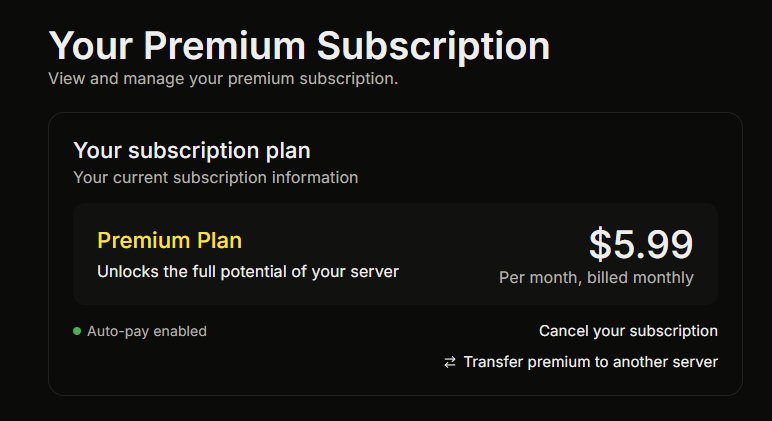
### Premium wird aktiviert
In der Regel innerhalb einer Minute meldet die Premium-Seite, dass Premium aktiv ist, und die Premium-Funktionen werden serverweit freigeschaltet.
{% endstep %}
{% endstepper %}
## Berechtigungen zum Abonnieren
Du benötigst die **Premium verwalten** Dashboard-Berechtigung oder du musst Serverbesitzer / Discord-Administrator sein.
## Was unmittelbar nach dem Kauf aktiviert wird
Innerhalb weniger Minuten:
* Die Premium-Seiten in deinem Dashboard (Statistiken, Steam-Verknüpfung, Benutzerdefinierte Befehle, Bot-Personalisierung) werden freigeschaltet.
* Premium-geschützte Panel-Funktionen beginnen mit der Durchsetzung (erforderliche Rollen, Aufforderungen zur Steam-Verknüpfung usw.).
* Der Bot-Personalisierer wird automatisch erneut angewendet, wenn du einen konfiguriert hast.
## Wenn Premium nicht innerhalb von 5 Minuten aktiviert wird
Selten, aber falls du den Checkout abschließt und nicht siehst, dass Premium aktiviert wird:
1. Lade das Dashboard neu.
2. Überprüfe die Premium-Seite. Dort sollte dein Abonnement als aktiv angezeigt werden.
3. Wenn nicht, kontaktiere . Das Team kann das schnell beheben.
## Abonnieren für mehrere Server
Du kannst mehrere Server abonnieren, jeweils mit einem eigenen Abonnement. Verwalte sie alle über [ticketking.xyz/user/subscriptions](https://ticketking.xyz/user/subscriptions).
Du kannst auch **übertragen** ein aktives Abonnement von einem Server auf einen anderen über dein Dashboard.
→ [Dein Abonnement verwalten](/docs/de/premium/managing-your-subscription.md)
## Verwandt
{% content-ref url="/pages/d7231f55de745463ab5b844b3cd3adfb1a392536" %}
[Dein Abonnement verwalten](/docs/de/premium/managing-your-subscription.md)
{% endcontent-ref %}
---
# Agent Instructions
This documentation is published with GitBook. GitBook is the documentation platform designed so that both humans and AI agents can read, navigate, and reason over technical content effectively. Learn more at gitbook.com.
## Querying This Documentation
If you need additional information that is not directly available in this page, you can query the documentation dynamically by asking a question.
Perform an HTTP GET request on the current page URL with the `ask` query parameter, and the optional `goal` query parameter:
```
GET https://ticketking.xyz/docs/de/premium/subscribing.md?ask=&goal=
```
`ask` is the immediate question: it should be specific, self-contained, and written in natural language.
`goal` is optional and describes the broader end goal you are ultimately trying to accomplish on behalf of the user. GitBook uses it to tailor the answer towards what is most useful for that goal.
The response will contain a direct answer to the question and relevant excerpts and sources from the documentation.
Use this mechanism when the answer is not explicitly present in the current page, you need clarification or additional context, or you want to retrieve related documentation sections.