> For the complete documentation index, see [llms.txt](https://ticketking.xyz/docs/llms.txt). Markdown versions of documentation pages are available by appending `.md` to page URLs; this page is available as [Markdown](https://ticketking.xyz/docs/de/panels/resend-a-panel.md).
# Sende ein Panel erneut
Falls die Panel-Nachricht gelöscht wurde oder du eine neue Kopie möchtest.
Wenn die Panel-Nachricht in Discord verschwindet (ein Moderator hat sie gelöscht, der Kanal wurde geleert usw.), können Mitglieder nicht mehr damit interagieren. Die Lösung ist, sie erneut zu senden.
## Die Aktion „Erneut senden“
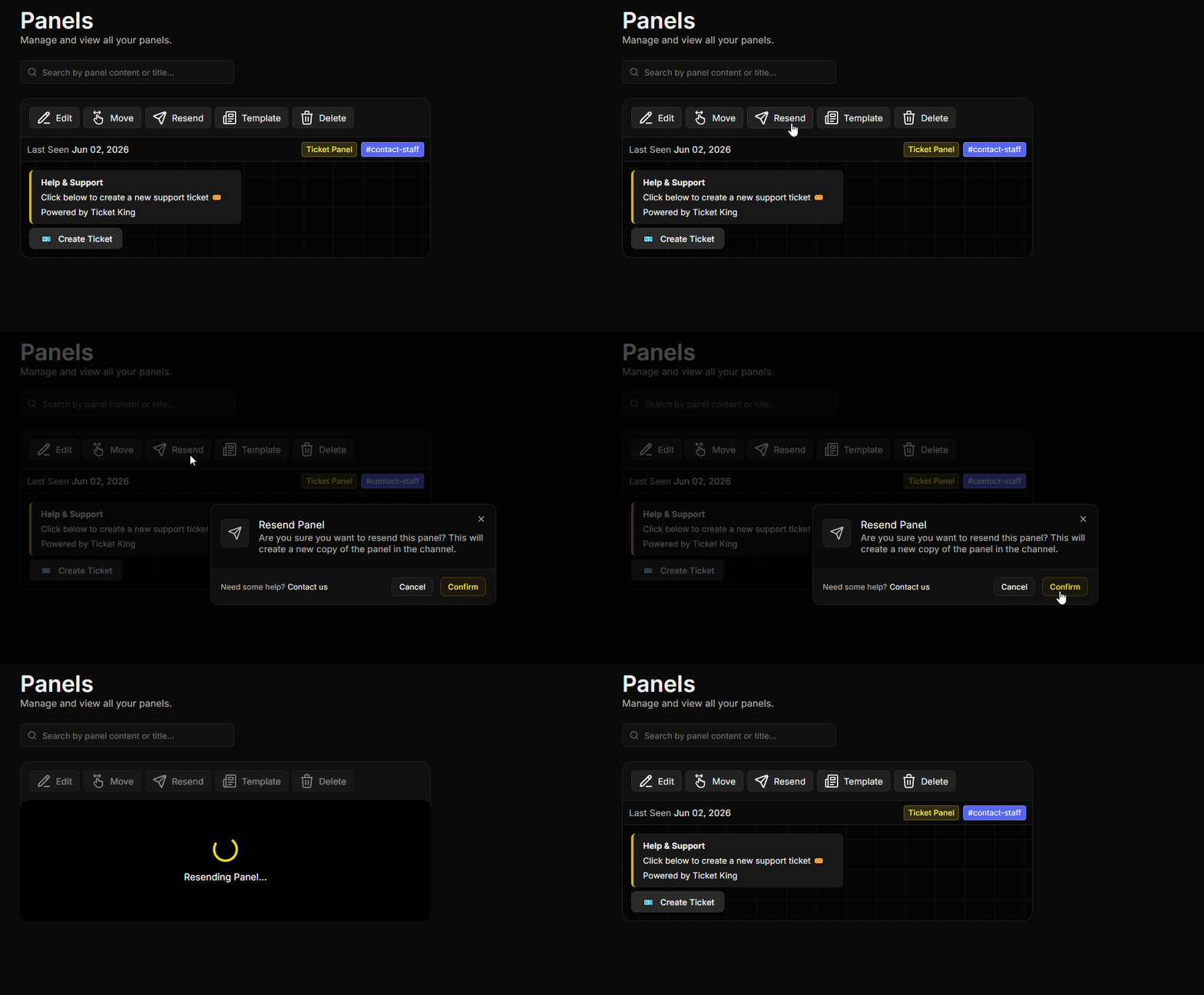
Von der **Panels** Seite:
1. Finde das Panel, das du erneut senden möchtest.
2. Klicke auf der Panel-Karte auf **Erneut senden**.
3. Bestätige.
Der Bot postet eine neue Kopie des Panels in dem dafür konfigurierten Kanal. Alles andere bleibt unverändert.
## Wann man es verwenden sollte
* Die Panel-Nachricht fehlt oder ist in Discord sichtbar defekt.
* Du möchtest das Panel ans Ende des Kanals verschieben (neue Nachrichten haben es nach oben gedrückt).
* Du hast umfangreiche Änderungen vorgenommen und möchtest einen neuen Beitrag, damit die Mitglieder es bemerken.
## Was beibehalten wird
Alles außer der vorherigen Panel-Nachricht:
* Optionen.
* Einstellungen pro Option.
* Offene Tickets.
* Prüfprotokoll.
* Vorlagen.
## Erneut senden vs. Verschieben
* **Erneut senden.** Gleicher Kanal, neue Nachricht.
* **Verschieben.** Anderer Kanal. Siehe [Panel verschieben](/docs/de/panels/move-a-panel.md).
## Häufige Probleme
{% hint style="warning" %}
**Das erneute Senden wurde gepostet, aber die alte Nachricht ist noch da.** Ticket King konnte die vorherige Nachricht nicht finden, weil sie manuell gelöscht wurde oder der Kanal geleert wurde. Lösche den Rest bei Bedarf selbst.
{% endhint %}
{% hint style="danger" %}
**Berechtigungsfehler beim erneuten Senden.** Wenn du die Meldung „Ich habe keine Berechtigung, Nachrichten in diesem Kanal zu senden“ siehst, kann der Bot nicht im Kanal des Panels posten. Stelle sicher, dass der Bot dort **Kanal ansehen**, **Nachrichten senden**, und **Embed-Links** hat, und versuche es dann erneut.
{% endhint %}
## Verwandt
{% content-ref url="/pages/15c6dab46732ef4e7bf661807cc29e7e8a85ef71" %}
[Verschiebe ein Panel in einen anderen Kanal](/docs/de/panels/move-a-panel.md)
{% endcontent-ref %}
---
# Agent Instructions
This documentation is published with GitBook. GitBook is the documentation platform designed so that both humans and AI agents can read, navigate, and reason over technical content effectively. Learn more at gitbook.com.
## Querying This Documentation
If you need additional information that is not directly available in this page, you can query the documentation dynamically by asking a question.
Perform an HTTP GET request on the current page URL with the `ask` query parameter, and the optional `goal` query parameter:
```
GET https://ticketking.xyz/docs/de/panels/resend-a-panel.md?ask=&goal=
```
`ask` is the immediate question: it should be specific, self-contained, and written in natural language.
`goal` is optional and describes the broader end goal you are ultimately trying to accomplish on behalf of the user. GitBook uses it to tailor the answer towards what is most useful for that goal.
The response will contain a direct answer to the question and relevant excerpts and sources from the documentation.
Use this mechanism when the answer is not explicitly present in the current page, you need clarification or additional context, or you want to retrieve related documentation sections.