> For the complete documentation index, see [llms.txt](https://ticketking.xyz/docs/llms.txt). Markdown versions of documentation pages are available by appending `.md` to page URLs; this page is available as [Markdown](https://ticketking.xyz/docs/de/panels/public-presets.md).
# Öffentliche Vorlagen
Der kuratierte Katalog mit Starter-Panel-Designs.
Öffentliche Presets sind von der Entwicklerin bzw. dem Entwickler zusammengestellte Panel-Designs. Sie decken gängige Ticket-Workflows ab, wie allgemeinen Support, Fehlerberichte, Bewerbungen für das Team und Partnerschaften.
Anders als Ihre privaten [Vorlagen](/docs/de/panels/templates.md), sind öffentliche Presets **für jeden Server verfügbar** und werden vom Entwickler auf dem neuesten Stand gehalten.
## Im Katalog stöbern
1. Öffnen Sie die **Vorlagen** Seite über die Seitenleiste.
2. Klicke auf den **Öffentliche Presets** Schaltfläche oben auf der Seite.
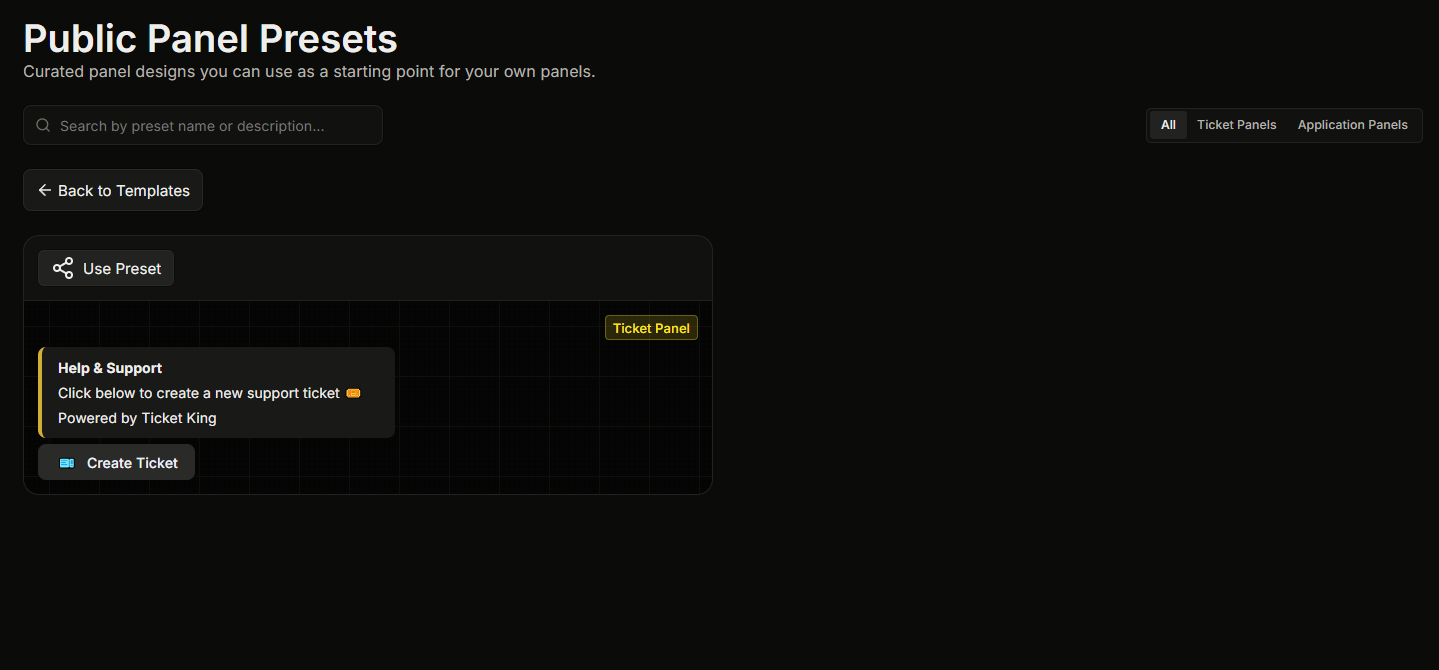
Dadurch öffnet sich die **Seite „Öffentliche Panel-Presets“** Seite, auf der jedes Preset als Karte mit Live-Vorschau angezeigt wird. Sie können den Katalog nach Namen durchsuchen.
## Ein Preset verwenden
Klicken Sie auf der Preset-Karte auf **Preset verwenden**. Dadurch wird ein neues Panel gestartet, das bereits mit dem Design des Presets ausgefüllt ist. Der vollständige Erstellungsassistent wird übersprungen. Bevor Sie im Editor landen, müssen Sie nur noch den Kanal auswählen, an den das Panel gesendet werden soll.
Sie können vor dem Speichern alles bearbeiten.
## Was Presets nicht sind
* **Kein Vertrag.** Jedes Preset ist vollständig anpassbar, nachdem Sie damit ein Panel gestartet haben.
* **Nicht Ihr Support-Team.** Ein Preset liefert Ihnen nur das Design. Ihr Panel verwendet weiterhin die Support-Rollen Ihres Servers, Ihre Kanäle und Ihre Einstellungen.
## Verwandt
{% content-ref url="/pages/20e1fc9d21724a0a1a3eb0e3b914810a934e5abc" %}
[Vorlagen](/docs/de/panels/templates.md)
{% endcontent-ref %}
---
# Agent Instructions
This documentation is published with GitBook. GitBook is the documentation platform designed so that both humans and AI agents can read, navigate, and reason over technical content effectively. Learn more at gitbook.com.
## Querying This Documentation
If you need additional information that is not directly available in this page, you can query the documentation dynamically by asking a question.
Perform an HTTP GET request on the current page URL with the `ask` query parameter, and the optional `goal` query parameter:
```
GET https://ticketking.xyz/docs/de/panels/public-presets.md?ask=&goal=
```
`ask` is the immediate question: it should be specific, self-contained, and written in natural language.
`goal` is optional and describes the broader end goal you are ultimately trying to accomplish on behalf of the user. GitBook uses it to tailor the answer towards what is most useful for that goal.
The response will contain a direct answer to the question and relevant excerpts and sources from the documentation.
Use this mechanism when the answer is not explicitly present in the current page, you need clarification or additional context, or you want to retrieve related documentation sections.