> For the complete documentation index, see [llms.txt](https://ticketking.xyz/docs/llms.txt). Markdown versions of documentation pages are available by appending `.md` to page URLs; this page is available as [Markdown](https://ticketking.xyz/docs/de/formulare/filtering-channel-select.md).
# Kanal-Auswahl nach Kanaltyp filtern
Beschränke eine Kanal-Auswahlfrage auf bestimmte Discord-Kanaltypen.
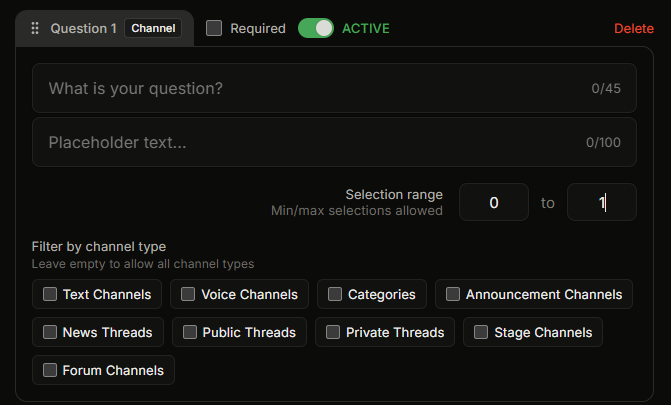
Die **Kanalauswahl** Der Fragetyp lässt Mitglieder einen Kanal auswählen. Standardmäßig werden alle Kanäle angezeigt, die sie auf dem Server sehen können. Du kannst die Liste auf bestimmte Kanaltypen eingrenzen.
## Die neun Kanaltypen
Die Einstellung „Nach Kanaltyp filtern“ ist eine Mehrfachauswahl. Wähle eine beliebige Kombination:
| Typ | Was Mitglieder auswählen können |
| ----------------------- | ------------------------------------------------------------------------------- |
| **Textkanäle** | Normale Textkanäle. Die häufigste Auswahl. |
| **Sprachkanäle** | Sprachkanäle, für Meldungen zu sprachspezifischen Problemen. |
| **Kategorien** | Die Kanal-Kategorien selbst, also die Überschriften, nicht die Kanäle darunter. |
| **Ankündigungskanäle** | Ankündigungskanäle. |
| **News-Threads** | Threads, die unter Ankündigungskanälen erstellt wurden. |
| **Öffentliche Threads** | Öffentliche Threads unter Textkanälen. |
| **Private Threads** | Private Threads unter Textkanälen. |
| **Bühnenkanäle** | Bühnen-Sprachkanäle. |
| **Forenkanäle** | Forenkanäle. |
Lass den Filter leer, um jeden Kanaltyp zuzulassen. Wähle einen oder mehrere aus, um ihn einzuschränken.
## Wann filtern
Häufige Fälle:
* „Welcher Textkanal ist defekt?“ Wähle nur Textkanäle.
* „In welchem Sprachkanal liegt das Problem?“ Wähle Sprachkanäle und Bühnenkanäle.
* „Welcher Thread ist das Problem?“ Wähle öffentliche Threads, private Threads und News-Threads.
* „Welche Kategorie braucht den neuen Kanal?“ Wähle nur Kategorien.
Durch das Filtern wählen Mitglieder nicht den falschen Kanaltyp aus, was dem Team Zeit spart.
## Was Mitglieder sehen
Wenn ein Filter angewendet ist, zeigt die Kanalauswahl nur Kanäle an, die einem der ausgewählten Typen entsprechen. Mitglieder können keine Kanäle auswählen, die nicht passen.
Kanäle, die die Rolle eines Mitglieds nicht **Kanal ansehen** werden nie angezeigt, egal wie der Filter eingestellt ist. Die kanalbezogenen Berechtigungen von Discord gelten weiterhin.
## Verwandt
{% content-ref url="/pages/ca532b7cdc31fe4e013fe486c43229272ff93f35" %}
[Fragetypen](/docs/de/formulare/question-types.md)
{% endcontent-ref %}
---
# Agent Instructions
This documentation is published with GitBook. GitBook is the documentation platform designed so that both humans and AI agents can read, navigate, and reason over technical content effectively. Learn more at gitbook.com.
## Querying This Documentation
If you need additional information that is not directly available in this page, you can query the documentation dynamically by asking a question.
Perform an HTTP GET request on the current page URL with the `ask` query parameter, and the optional `goal` query parameter:
```
GET https://ticketking.xyz/docs/de/formulare/filtering-channel-select.md?ask=&goal=
```
`ask` is the immediate question: it should be specific, self-contained, and written in natural language.
`goal` is optional and describes the broader end goal you are ultimately trying to accomplish on behalf of the user. GitBook uses it to tailor the answer towards what is most useful for that goal.
The response will contain a direct answer to the question and relevant excerpts and sources from the documentation.
Use this mechanism when the answer is not explicitly present in the current page, you need clarification or additional context, or you want to retrieve related documentation sections.