> For the complete documentation index, see [llms.txt](https://ticketking.xyz/docs/llms.txt). Markdown versions of documentation pages are available by appending `.md` to page URLs; this page is available as [Markdown](https://ticketking.xyz/docs/de/einstellungen/server-settings.md).
# Servereinstellungen & Protokollierung
Serversprache, Embed-Farbe und Log-Kanäle.
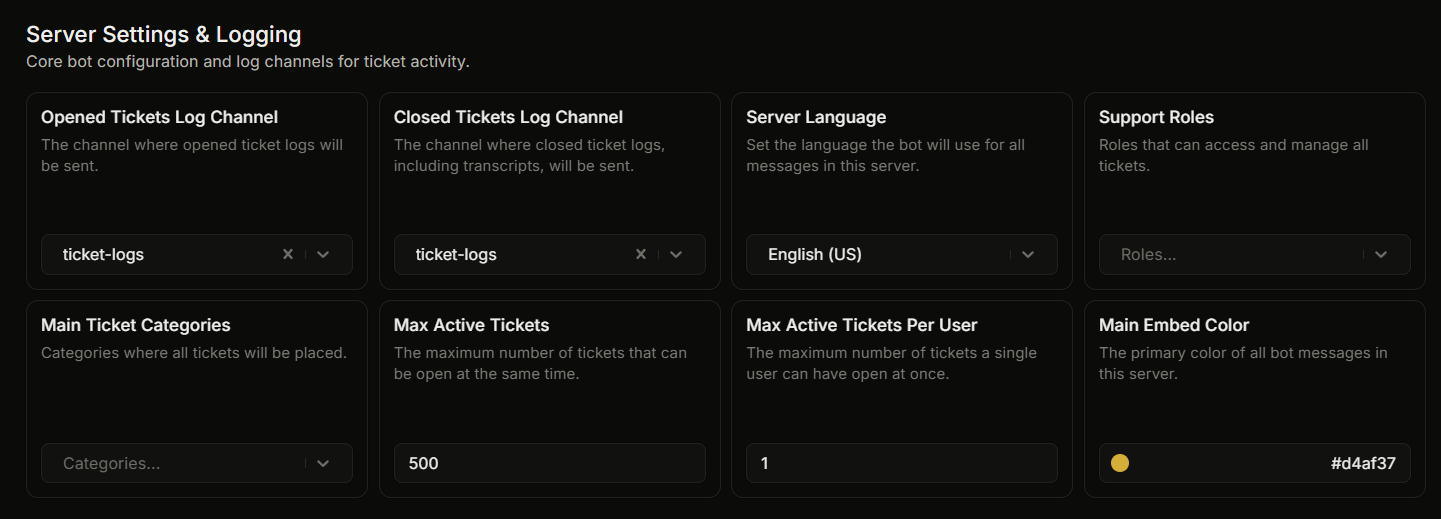
Die erste Gruppe auf der Einstellungsseite umfasst die am häufigsten verwendeten serverweiten Einstellungen.
| UI-Beschriftung | Was er tut | Standard |
| ------------------------------------------- | ----------------------------------------------------------------------------------------------------------------------------- | ---------------- |
| **Protokollkanal für geöffnete Tickets** | Discord-Kanal, der jedes Mal, wenn ein Ticket geöffnet wird, einen „Ticket Opened“-Embed erhält. | Keine |
| **Protokollkanal für geschlossene Tickets** | Discord-Kanal, der jedes Mal, wenn ein Ticket geschlossen wird, einen „Ticket Closed“-Embed (mit dem Transkript-Link) erhält. | Keine |
| **Serversprache** | Die Sprache, die der Bot für alle Nachrichten in diesem Server verwendet. 40 unterstützte Sprachen. | Englisch |
| **Support-Rollen** | Rollen, die auf jedes Ticket zugreifen und es verwalten können. Bis zu 25. | Keine |
| **Haupt-Ticket-Kategorien** | Kategorien, in denen alle Tickets abgelegt werden. Bis zu 25. | Keine |
| **Maximale aktive Tickets** | Die maximale Anzahl an Tickets, die im gesamten Server gleichzeitig geöffnet sein können. Bereich 1 bis 2000. | 500 |
| **Maximal aktive Tickets pro Nutzer** | Die maximale Anzahl an Tickets, die ein einzelnes Mitglied gleichzeitig geöffnet haben kann. Bereich 1 bis 2000. | 1 |
| **Haupt-Embed-Farbe** | Akzentfarbe auf jedem Ticket-King-Embed in deinem Server. Hex-Wert. | `#d4af37` (Gold) |
Support-Rollen und Haupt-Ticket-Kategorien sind kostenlos. In dieser Gruppe gibt es keinen Premium-Artikel. (Gesperrte Rollen sind ebenfalls kostenlos, werden aber in ihrer eigenen Gruppe für gesperrte Rollen und nicht hier festgelegt.)
## Detaillierte Seiten
* [Die Einstellung „Server Language“](https://ticketking.xyz/docs/de/sprachen/server-language.md)
* [Die Embed-Farbe des Servers](https://ticketking.xyz/docs/de/anpassung-and-branding/server-embed-color.md)
* [Log-Kanäle](https://ticketking.xyz/docs/de/protokollierung/three-log-channels.md)
## Verwandt
{% content-ref url="/pages/e45441f2f90edd58d5fe8ab487164c008f997429" %}
[Einstellungsübersicht](https://ticketking.xyz/docs/de/einstellungen/overview.md)
{% endcontent-ref %}
---
# Agent Instructions
This documentation is published with GitBook. GitBook is the documentation platform designed so that both humans and AI agents can read, navigate, and reason over technical content effectively. Learn more at gitbook.com.
## Querying This Documentation
If you need additional information that is not directly available in this page, you can query the documentation by asking a question.
Perform an HTTP GET request on the following URL with the `ask` and `goal` query parameters:
```
GET https://ticketking.xyz/docs/de/einstellungen/server-settings.md?ask=&goal=
```
`ask` is the immediate question: it should be specific, self-contained, and written in natural language.
`goal` is what the user is ultimately trying to achieve, the reason they need the answer. Sharing it helps GitBook give you a better, more relevant answer. A goal is most helpful when it describes the outcome the user wants rather than restating the question. For example, with `ask=how do I create an API token`, a goal like `automate deployments from our CI pipeline` lets GitBook tailor the answer to that use case.
The response will contain a direct answer to the question and relevant excerpts and sources from the documentation.
Use this mechanism when the answer is not explicitly present in the current page, you need clarification or additional context, or you want to retrieve related documentation sections.