> For the complete documentation index, see [llms.txt](https://ticketking.xyz/docs/llms.txt). Markdown versions of documentation pages are available by appending `.md` to page URLs; this page is available as [Markdown](https://ticketking.xyz/docs/de/anpassung-and-branding/server-embed-color.md).
# Die Embed-Farbe des Servers
Die Akzentfarbe, die in jedem Ticket-King-Embed auf deinem Server verwendet wird.
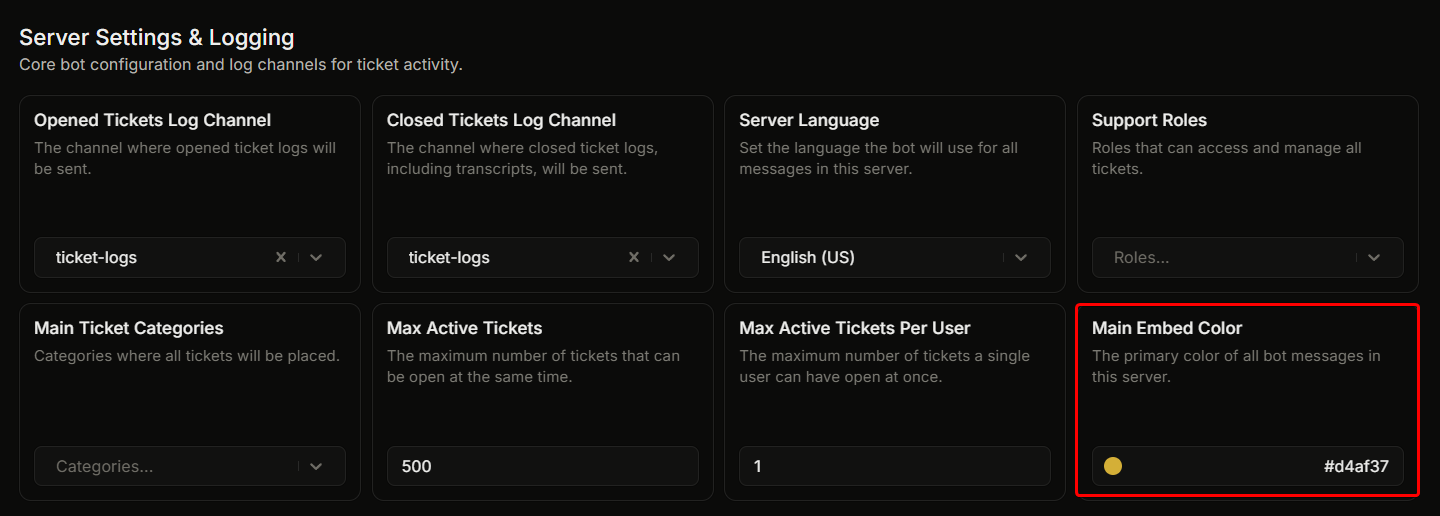
Einstellungen, "Servereinstellungen & Protokollierung", **Haupt-Embed-Farbe**.
Dies ist der Akzentstreifen an der linken Seite jedes Ticket King-Embeds auf deinem Server. Er gilt für Panels, Ticket-Willkommens-Embeds, Protokoll-Embeds und Bewerbungs-Embeds.
## Standard
`#d4af37` (goldfarben).
## Es zu ändern
1. Klicke auf das Farbfeld neben dem Feld.
2. Der Farbwähler öffnet sich. Gib einen Hex-Farbcode ein oder klicke auf den Farbkreis.
3. Die Einstellung wird automatisch gespeichert.
## Wie Embeds es verwenden
Die meisten Embeds verwenden diese Farbe automatisch:
* Panel-Embeds (wenn das Color-Feld des Panels leer gelassen wird). Lege bei einem Panel-Embed eine Farbe fest, um sie dort zu überschreiben.
* Das Willkommens-Embed in neuen Ticket-Kanälen.
* Protokoll-Embeds zum Öffnen und Schließen.
* Bewerbungs-Embeds.
Fehler-Embeds verwenden stattdessen ein festes Rot, daher ändert die hier festgelegte Farbe sie nicht.
## Eine gute Farbe wählen
Passe sie an das bestehende Farbschema deines Servers an. Die meisten Server wählen die Farbe ihrer wichtigsten markenbezogenen Rolle oder die Hauptfarbe ihres Server-Icons.
Vermeide:
* **Reines Schwarz oder reines Weiß.** Diese sind in den Discord-Themes schwer zu erkennen.
* **Farben, die der Benutzeroberfläche von Discord ähneln.** Discord-Blurple (`#5865F2`)
## Verwandt
{% content-ref url="/pages/c36844a27576f4d7b491ce4627c98a7bf28a035d" %}
[Bearbeite das Embed](/docs/de/panels/edit-the-embed.md)
{% endcontent-ref %}
---
# Agent Instructions
This documentation is published with GitBook. GitBook is the documentation platform designed so that both humans and AI agents can read, navigate, and reason over technical content effectively. Learn more at gitbook.com.
## Querying This Documentation
If you need additional information that is not directly available in this page, you can query the documentation dynamically by asking a question.
Perform an HTTP GET request on the current page URL with the `ask` query parameter, and the optional `goal` query parameter:
```
GET https://ticketking.xyz/docs/de/anpassung-and-branding/server-embed-color.md?ask=&goal=
```
`ask` is the immediate question: it should be specific, self-contained, and written in natural language.
`goal` is optional and describes the broader end goal you are ultimately trying to accomplish on behalf of the user. GitBook uses it to tailor the answer towards what is most useful for that goal.
The response will contain a direct answer to the question and relevant excerpts and sources from the documentation.
Use this mechanism when the answer is not explicitly present in the current page, you need clarification or additional context, or you want to retrieve related documentation sections.