> For the complete documentation index, see [llms.txt](https://ticketking.xyz/docs/llms.txt). Markdown versions of documentation pages are available by appending `.md` to page URLs; this page is available as [Markdown](https://ticketking.xyz/docs/customization-and-branding/ticket-name-format.md).
# Custom ticket name
How new ticket channels are named. Covers variables, character limits, and Steam-aware naming.
When a member opens a ticket, Ticket King creates a channel (or thread) with a generated name. You control the format.
## Where to configure
You can set it per ticket option, or set a panel-wide default that every option inherits.
* **Per-panel default:** Panel Defaults, **Default Custom Ticket Name** (placeholder `ticket-{TICKET_NUMBER}`).
* **Per-option override:** Per-option editor, Advanced tab, **Custom Ticket Name**.
* If you set neither, the default `ticket-{TICKET_NUMBER}` is used.
The format you type can be up to **100 characters**. That is the length of the format itself, placeholders included — `{TICKET_NUMBER}` counts as 15 characters even though it usually renders as two. The final channel name is separately capped at **100 characters** by Discord, and Ticket King trims it to fit.
## Variables
| Variable | Resolves to |
| ----------------- | -------------------------------------------------------------------- |
| `{TICKET_NUMBER}` | The ticket's number |
| `{TYPE}` | The panel option label |
| `{USER}` | The ticket author. In a channel name this resolves to their user ID. |
| `{USER_ID}` | The ticket author's Discord ID |
| `{USER_NAME}` | The ticket author's username |
| `{GUILD_NAME}` | Your server name |
| `{CREATED_AT}` | Ticket creation timestamp |
| `{STEAM_ID}` | Steam ID (only when Steam Linking is on, which is Premium) |
## Common patterns
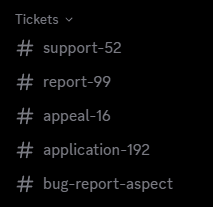
| Format | Result |
| ------------------------------------ | ------------------ |
| `ticket-{TICKET_NUMBER}` | `ticket-42` |
| `ticket-{TICKET_NUMBER}-{USER_NAME}` | `ticket-42-aspect` |
| `{TYPE}-{TICKET_NUMBER}` | `bug-report-42` |
| `{USER_NAME}-{TICKET_NUMBER}` | `aspect-42` |
| `support-{TICKET_NUMBER}` | `support-42` |
## Whitespace and special characters
Discord channel names cannot contain spaces. Ticket King replaces spaces with hyphens automatically.
Discord channel names are also lowercased and have stricter character rules than display names, so special characters get normalized.
## Blocked words on Community servers
If your server has **Community** enabled, Discord filters channel names against the list of words it does not allow for servers in Server Discovery. A ticket whose generated name contains one of those words is rejected by Discord, and the member is told the name isn't allowed instead of getting a ticket.
The word can come from the text you typed into the format or from a variable that resolves to member-controlled text, usually `{USER_NAME}`. Formats built from `{TICKET_NUMBER}`, `{TYPE}`, and `{USER_ID}` are not affected.
→ [A ticket name isn't allowed](/docs/troubleshooting/ticket-name-not-allowed.md)
## The Steam ID variable (Premium)
`{STEAM_ID}` only resolves when **Steam Linking** is on, which is a Premium feature. If Steam Linking is not enabled, the variable resolves to nothing.
## What members see
The channel name is visible to:
* The ticket author.
* All staff who have access to the channel.
* Anyone with Discord's "Manage Channels" who can see the channels list.
So whatever you put in the custom ticket name will be visible. Do not put anything sensitive in the name itself. Put it in the description or welcome message instead.
## Saving
Changes apply to **future tickets**. Tickets that are already open keep the name they were given when they opened.
## Related
{% content-ref url="/pages/aHGH6BOJh48aZHUVoiWW" %}
[Per-option settings](/docs/panels/per-option-settings.md)
{% endcontent-ref %}
{% content-ref url="/pages/1XXFSFiH6KoRmi1V1AJZ" %}
[Ticket numbering](/docs/tickets/ticket-numbering.md)
{% endcontent-ref %}
---
# Agent Instructions
This documentation is published with GitBook. GitBook is the documentation platform designed so that both humans and AI agents can read, navigate, and reason over technical content effectively. Learn more at gitbook.com.
## Querying This Documentation
If you need additional information that is not directly available in this page, you can query the documentation dynamically by asking a question.
Perform an HTTP GET request on the current page URL with the `ask` query parameter, and the optional `goal` query parameter:
```
GET https://ticketking.xyz/docs/customization-and-branding/ticket-name-format.md?ask=&goal=
```
`ask` is the immediate question: it should be specific, self-contained, and written in natural language.
`goal` is optional and describes the broader end goal you are ultimately trying to accomplish on behalf of the user. GitBook uses it to tailor the answer towards what is most useful for that goal.
The response will contain a direct answer to the question and relevant excerpts and sources from the documentation.
Use this mechanism when the answer is not explicitly present in the current page, you need clarification or additional context, or you want to retrieve related documentation sections.