> For the complete documentation index, see [llms.txt](https://ticketking.xyz/docs/llms.txt). Markdown versions of documentation pages are available by appending `.md` to page URLs; this page is available as [Markdown](https://ticketking.xyz/docs/customization-and-branding/bot-personalizer.md).
# Bot Personalizer
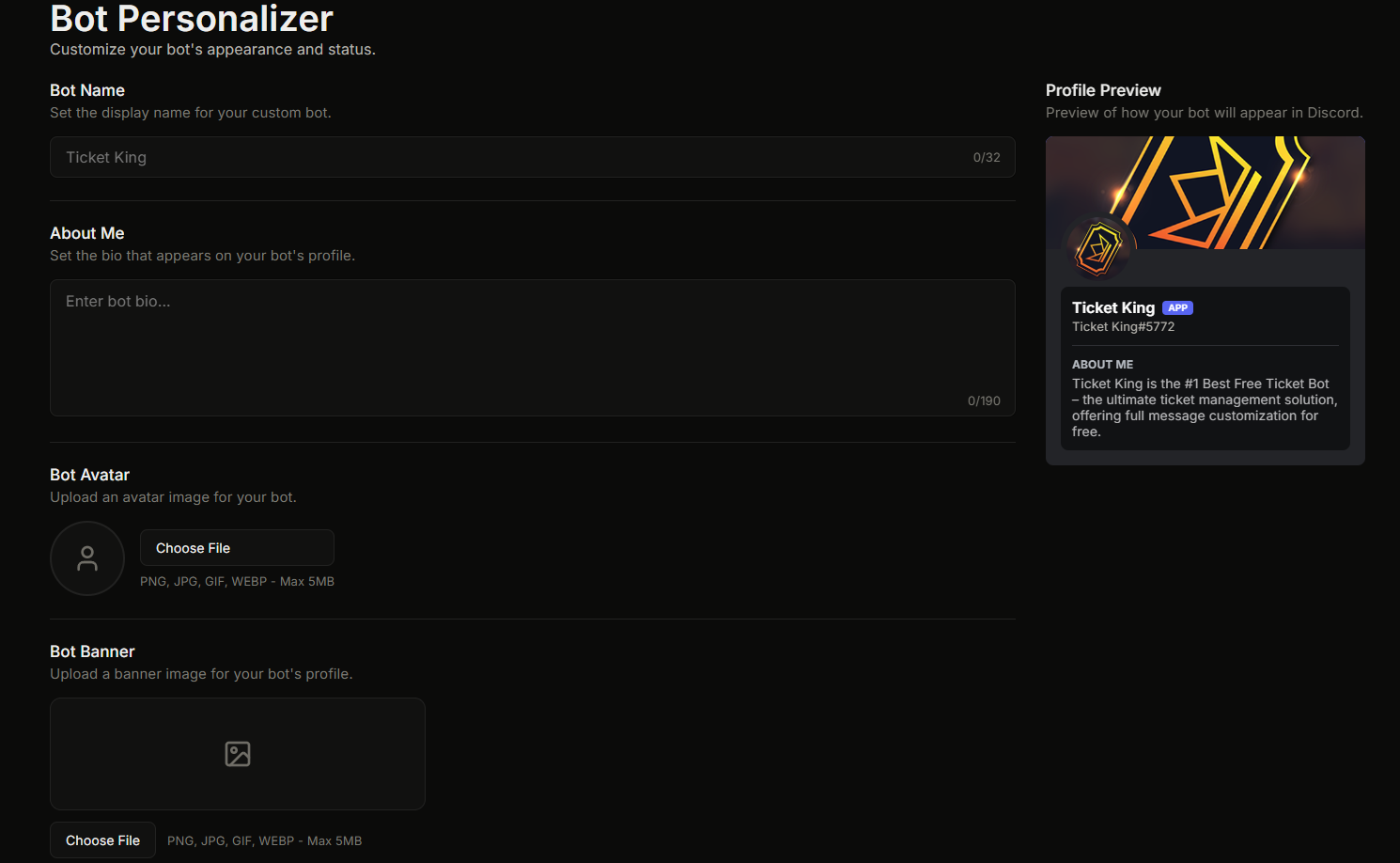
Give Ticket King a custom name, avatar, banner, and bio in your server.
**Premium feature.** Bot Personalizer lets you change how Ticket King appears in **your server only**. You can set a custom display name, avatar, banner, and bio. To your members, the bot can look like a part of your own server.
The page is at **Dashboard, Bot Personalizer**.
## What you can customize
| Field | Type | Cap |
| -------------- | ---------- | ---------------------------------------------------------------------------- |
| **Bot Name** | text | 32 characters |
| **About Me** | textarea | 190 characters |
| **Bot Avatar** | image file | 5 MB, PNG/JPG/GIF/WEBP, 1:1 aspect (crop tool provided) |
| **Bot Banner** | image file | 5 MB, PNG/JPG/GIF/WEBP, 17:6 aspect / Discord's 680×240 (crop tool provided) |
## Review process
Every submission goes through **automated content review** before applying:
1. You upload / type changes and hit **Save**.
2. Avatar / banner uploads are submitted to our review system.
3. Approved content is applied to the bot in your server.
4. If denied, you see the rejection reason and can resubmit different content.
Typical review time: **a few minutes**.
While a submission is pending, the dashboard shows yellow chips: *"Avatar awaiting verification"* / *"Banner awaiting verification."*
If denied, the chips turn red: *"Avatar was not approved. Please upload a different image."*
## How often you can change it
You can make **2 changes per hour** in each server. Discord itself limits how often a bot's profile images can change, so the personalizer never allows more than that.
The dashboard shows how many changes you have left at the top of the page: *"1 of 2 changes remaining in the next hour · Resets 3:45 PM."*
Both saving and the "Re-apply to Discord" action count toward this limit.
## Re-applying to Discord
If your bot was re-added to your server or its appearance was manually changed, click **Re-apply to Discord** in the dashboard to push your latest approved personalizer back to Discord without changing the underlying content.
## Required Discord permission
The bot needs **Change Nickname** permission in your server. Without it, the dashboard shows:
> :triangle-exclamation: **Bot Missing Permissions**
>
> The bot is missing the following Discord permission(s) in this server and cannot update its profile: Change Nickname. Grant the permission to the bot's role (or @everyone), then return here to save your changes.
Avatar and banner changes apply to the bot in every server at once, so they do not need any per-server Discord permission.
## Content Guidelines
The content review system enforces guidelines covering:
**Allowed:**
* Custom bot display names.
* Professional bios with Discord markdown formatting.
* Brand-appropriate avatars and banners.
* Server-related imagery and branding.
**Not Allowed** (verbatim from the guidelines):
* Explicit, sexual, or suggestive imagery
* Any sexual or suggestive content involving, or appearing to involve, minors
* Gore, violence, or self-harm content
* Hate symbols, extremist content, or discriminatory material
* Weapons or drug-related imagery
* Deepfaked or digitally manipulated imagery
* Impersonation of real public figures or celebrities
* Scam, phishing, or fraudulent imagery
* Profanity, slurs, or toxic language in names or bios
* Personal information (phone numbers, addresses, etc.)
* Links or URLs embedded in images
* Gambling or alcohol-related content
{% hint style="danger" %}
**Severe violations** (explicit or sexual content, especially involving minors, hate symbols, gore, self-harm, or deepfaked faces) result in a **permanent ban** from the Bot Personalizer feature, and the offending content is removed immediately.
Less severe violations reject the submission, and you can try again with different content.
{% endhint %}
Full rules are in the [Acceptable Use Policy](https://ticketking.xyz/acceptable-use).
## Resetting to default
Clear all fields and save. The bot reverts to its default username, avatar, banner, and bio in your server.
## If your server is banned from Bot Personalizer
A server can be banned from the Bot Personalizer feature for a severe content violation. If your server is banned, you will see a message like this when you try to use the page:
> This server has been banned from using the Bot Personalizer feature. If you believe this was a mistake, please contact us on our Discord server to appeal.
The content review is automated, so it can get it wrong. If you believe your server was flagged in error, contact us and we will look into it and help sort it out. Open a ticket or message us in the support Discord at [ticketking.xyz/discord](https://ticketking.xyz/discord), and let us know your server name and what you were trying to set.
## Related
{% content-ref url="/pages/exzL4IxFJ6d9jWNjp6BF" %}
[The premium-only feature list](/docs/premium/feature-list.md)
{% endcontent-ref %}
---
# Agent Instructions
This documentation is published with GitBook. GitBook is the documentation platform designed so that both humans and AI agents can read, navigate, and reason over technical content effectively. Learn more at gitbook.com.
## Querying This Documentation
If you need additional information that is not directly available in this page, you can query the documentation dynamically by asking a question.
Perform an HTTP GET request on the current page URL with the `ask` query parameter, and the optional `goal` query parameter:
```
GET https://ticketking.xyz/docs/customization-and-branding/bot-personalizer.md?ask=&goal=
```
`ask` is the immediate question: it should be specific, self-contained, and written in natural language.
`goal` is optional and describes the broader end goal you are ultimately trying to accomplish on behalf of the user. GitBook uses it to tailor the answer towards what is most useful for that goal.
The response will contain a direct answer to the question and relevant excerpts and sources from the documentation.
Use this mechanism when the answer is not explicitly present in the current page, you need clarification or additional context, or you want to retrieve related documentation sections.